
Estimate the lumens and whole bulbs or fixtures your living room needs from room size, brightness goal, and bulb brightness.
Table of contents
How to use our Living Room Lighting Calculator
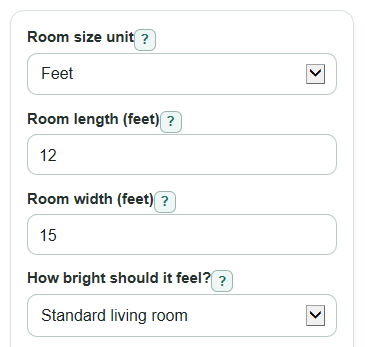
- Choose Room size unit, then enter Room length and Room width using that unit.
- Pick How bright should it feel? based on how you use the room: Cozy, Standard living room, or Bright for reading or games.
- Enter Lumens per bulb or fixture from the bulb box or fixture spec sheet.
- Open Advanced options only if you want to adjust Light that reaches the room area, Light kept after age and dust, LED efficiency, or Number format.
- Click Calculate, then sanity-check the result: if Whole bulbs or fixtures to use seems very high, recheck the room unit, room size, and lumens per light.
Definitions
Lumen (lm): A unit for how much visible light a bulb or fixture gives off.
Lumens per bulb or fixture: The rated light output for one bulb or one fixture.
Foot-candle (fc): The amount of light landing on one square foot of area. One foot-candle equals one lumen per square foot.
Lux: The amount of light landing on one square meter of area. One lux equals one lumen per square meter.
Recommended total light: The target lumens for the whole living room before rounding up to a whole number of lights.
Whole bulbs or fixtures to use: The count after the calculator rounds up so the plan is not below the target.
Light that reaches the room area: The percent of bulb or fixture light that actually reaches the room area after shades, fixture direction, furniture, and finishes.
Light kept after age and dust: The percent of light still expected after bulb aging, dust, or dirt on shades and covers.
Common mistakes and quick fixes
Mistake: Mixing feet and meters in Room length or Room width.
Fix: Set Room size unit first, then enter both Room length and Room width in that same unit.
Mistake: Using bulb watts instead of Lumens per bulb or fixture.
Fix: Enter the lumen rating, such as 800 lm, not the watt number printed on the package.
Mistake: Choosing Bright for reading or games for a room meant to feel soft and relaxed.
Fix: Change How bright should it feel? to Cozy or Standard living room if the Recommended total light seems too strong.
Mistake: Leaving Light that reaches the room area at 100% for shaded lamps, indirect light, or dark finishes.
Fix: Lower Light that reaches the room area to account for light blocked or absorbed before it reaches the room.
Mistake: Treating Extra light from rounding up as an error.
Fix: Use Extra light from rounding up to decide whether to choose lower-lumen bulbs, fewer higher-output fixtures, or a dimmer.
Mistake: Reading Estimated LED power as an exact electric bill amount.
Fix: Use Estimated LED power only as a rough wattage estimate based on LED efficiency.
Limitations & Key Assumptions / Boundary Conditions
- The calculator is for general living room planning, not a full lighting design with fixture photometrics, ceiling height, beam angle, glare, wall reflectance, or exact fixture layout.
- The brightness choices use fixed targets: Cozy is 10 fc, Standard living room is 15 fc, and Bright for reading or games is 20 fc.
- Room area is treated as a simple rectangle. For L-shaped rooms or open floor plans, split the space into rectangles or measure only the area you want to light.
- Light that reaches the room area and Light kept after age and dust are broad adjustment factors. Real results can differ by lamp shade, fixture direction, wall color, furniture, and cleaning schedule.
- Whole bulbs or fixtures to use rounds up. This can make Installed lumens higher than Recommended total light, which is why Extra light from rounding up is shown.
- Estimated LED power depends on the LED efficiency you enter. Actual watts can differ from the rough estimate on dimmable bulbs, smart bulbs, or integrated fixtures.
- The calculator does not choose the best fixture placement. A few bright fixtures can meet the lumen target but still leave dark corners or glare.
Methodology
How the calculator works
The calculator first finds Room area from Room length and Room width. If Room size unit is Feet, the area is already in square feet. If Room size unit is Meters, the area is converted to square feet because the brightness targets are stored in foot-candles.
area = room_length * room_width
area_ft2 = area_m2 * 10.7639104167
Next, the selected brightness goal sets the target light level. Cozy uses 10 fc, Standard living room uses 15 fc, and Bright for reading or games uses 20 fc. These are simple planning choices inside common residential foot-candle guidance ranges [3]. The same target is also shown in lux.
target_fc = 10, 15, or 20
target_lux = target_fc * 10.7639104167
Recommended total light is the exact lumen target before rounding. A foot-candle is lumens per square foot, so the basic method is square feet times foot-candles. The advanced percent factors raise the required lumens when only part of the rated light is expected to reach and stay in the room.
total_lumens = area_ft2 * target_fc / ((delivered_light_percent / 100) * (light_loss_percent / 100))
Whole bulbs or fixtures to use is rounded up from the exact lumen target. Then the calculator shows how much light that whole-light plan installs and how much extra light comes from rounding up.
whole_lights = ceil(total_lumens / lumens_per_light)
installed_lumens = whole_lights * lumens_per_light
extra_lumens = installed_lumens - total_lumens
Estimated LED power divides installed lumens by LED efficiency.
estimated_led_watts = installed_lumens / led_efficacy
Worked mini-example
For a 12 ft by 15 ft living room, the area is 180 ft2. With Standard living room selected, the target is 15 fc. With 100% delivered light and 100% light kept, the recommended total light is 180 * 15 = 2,700 lm. If each bulb is 800 lm, the count is ceil(2,700 / 800) = 4 lights. Installed lumens are 4 * 800 = 3,200 lm, so Extra light from rounding up is 500 lm. With LED efficiency at 100 lm/W, Estimated LED power is 32 W.
Validation and display choices
Room length, Room width, Lumens per bulb or fixture, Light that reaches the room area, Light kept after age and dust, and LED efficiency must be valid numbers greater than 0. Commas and spaces are removed before parsing. Auto Number format uses regular numbers for normal home-lighting values and switches to scientific notation only for extremely large or extremely small values.
Sources
- IES Recommended Lighting Levels: Everything You Need To Know | Modern.Place - Modern
- U.S. DOE (Building America) - Strategy Guideline: High Performance Residential Lighting (PDF) - Energy
- Recommended Foot-Candle Levels for Residential Interiors - Stetra Lighting - Stetralighting
- Ceiling Light High Lumens: How Bright Should Your Room Be? - Xhlux