
Estimate how many office light fixtures you need and check whether your current fixtures are close to a desk-light target.
Advanced options
Table of contents
How to use our Office Lighting Calculator
- Enter Room length (feet) and Room width (feet) for the office area you want to light.
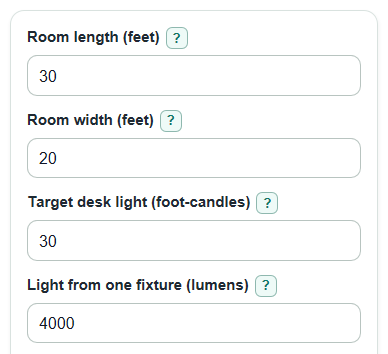
- Enter Target desk light (foot-candles) and Light from one fixture (lumens). Use the fixture label for lumens when possible.
- If you are checking an existing room, enter Fixtures you have now (optional). Leave it blank for a new-plan fixture count only.
- Open Advanced options only if you want to adjust Light reaching desks (percent), Kept light after dirt and aging (percent), or Number display.
- Sanity-check the result: Estimated desk light with that count should be at or above your target, and an unusually high Recommended fixtures count usually means the room is large, the fixture lumens are low, or the percent factors are too low.
Definitions
Lumen: A measure of how much visible light a fixture or bulb makes before room losses are considered.
Foot-candle: Light on one square foot of surface. In this calculator, Target desk light (foot-candles) is the average light level you want on desks or work surfaces.
Lux: The metric version of light on a surface. One foot-candle equals 10.76391 lux.
Light reaching desks (percent): The estimated share of fixture light that reaches the work area after room shape, fixture direction, and surface reflections.
Kept light after dirt and aging (percent): The share of light still expected after lamps, lenses, and room surfaces get older or dirty.
Fixtures to add or remove: Recommended fixtures minus Fixtures you have now (optional). Positive means add fixtures, and negative means the current count is above the rough recommendation.
Common mistakes and quick fixes
Mistake: Using outside building dimensions for Room length (feet) or Room width (feet).
Fix: Measure the inside floor area that the office fixtures actually need to light.
Mistake: Entering watts instead of Light from one fixture (lumens).
Fix: Use the lumen number from the fixture, bulb, or product sheet, not the power use in watts.
Mistake: Leaving Target desk light (foot-candles) at 30 when the task needs brighter desk light.
Fix: Change Target desk light (foot-candles) to the level required by your project, source, or local rule.
Mistake: Setting Light reaching desks (percent) to 100 for a normal room.
Fix: Use a lower realistic value unless you have a lighting layout or measured data showing nearly all fixture light reaches the work area.
Mistake: Treating Fixtures you have now (optional) as a required input.
Fix: Leave Fixtures you have now (optional) blank unless you want the current-room check outputs.
Mistake: Reading a negative Fixtures to add or remove as an error.
Fix: A negative Fixtures to add or remove value means your current count is above the rough recommended count.
Limitations & Key Assumptions / Boundary Conditions
- This is an average-light estimate, not a full lighting layout. It does not check glare, shadows, fixture spacing, ceiling height, beam spread, color quality, or emergency lighting rules.
- The result depends strongly on Light reaching desks (percent) and Kept light after dirt and aging (percent). If those guesses are wrong, the fixture count can be wrong.
- Room length and width are treated as a simple rectangle. For L-shaped rooms, divided offices, tall shelves, or partitions, calculate each zone separately.
- Light from one fixture (lumens) should be maintained or rated fixture lumens when available. Bulb lumens may overstate desk light if the fixture blocks or redirects light.
- Local codes, tenant standards, and task-specific lighting needs can require a different Target desk light (foot-candles).
- The optional current-fixture check assumes all current fixtures have the same lumens and are spread in a useful way across the room.
Methodology
Calculation method
The calculator uses the lumen method: estimate the light needed on the work area, then divide by the useful light delivered by one fixture after room and maintenance factors.
area_ft2 = room_length_ft * room_width_ft
room_factor = room_efficiency_percent / 100
loss_factor = dirt_age_factor_percent / 100
recommended_fixture_count = ceil((target_fc * area_ft2) / (lumens_per_fixture * room_factor * loss_factor))
The fixture count is rounded up because part of a fixture cannot normally be installed.
Follow-up outputs
After the fixture count is found, the calculator estimates the maintained desk light from that count.
estimated_fc = fixture_count * lumens_per_fixture * room_factor * loss_factor / area_ft2
lux = foot_candles * 10.76391
If Fixtures you have now (optional) is entered, the same maintained-foot-candle formula is run with the current count. The calculator also computes:
fixture_gap = recommended_fixture_count - current_fixture_count
current_vs_target_percent = current_estimated_fc / target_fc * 100
Worked example
For a 30 ft by 20 ft office, the area is 600 square feet. With a 30 foot-candle target, 4,000 lumens per fixture, 70 percent light reaching desks, and 80 percent kept light after dirt and aging, useful light per fixture is 4,000 * 0.70 * 0.80 = 2,240 lumens.
recommended_fixture_count = ceil((30 * 600) / 2240) = ceil(8.04) = 9 fixtures
estimated_fc = 9 * 4000 * 0.70 * 0.80 / 600 = 33.6 foot-candles
lux = 33.6 * 10.76391 = 361.667376 lux
That means 9 fixtures slightly beats the 30 foot-candle target after the selected factors are applied.