
Convert battery capacity between Ah, mAh, Wh, and volts, then estimate usable energy and runtime from a load.
Advanced options
Table of contents
How to use our Battery Capacity Calculator
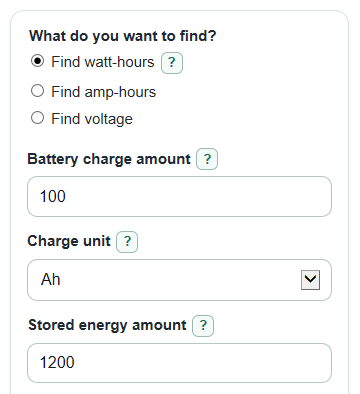
- Choose What do you want to find? so the missing value is the answer: watt-hours, amp-hours, or voltage.
- Enter the battery label numbers shown for that mode, including Battery charge amount, Charge unit, Stored energy amount, Energy unit, and Battery voltage when they apply.
- Open Advanced options if you want usable energy or runtime, then set Usable part of the battery, System efficiency, and optional Load power.
- Click Calculate and read Main answer first, then use Rated stored energy to compare batteries with different voltages.
- Sanity-check the output: a 12 V 100 Ah battery should be about 1,200 Wh, and 20,000 mAh at 3.7 V should be about 74 Wh.
Definitions
Battery charge amount: The Ah or mAh capacity number often printed on a battery label. It describes electric charge, not total energy by itself.
Ah: Amp-hours. A charge unit often used for larger batteries.
mAh: Milliamp-hours. A smaller charge unit often used for phones, power banks, and small cells. 1 Ah equals 1,000 mAh.
Stored energy amount: The battery energy rating entered as mWh, Wh, or kWh.
Wh: Watt-hours. A practical energy unit for comparing batteries at different voltages.
Battery voltage: The nominal voltage used for the conversion, such as 3.7 V, 12 V, 24 V, or 48 V.
Usable part of the battery: The percent of rated capacity you plan to use before stopping discharge.
System efficiency: The percent of stored energy that reaches the load after losses from an inverter, converter, wiring, or device.
Load power: The watts used by the device. Many electrical devices are rated in watts [2].
Common mistakes and quick fixes
Mistake: Comparing Battery charge amount values without checking Battery voltage.
Fix: Compare Rated stored energy instead, because Ah and mAh only compare fairly at the same voltage.
Mistake: Entering a mAh number while Charge unit is set to Ah.
Fix: Set Charge unit to mAh, or divide the mAh number by 1,000 before entering it as Ah.
Mistake: Using a charger voltage for Battery voltage instead of the battery label voltage.
Fix: Use the nominal Battery voltage printed on the battery or pack unless you are modeling a specific measured condition.
Mistake: Leaving Usable part of the battery or System efficiency blank.
Fix: Enter a percent from 0 to 100; use 100 if you do not want that setting to reduce Usable energy after settings.
Mistake: Typing a zero or negative Load power and expecting Estimated runtime.
Fix: Enter Load power greater than 0 W, or leave it blank if you only need the capacity conversion.
Mistake: Treating Estimated runtime as an exact promise.
Fix: Use Estimated runtime as a planning estimate and leave room for real battery behavior, inverter losses, and changing device power.
Limitations & Key Assumptions / Boundary Conditions
- The calculator uses the simple label relationship between watt-hours, amp-hours, and nominal volts. It does not model a full battery discharge curve.
- Battery voltage means nominal voltage. Charging voltage, cutoff voltage, and a momentary multimeter reading can give different results.
- Real usable capacity can change with discharge rate, temperature, battery age, and the battery management system. Capacity can depend on discharge rate [1].
- Estimated runtime assumes Load power stays constant. Motors, heaters, computers, and inverters can change power during use.
- Usable part of the battery and System efficiency are user estimates. If either is 0 percent, Usable energy after settings and any Estimated runtime are 0.
- Results are for capacity conversion and planning. They are not a battery health test, safety approval, or airline battery rule check.
Methodology
Core conversion
The calculator first converts the entered charge to amp-hours and the entered energy to watt-hours when needed. It strips commas and spaces before parsing numbers, so 1,200 and 1 200 are treated as 1200.
charge_ah = charge_mah / 1000
energy_wh = energy_mwh / 1000
energy_wh = energy_kwh * 1000
Then it solves the missing value selected in What do you want to find?.
energy_wh = charge_ah * voltage_v
charge_ah = energy_wh / voltage_v
voltage_v = energy_wh / charge_ah
Usable energy and runtime
Advanced settings reduce the rated energy by the planned usable percent and the system efficiency percent.
usable_energy_wh = energy_wh * (usable_percent / 100) * (system_efficiency_percent / 100)
If Load power is entered and is greater than 0, runtime is estimated from usable energy divided by watts.
runtime_hours = usable_energy_wh / load_power_w
Mini-example
For a 12 V battery with Battery charge amount 100 and Charge unit Ah, the rated energy is 100 Ah times 12 V, which equals 1,200 Wh. If Usable part of the battery is 50 percent and System efficiency is 85 percent, usable energy is 1,200 Wh times 0.50 times 0.85, or 510 Wh. With Load power 200 W, Estimated runtime is 510 Wh divided by 200 W, or 2.55 hours.
Validation and display
Battery voltage, Battery charge amount, and Stored energy amount must be greater than 0 when that value is needed for the selected mode. Usable part of the battery and System efficiency must be from 0 to 100. Load power is optional, but if entered it must be greater than 0. Auto number format uses ordinary numbers for common battery values and scientific notation only for very small or very large values.