
Convert stones to kilograms with optional extra pounds, so entries like 11 st 4 lb turn into a clear kg result.
Table of contents
How to use our Stones to kg Converter
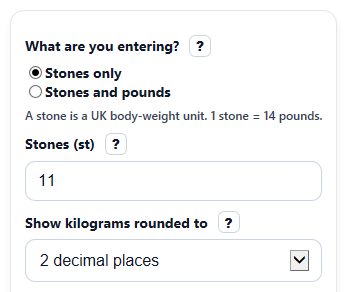
- Choose "What are you entering?" and pick either "Stones only" or "Stones and pounds".
- Enter your value in "Stones (st)" and, if needed, enter the leftover amount in "Extra pounds (lb)".
- Pick how you want "Show kilograms rounded to" display the answer.
- Click "Calculate" to see "Weight in kilograms," the exact kg value before display rounding, and "Total weight in pounds."
- Sanity-check the result by reviewing "Formula used" and making sure "Extra pounds (lb)" is less than 14 when you use mixed entry.
Definitions
Stone (st): A UK body-weight unit. One stone equals 14 pounds.
Pound (lb): A weight unit used in US and UK-style measurements.
Kilogram (kg): A metric unit of mass and the main converted result shown by the calculator.[1]
Extra pounds (lb): The pounds left over after whole stones, such as the 4 in 11 st 4 lb.
Exact calculation before display rounding: The full kg value from the conversion factor before the page rounds what you see.
Total weight in pounds: The whole weight rewritten in pounds using 14 lb for each stone.
Common mistakes and quick fixes
Mistake: Typing 14 or more into "Extra pounds (lb)".
Fix: Move every 14 lb into "Stones (st)" and leave only the leftover pounds in "Extra pounds (lb)".
Mistake: Leaving "Stones (st)" blank or entering text instead of a number.
Fix: Enter a numeric value in "Stones (st)" such as 11 or 8.5.
Mistake: Entering a negative value in "Stones (st)" or "Extra pounds (lb)".
Fix: Use 0 or a positive number only; negative weights are not accepted by the calculator.
Mistake: Using decimal stones in mixed entry, such as 11.5 in "Stones (st)" and also filling "Extra pounds (lb)".
Fix: For cleaner mixed entry, keep "Stones (st)" as the whole-stone part and put the leftover amount in "Extra pounds (lb)".
Mistake: Thinking "Weight in kilograms" changed the math when you switched "Show kilograms rounded to".
Fix: Check "Exact calculation before display rounding" to see the same underlying value before the display is rounded.
Limitations & Key Assumptions / Boundary Conditions
- This converter uses the fixed relationships 1 st = 14 lb and 1 lb = 0.45359237 kg, so results follow standard unit conversion only.
- In "Stones and pounds" mode, "Extra pounds (lb)" must be 0 to less than 14. The tool does not silently turn 14 lb into another stone.
- In "Stones only" mode, any value in "Extra pounds (lb)" is ignored so hidden or unused input does not affect the result.
- Decimal values are allowed in "Stones (st)" for stones-only entry. In mixed entry, decimal stones can be harder to interpret because they combine two styles.
- The rounding setting changes only the displayed "Weight in kilograms" value. The exact calculation is still based on the exact factor result.
- If you need a form-specific rounding rule, compare "Weight in kilograms" with "Exact calculation before display rounding" and follow the rule required by that form.
Methodology
Conversion method
The calculator converts stones to kilograms with exact unit relationships. If you enter stones only, it multiplies stones by the exact kilograms-per-stone factor. If you enter stones and pounds, it first converts the whole value to pounds, then converts pounds to kilograms.
1 st = 14 lb
1 lb = 0.45359237 kg
1 st = 6.35029318 kg
kg = st x 6.35029318
kg = (st x 14 + lb) x 0.45359237
total pounds = st x 14 + lb
Worked example
For 11 st 4 lb, first convert to total pounds:
11 x 14 + 4 = 158 lb. Then convert pounds to kilograms:
158 x 0.45359237 = 71.66759446 kg. If the display is set to 2 decimal places, "Weight in kilograms" shows 71.67 kg, while "Exact calculation before display rounding" keeps 71.66759446 kg.
Display rounding
The rounding menu changes only the main displayed kg answer. It does not change the internal conversion. That is why the exact-value field helps when you want to check the math or apply a different rounding rule.
Calculation choices
When "What are you entering?" is set to stones only, the calculator ignores "Extra pounds (lb)" completely. When mixed entry is selected, pounds must be at least 0 and less than 14, because 14 lb should be moved into the stones part instead of being auto-corrected.
Assumptions and limits
This tool is a unit converter, not a body-composition or health estimate. It assumes the entered stone and pound values are already the weight you want to convert, and it does not adjust for weighing conditions, clothing, scale error, or local form-rounding rules.