
Use this time clock calculator to total weekly work hours, subtract unpaid breaks, convert to decimal hours, and estimate pay.
Advanced options
Table of contents
How to use our Time Clock Calculator
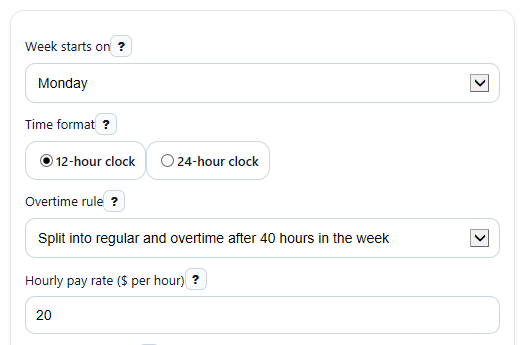
- Choose Week starts on, Time format, and Overtime rule so the weekly card matches your schedule and payroll setup.
- Fill in Weekly time entries for each day you worked by entering a start time and end time, then add your unpaid break as minutes or switch Break entry style in Advanced options if you want to enter break start and end times instead.
- If you want a pay estimate, enter Hourly pay rate ($ per hour). If overtime splitting is on, you can also adjust Overtime pay multiplier in Advanced options.
- Click Calculate, then review Daily totals, Total worked time, and Payroll total together to make sure the week looks right before using the pay numbers.
- Check Notes for overnight or rounding messages. If the decimal total looks off, confirm your break entry and whether Time rounding should be set to no rounding, nearest 5 minutes, or nearest 15 minutes.
Definitions
Week starts on: Sets whether the 7-day card runs Monday to Sunday or Sunday to Saturday.
Time format: The clock style you use to enter times, either 12-hour clock with AM/PM or 24-hour clock.
Overtime rule: The rule used to split total hours into Regular hours and Overtime hours.
Unpaid break: Time removed from a shift before totals are calculated.
Total worked time: Your weekly total shown in hours and minutes after unpaid breaks.
Payroll total: The same weekly total shown in decimal hours, such as 32.50 hours instead of 32 hours 30 minutes.
Regular hours: Hours paid at the base hourly rate under the selected overtime rule.
Overtime hours: Hours above the selected weekly threshold when overtime splitting is turned on.
Estimated gross pay: Pay before taxes based on the entered hourly rate and selected overtime settings.
Time rounding: Payroll-style rounding of entered clock times to the nearest selected increment.
Common mistakes and quick fixes
Mistake: Entering a start time in Weekly time entries but leaving the end time blank for that same day.
Fix: Give that row both times, or clear the row fully so it is excluded from Daily totals and the weekly total.
Mistake: Typing paid break time into the unpaid break part of Weekly time entries .
Fix: Only subtract unpaid time. If the break was paid, enter 0 break minutes so Total worked time is not reduced by mistake.
Mistake: Leaving Time rounding on when you want exact clock time.
Fix: Set Time rounding to No rounding if your workplace does not round punch times before payroll.
Mistake: Choosing the wrong Overtime rule and expecting Regular hours and Overtime hours to match your paycheck automatically.
Fix: Use the overtime split only if your payroll uses a simple over-40 weekly rule. If not, choose Do not split overtime and treat the pay result as an estimate.
Mistake: Entering text or an invalid number in Hourly pay rate ($ per hour) .
Fix: Enter a valid hourly rate to show Estimated gross pay , or leave the field blank if you only want hour totals.
Mistake: Forgetting that a shift ending after midnight is still one shift.
Fix: In Weekly time entries , enter the real later end time even if it is earlier on the clock, such as 10:00 PM to 6:00 AM. The calculator treats that as overnight and explains it in Notes .
Limitations & Key Assumptions / Boundary Conditions
- This calculator uses a simple weekly overtime choice: split hours after 40 in the week, or do not split overtime at all. Some employers or states use different rules.
- Estimated gross pay is only an estimate. Real payroll can differ because of bonuses, shift differentials, daily overtime rules, double time, or other employer policies.
- Only rows with both a start time and end time are counted. Incomplete rows should be fixed before you trust the weekly total.
- Breaks are treated as unpaid time to subtract. Entering paid breaks as unpaid will understate your hours.
- If a shift end time is earlier than the start time, the calculator treats it as a cross-midnight shift by adding one day rollover.
- When Time rounding is used, totals may differ from exact clock time because the entered times are rounded before hours are summed.
- Break start and end entries must fall within the shift. If they do not, the row should be corrected instead of estimated.
Methodology
How the calculator adds time
For each day, the calculator converts the shift start and shift end into minutes after midnight. If the end time is earlier than the start time, it treats the shift as overnight and adds 1,440 minutes for the next day rollover.
worked_minutes_day = end_minutes_adj - start_minutes - break_minutes
After that, it adds all valid day rows together.
worked_minutes_week = sum(worked_minutes_day)
To make the payroll-style result, it converts weekly minutes to decimal hours.
decimal_hours = worked_minutes_week / 60
Overtime and pay estimate
If Overtime rule is set to weekly overtime after 40 hours, the calculator splits hours using the standard 40-hour weekly baseline under the FLSA [1]. If overtime splitting is off, all hours stay in regular time.
if ot_mode = weekly40: overtime_hours = max(0, decimal_hours - 40)
if ot_mode = weekly40: regular_hours = decimal_hours - overtime_hours
if ot_mode = none: overtime_hours = 0 and regular_hours = decimal_hours
If an hourly rate is entered, estimated gross pay is calculated from regular hours plus overtime hours times the overtime multiplier. A 1.5 multiplier is a common default, but you can change it [1].
gross_pay = regular_hours * hourly_rate + overtime_hours * hourly_rate * ot_multiplier
How rounding works
If you choose payroll rounding, the calculator rounds relevant clock-time entries to the nearest selected increment before totaling. This can change both daily and weekly results. Time-clock systems often use rounding policies, including quarter-hour rounding, when done in a neutral way [2][3].
rounded_minutes = round(raw_minutes / increment) * increment
Mini example
Suppose you worked Monday through Friday from 9:00 AM to 5:00 PM with a 30-minute unpaid break each day. Each day is 8 hours minus 30 minutes, so each day counts as 7 hours 30 minutes, or 7.5 hours. Over 5 days, that gives 37.5 hours total.
worked_minutes_day = 480 - 30 = 450
worked_minutes_week = 5 * 450 = 2250
decimal_hours = 2250 / 60 = 37.5
If the hourly rate is $20 and no overtime applies, the pay estimate is $750.
gross_pay = 37.5 * 20 = 750
Practical assumptions
This method assumes unpaid breaks are entered correctly, incomplete rows are excluded until fixed, and overnight shifts are handled by moving the end time into the next day when needed. Results can differ from a real paycheck if your employer uses different overtime rules, different rounding rules, or additional pay adjustments.
Sources
- Fact Sheet #23: Overtime Pay Requirements of the FLSA | U.S. Department of Labor - DOL
- Cornell Law School (LII) - 29 CFR 785.48 (Use of time clocks) overview - Cornell
- Florida SouthWestern State College - Payroll orientation (employee time; nearest quarter-hour rounding) - FSW
- How Timesheet Hours Are Calculated - When I Work Help Center - Wheniwork