
Convert decimal hours, minutes, seconds, or days into standard time parts with clear rounding and easy-to-read results.
Advanced options
Table of contents
How to use our Decimal to Time Calculator
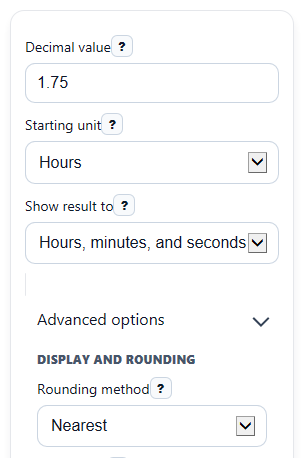
- Enter your number in Decimal value, such as 1.75, 90.5, or -2.5.
- Choose the meaning of that number in Starting unit: hours, minutes, seconds, or days.
- Pick the smallest part to show in Show result to, then open Advanced options if you want a different Rounding method, Result style, or Clock format padding.
- Click Calculate to see Converted time, plus the matching totals in Total hours, Total minutes, and Total seconds.
- Sanity-check the answer: make sure the clock-style result matches the decimal totals and read Rounding note or Note if the result crosses 24 hours, is negative, or changed because of rounding.
Definitions
Decimal value: A time amount written as one number, such as 1.75 hours or 90.5 minutes.
Starting unit: The unit your entered number starts in before conversion: hours, minutes, seconds, or days.
Show result to: The smallest time part shown in the split result, either minutes or seconds.
Rounding method: The rule used on the smallest shown unit: nearest, down, or up.
Clock-style time: A duration written like hh:mm or hh:mm:ss. Here it is a length of time, not a wall-clock time of day.
Time breakdown: The same duration written in words, such as 1 hour, 45 minutes.
Total hours, Total minutes, Total seconds: The full duration converted into one single unit, kept as signed decimal totals.
Common mistakes and quick fixes
Mistake: Typing a clock value like 1:45 into Decimal value instead of a decimal such as 1.75.
Fix: Enter only one decimal number in Decimal value , then let Converted time show the base-60 result.
Mistake: Leaving Starting unit on Hours when your number is really minutes or seconds.
Fix: Match Starting unit to what the number means before you calculate.
Mistake: Expecting Show result to set to Hours and minutes to keep seconds hidden without affecting rounding.
Fix: Check Rounding method and read Rounding note , because the smallest shown unit is rounded.
Mistake: Thinking Clock-style time wraps after 24 hours like a wall clock.
Fix: Read Clock-style time as a duration, so values above 24 hours stay above 24 instead of restarting at 00.
Mistake: Assuming a negative Total hours or negative Total minutes is an error.
Fix: Negative totals are allowed and mean the entered duration is below zero; check Note for context.
Mistake: Comparing only Converted time and ignoring Total seconds or Total minutes when checking payroll or spreadsheet math.
Fix: Use the decimal totals result cards to confirm the exact single-unit value you need.
Limitations & Key Assumptions / Boundary Conditions
- This calculator converts standard time units only. It does not use historical decimal time systems.
- The split display rounds only the smallest shown unit, based on your chosen Rounding method.
- If rounding pushes 60 seconds to a full minute, or 60 minutes to a full hour, the result carries into the next larger part.
- Durations over 24 hours are shown as full elapsed time and do not wrap like a time-of-day clock.
- Negative values are allowed and keep a minus sign for the overall duration, but the time parts themselves are shown from the absolute size of the duration.
- Very precise decimal inputs can display slight decimal differences in totals because computers store many decimals approximately.
Methodology
How the calculator works
The calculator first converts your entry into total seconds, because seconds are the common base unit for all four starting units.
total_seconds = decimal_value * unit_seconds
It uses 3600 seconds per hour, 60 seconds per minute, 1 second per second, and 86400 seconds per day.
Display when showing hours and minutes
If Show result to is set to hours and minutes, the calculator converts the absolute duration to total minutes, applies your chosen rounding rule, and then splits that rounded minute count into hours and minutes.
display_minutes_total = round_rule(abs(total_seconds) / 60)
hours = floor(display_minutes_total / 60)
minutes = display_minutes_total - hours*60
Display when showing hours, minutes, and seconds
If Show result to is set to hours, minutes, and seconds, the calculator rounds total seconds first, then breaks the rounded count into time parts.
display_seconds_total = round_rule(abs(total_seconds))
hours = floor(display_seconds_total / 3600)
rem = display_seconds_total - hours*3600
minutes = floor(rem / 60)
seconds = rem - minutes*60
The sign is applied to the overall result afterward, so a negative duration keeps a leading minus sign without making the individual parts negative.
Decimal totals
The calculator also returns the same duration as single-unit decimal totals for easier spreadsheet, payroll, and comparison work.
total_hours = total_seconds / 3600
total_minutes = total_seconds / 60
total_seconds = total_seconds
Mini example
Example: enter 1.75 for Decimal value and choose Hours for Starting unit. First, convert to seconds: 1.75 x 3600 = 6300. Then split 6300 seconds into 1 hour, 45 minutes, and 0 seconds. The decimal totals are 1.75 hours, 105 minutes, and 6300 seconds.
Assumptions that affect results
The calculator treats the result as a duration, not a clock time of day. It does not wrap after 24 hours. Differences from another tool usually come from a different rounding rule or from one tool showing minutes only while another shows seconds too.