
Convert hours, minutes, and seconds into exact decimal time or turn a decimal value back into regular time without mixing up 1:30 and 1.
Advanced options
Table of contents
How to use our Time to Decimal Calculator
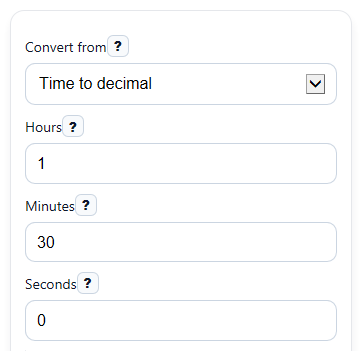
- Choose Convert from, then either enter Hours, Minutes, and Seconds or enter a Decimal value and its Decimal unit.
- If you are converting regular time, keep Minutes and Seconds between 0 and 59, and use 0 for any part you do not need.
- Open Advanced options only if you want a reporting rule, then pick a Rounding method and the number of Decimal places to show.
- Click Calculate to see the Converted result, the exact decimal values, the Time breakdown, and any Rounded decimal result.
- Sanity-check the answer by comparing Exact decimal hours with Time breakdown; for example, 1 hour 30 minutes should match 1.50 hours, not 1.30 hours.
Definitions
Convert from: The direction of conversion, either regular time parts to decimal time or decimal time back to hours, minutes, and seconds.
Decimal value: A base-10 time amount such as 1.5 hours or 135.5 minutes, not a clock-style entry like 1:30.
Decimal unit: Tells the calculator whether the Decimal value is in hours, minutes, or seconds.
Exact decimal hours: The full duration written as hours with a decimal part, before any reporting round-off.
Rounded decimal result: A reporting version of the decimal answer after applying the selected Rounding method.
Time breakdown: The same duration shown as whole hours, whole minutes, and remaining seconds.
Common mistakes and quick fixes
Mistake: Typing 1:30 into Decimal value in Decimal to time mode.
Fix: Enter 1.5 for decimal hours, or switch Convert from to Time to decimal and use Hours = 1 and Minutes = 30.
Mistake: Entering 75 in Minutes or 90 in Seconds .
Fix: Keep Minutes and Seconds from 0 to 59, and move extra time into Hours when needed.
Mistake: Reading Rounded decimal result as if it were the exact value.
Fix: Check Note and compare it with Exact decimal hours so you know whether rounding changed the reported answer.
Mistake: Picking the wrong Decimal unit before converting back to time.
Fix: Set Decimal unit to hours, minutes, or seconds so the Converted result and Time breakdown match what your decimal number actually means.
Mistake: Expecting 1 hour 7 minutes to become 1.07 in Exact decimal hours .
Fix: Use the calculator output, because decimal time is based on 60 minutes per hour, so 1 hour 7 minutes is about 1.12 hours, not 1.07.
Limitations & Key Assumptions / Boundary Conditions
- Minutes and Seconds must be from 0 to 59 in Time to decimal mode. Values outside that range should be corrected before calculating.
- Decimal value must be 0 or more in Decimal to time mode. Negative durations are not handled in this version.
- Rounding changes only the reported decimal answer. The exact conversion is still shown separately so you can compare them.
- Nearest 6 minutes means nearest 0.1 hour, and nearest 15 minutes means quarter-hour reporting. Your employer, client, or software may use a different rule.
- Displayed decimals follow the selected Decimal places, so the screen value may look shorter than the full internal calculation.
- This tool converts durations, not clock times of day. For example, it treats 1:30 as 1 hour 30 minutes, not 1:30 PM.
Methodology
How the calculator converts time
The calculator first turns the entered duration into total seconds, then it converts that total into decimal hours, decimal minutes, or decimal seconds. This avoids the common mistake of reading minutes as if they were base-10 digits.
total_seconds = hours*3600 + minutes*60 + seconds
decimal_hours = total_seconds / 3600
decimal_minutes = total_seconds / 60
decimal_seconds = total_seconds
How decimal values convert back to time
In Decimal to time mode, the calculator turns the entered decimal amount into total seconds based on the chosen Decimal unit, then splits that total into hours, minutes, and seconds.
total_seconds = decimal_hours*3600 OR decimal_minutes*60 OR decimal_seconds
hours = floor(total_seconds/3600)
minutes = floor((total_seconds - hours*3600)/60)
seconds = total_seconds - hours*3600 - minutes*60
How rounding works
If you choose a Rounding method, the calculator rounds total minutes to the nearest reporting increment first, then converts that rounded time into decimal hours for the rounded display. Common increments are 1 minute, 6 minutes for tenths of an hour, and 15 minutes for quarter hours.
rounded_minutes = round(total_minutes / increment_minutes) * increment_minutes
rounded_decimal_hours = rounded_minutes / 60
Mini example
Example: 1 hour 30 minutes 0 seconds gives 5,400 total seconds. Dividing by 3,600 gives 1.5 decimal hours, dividing by 60 gives 90 decimal minutes, and the time breakdown stays 1 hour 30 minutes 0 seconds. If you round 1 hour 7 minutes to the nearest 15 minutes, 67 minutes rounds to 60 minutes, so the rounded decimal result is 1.00 hour.
Assumptions used
The method assumes standard unit relationships: 60 seconds per minute, 60 minutes per hour, and 3,600 seconds per hour. It handles non-negative durations only, and rounded reporting values may differ from the exact values shown separately.
Sources
- How to Convert Minutes to Decimals and Decimals to Minutes - Timesheets
- Northern Arizona University (NAU) PDF - Conversion from Minutes to Decimal Hours - NAU
- University of Mississippi HR PDF - Payroll Time Conversion Chart (minutes to decimal; quarter-hour increments note) - Olemiss
- University of New Mexico Gallup PDF - Clock Rounding Table (nearest tenth; 0.1 = 6 minutes) - UNM