
Convert minutes to seconds using either decimal minutes or minutes plus extra seconds so you can avoid common time-entry mistakes.
Table of contents
How to use our Minutes to Seconds Converter
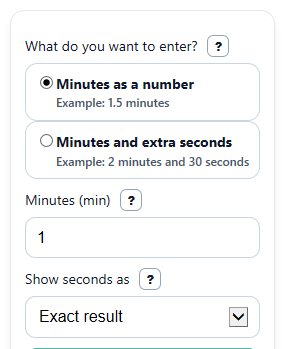
- Choose your input style under "What do you want to enter?" Pick "Minutes as a number" for values like 1.5, or "Minutes and extra seconds" for times like 2 minutes 30 seconds.
- Enter your value in the visible field or fields. Use "Minutes (min)" alone for decimal minutes, or fill in both "Minutes (min)" and "Extra seconds (s)" for a mixed time.
- Pick "Show seconds as" if you want the exact result or the nearest whole second.
- Click "Calculate" to see "Total seconds," "Time entered," and "Rule used."
- Sanity-check the answer: 1 minute should equal 60 seconds, and 30 seconds should add 30 more, so 2 minutes 30 seconds should show 150 seconds.
Definitions
Minutes (min): Time measured in minutes. In decimal mode, this can be a whole number or a decimal such as 1.5.
Extra seconds (s): The seconds added after the minute part, such as the 30 in 2 minutes 30 seconds.
Total seconds: The full time after conversion, written only in seconds.
Exact result: Shows the calculated seconds without rounding, except for trimming extra trailing zeros.
Nearest whole second: Rounds the result to the closest full second.
Rule used: The conversion equation the calculator applied to your entry.
Common mistakes and quick fixes
Mistake: Typing 1.30 into "Minutes (min)" while using "Minutes as a number" and expecting 1 minute 30 seconds.
Fix: Use "Minutes and extra seconds" and enter 1 in "Minutes (min)" and 30 in "Extra seconds (s)."
Mistake: Leaving the visible "Minutes (min)" field blank.
Fix: Fill in the active "Minutes (min)" input for your selected mode before you click Calculate.
Mistake: Putting all of a mixed time into "Extra seconds (s)," such as 130 for 1 minute 30 seconds, without checking the summary.
Fix: Either enter 1 in "Minutes (min)" and 30 in "Extra seconds (s)," or read "Time entered" to confirm the calculator read your time the way you meant.
Mistake: Forgetting that "Show seconds as" is set to round the answer.
Fix: Choose "Exact result" if you need decimal seconds, especially when "Extra seconds (s)" includes a decimal like 0.6.
Mistake: Thinking a negative "Total seconds" result is automatically wrong.
Fix: Check whether you entered a negative value in "Minutes (min)" or "Extra seconds (s)." A negative "Total seconds" means the entered time is below zero.
Limitations & Key Assumptions / Boundary Conditions
- This converter only changes minutes into seconds. It does not convert to hours, milliseconds, or clock formats like 1:30 automatically.
- When you choose "Minutes as a number," a value like 1.30 is treated as 1.3 minutes, not 1 minute 30 seconds.
- Negative values are allowed for math purposes, but they are unusual for everyday timing and may not fit real-world tasks like sports or cooking.
- If you choose "Nearest whole second," the displayed "Total seconds" is rounded, so it may differ slightly from the exact value.
- Very large numbers still calculate correctly, but you should double-check the "Time entered" summary to make sure you entered the intended unit and format.
- In "Minutes and extra seconds" mode, values of 60 or more in "Extra seconds (s)" are accepted and added directly, which may be different from how teachers or apps expect time to be written.
Methodology
How the conversion works
The calculator uses the fixed relationship that 1 minute equals 60 seconds [1]. Which formula it uses depends on the input style you choose.
seconds = minutes * 60
total_seconds = whole_minutes * 60 + extra_seconds
display_seconds = round(total_seconds)
When each formula is used
If you pick "Minutes as a number," the calculator multiplies "Minutes (min)" by 60. This is the right choice for entries like 1, 2.5, or 0.75.
If you pick "Minutes and extra seconds," the calculator converts the minute part to seconds and then adds "Extra seconds (s)." This is the safer choice for entries like 2 minutes 30 seconds.
If you pick "Nearest whole second" under "Show seconds as," the calculator rounds the final total to the nearest second after doing the full conversion.
Mini example
Example 1:
If "Minutes (min)" is 1.5 in decimal mode, the calculator computes 1.5 x 60 = 90, so "Total seconds" is 90.
Example 2:
If "Minutes (min)" is 2 and "Extra seconds (s)" is 30 in mixed mode, the calculator computes 2 x 60 + 30 = 150, so "Total seconds" is 150.
Example 3: If "Minutes (min)" is 1 and "Extra seconds (s)" is 0.6, the exact total is 60.6 seconds. With rounding on, the displayed result is 61 seconds.
How to interpret the outputs
Total seconds is the main answer. Time entered helps you confirm that the calculator read your input in the way you intended. Rule used shows the math for homework or checking.
Assumptions behind the result
The calculator assumes your input is already a duration in minutes or minutes plus seconds, not a clock time. Hidden fields are ignored for the inactive mode, and non-numeric text should be corrected before calculating. Negative results are kept as negative because they represent times below zero rather than being forced to zero.