
Convert a prescribed or label-provided milligram amount to milliliters using a known medicine strength or substance density. This tool does not choose a medication dose.
Advanced options
How to use our mg to mL Calculator
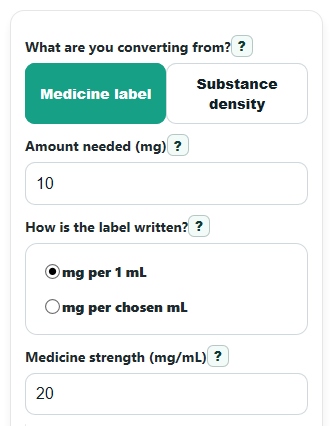
- Choose What are you converting from? Pick Medicine label if your bottle shows strength such as mg/mL or mg per 5 mL, or pick Substance density for a general liquid.
- Enter Amount needed (mg). Then, in medicine mode, either enter Medicine strength (mg/mL) or switch How is the label written? to ratio and fill in Label amount (mg) and Label volume (mL).
- If you use density mode, enter Density (g/mL). Use Advanced options only if you want a rounded measuring step, extra decimal places.
- Click Calculate. Read Calculated volume (mL) first, then check Strength used (mg/mL) to make sure it matches your label or expected density-based strength.
- If Rounded volume estimate (mL) is shown, use it only when your measuring tool matches that step size. If the result is tiny or very large, recheck the dose, units, and label numbers before measuring.
Definitions
mg (milligram): A unit of mass. Here it means the amount of substance or active ingredient you want.
mL (milliliter): A unit of liquid volume. This is how much liquid you measure.
Medicine strength (mg/mL): How many milligrams are in each 1 mL of liquid. A higher number means the liquid is more concentrated.
Label amount (mg) and Label volume (mL): The two numbers printed together on many medicine labels, such as 250 mg per 5 mL. These are converted into mg/mL before the main calculation.
Density (g/mL): Mass per milliliter for a general substance. This is for non-medicine conversions, not a substitute for drug label strength.
Strength used (mg/mL): The final concentration the calculator used to compute the answer. In density mode, density is converted into mg/mL first.
Common mistakes and quick fixes
Mistake: Entering Amount needed (mg) and expecting an answer without a strength or density value.
Fix: In medicine mode, fill in Medicine strength (mg/mL) or both Label amount (mg) and Label volume (mL) . In density mode, fill in Density (g/mL) .
Mistake: Typing the bottle pair into Medicine strength (mg/mL) as if 250 mg per 5 mL means 250 mg/mL.
Fix: Change How is the label written? to the ratio choice and enter Label amount (mg) = 250 and Label volume (mL) = 5, or convert it first and then enter 50 in Medicine strength (mg/mL) .
Mistake: Using Density (g/mL) for a medicine bottle when you really need labeled drug strength.
Fix: Use What are you converting from? = Medicine label for medicines, because Calculated volume (mL) should come from drug concentration, not general liquid density.
Mistake: Reading Rounded volume estimate (mL) as the exact answer.
Fix: Read Calculated volume (mL), including any value before display rounding. Rounded volume estimate (mL) is a mathematical comparison, not a recommendation to change a medication amount.
Mistake: Ignoring Strength used (mg/mL) after entering a label pair.
Fix: Compare Strength used (mg/mL) to the label math before using Calculated volume (mL) . This helps catch swapped numbers and unit mistakes.
Limitations & Key Assumptions / Boundary Conditions
- You cannot convert mg to mL from mg alone. The calculation needs either a medicine concentration in mg/mL, a label pair such as mg per X mL, or a density in g/mL.
- Medicine mode and density mode are not interchangeable. For medicines, use the labeled drug strength rather than general liquid density.
- The calculator assumes the label concentration is correct and uniform throughout the liquid.
- Rounded results depend on the measuring step you choose. Rounding can change the delivered amount, especially for very small doses.
- Very small results, such as under 0.01 mL, may be hard to measure with common household tools.
- Very large single-dose volumes may signal a wrong label entry, wrong unit, or wrong product strength, so they should be rechecked carefully.
Methodology
Core idea
This calculator changes a mass amount in milligrams into a liquid volume in milliliters. That only works when the liquid's concentration is known. Concentration means how much substance is in a given volume [3].
Formulas used
volume in mL = amount needed in mg / medicine strength in mg per mL
strength in mg per mL = label amount in mg / label volume in mL
volume in mL = amount needed in mg / (density in g per mL x 1000 mg per g)
rounded volume = round(exact volume / step) x step
How each mode works
In Medicine label mode, the calculator uses the label strength directly if you enter Medicine strength (mg/mL). If your bottle shows a pair such as 250 mg per 5 mL, it first converts that pair into mg/mL, then divides the needed mg dose by that strength.
In Substance density mode, the calculator treats the entered amount as mass and converts density from g/mL into mg/mL by multiplying by 1000. Then it uses the same divide-by-strength idea to get volume.
Mini example
Suppose Amount needed (mg) is 125 and the label says 250 mg per 5 mL.
strength = 250 / 5 = 50 mg/mL
volume = 125 / 50 = 2.5 mL
If rounding is set to 0.1 mL, the rounded volume estimate stays 2.5 mL because it already lands on that step.
Another example: if Amount needed (mg) is 10 and Medicine strength (mg/mL) is 20, then:
volume = 10 / 20 = 0.5 mL
Interpretation tips
Calculated volume (mL) is the main answer. Strength used (mg/mL) is a safety check that helps you confirm the calculator read your label the way you intended. Rounded volume estimate (mL) shows mathematical rounding to your chosen step. It can differ from the calculated conversion and does not recommend changing a prescribed amount.
Assumptions behind the math
The calculator assumes positive nonzero concentration or density values, ignores hidden fields from the inactive mode, and blocks non-finite results such as divide-by-zero. It also assumes the liquid is evenly mixed and that your label values are written in compatible units.