
Use this acreage calculator to find land area in acres from simple dimensions or custom corner points.
Advanced options
How to use our Acreage Calculator
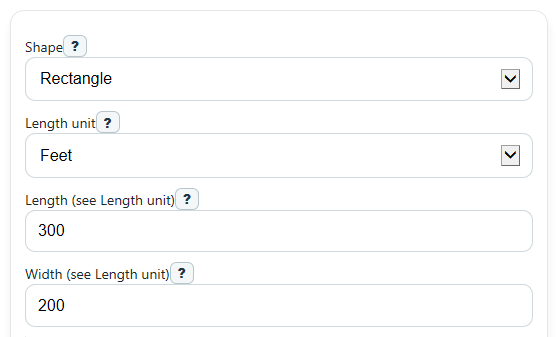
- Pick a value in Shape that matches your lot: rectangle, triangle, circle, or custom points.
- Enter the needed measurements in the shown fields, and choose the correct Length unit or Point unit before you calculate.
- If you use Corner points, enter one x,y pair per line in boundary order around the lot, such as 0,0 then 300,0 then 300,200.
- Open Advanced options if you want to change Decimal places, show Perimeter, or try Quick check acreage to see the side length of an equal-area square.
- Click Calculate, then sanity-check the result by comparing Area, Area in square feet, and any Result note or Warning to your expected lot size.
Definitions
Acre: A land area unit equal to 43,560 square feet [1].
Length unit: The unit used for side measurements in rectangle, triangle, and circle mode.
Point unit: The unit used only for the x,y values in Corner points.
Perimeter: The total distance around the outside edge of the shape.
Corner points: A list of boundary coordinates written as x,y pairs in order around the lot.
Hectare: A metric land area unit. The calculator shows it as another way to compare the same area.
Quick check: square side length: If a lot had the same area but was a perfect square, this is the length of each side.
Common mistakes and quick fixes
Mistake: Entering a rectangle in Shape but filling Base and Height instead of Length and Width .
Fix: Match the fields to the selected Shape . Rectangle uses Length and Width .
Mistake: Using feet for measurements while Length unit is set to meters or yards.
Fix: Set Length unit first, then enter values in that same unit so Area and Perimeter come out correctly.
Mistake: Typing slanted side length into Height for a triangle.
Fix: In triangle mode, Height must be the straight perpendicular distance from the Base to the opposite point.
Mistake: Entering Corner points out of order or with a bad line like 300 200 instead of 300,200.
Fix: Put one x,y pair on each line in boundary order around the edge, and include a comma in every point.
Mistake: Expecting Perimeter for a triangle when only Base and Height are known.
Fix: This calculator can show triangle area from Base and Height , but triangle Perimeter needs all three side lengths.
Mistake: Reading a very small or very large Area without checking the unit conversions.
Fix: Compare Area in acres with Area in square feet and Area in hectares to make sure the size feels reasonable.
Limitations & Key Assumptions / Boundary Conditions
- Rectangle mode assumes the lot is rectangular. If the real boundary bends or tapers, the acreage is only an estimate.
- Triangle mode uses Base and perpendicular Height only. It does not show triangle Perimeter because all three side lengths are not entered.
- Circle mode assumes the land is circular. Small radius errors can change area a lot because area grows with the square of the radius.
- Custom point results depend on point order. If points cross over each other or are not listed around the edge, the area may not match the intended parcel.
- If custom points are repeated, collinear, or do not enclose space, the boundary has zero area and the calculation should be treated as invalid.
- Results are geometric estimates from the numbers entered. Real property records can differ because of survey methods, legal descriptions, easements, and rounding.
- The calculator converts units consistently, but output precision still depends on the accuracy of your original measurements.
Methodology
How the calculator finds acreage
The calculator first finds area in the shape's own square unit, then converts that area to square feet when needed, then converts square feet to acres. It also shows hectares for an easy metric comparison.
Shape formulas
Rectangle: A = L x W
Triangle: A = (B x H) / 2
Circle: A = pi x r^2
Polygon from corner points: A = abs(sum(x_i y_(i+1) - y_i x_(i+1))) / 2
For custom points, the calculator uses the shoelace method on the points in the order entered, then closes the shape from the last point back to the first.
Unit conversions
square feet = square yards x 9
square feet = square meters x 10.7639104167
acres = square feet / 43,560
hectares = acres x 0.40468564224
If you enter lengths in feet, area is already in square feet after the shape formula. If you enter yards, the calculator converts square yards to square feet. If you enter meters, it converts square meters to square feet before finding acres.
Perimeter rules
Rectangle: P = 2L + 2W
Circle: P = 2 x pi x r
Polygon: P = sum of side lengths, including last point to first
Triangle perimeter is not shown here because base and height alone do not tell you all three side lengths.
Worked mini-example
Suppose a rectangular lot is 300 feet by 200 feet. Area in square feet is 300 x 200 = 60,000. Acres are 60,000 / 43,560 = 1.3774, which rounds to 1.38 acres with 2 decimal places. Perimeter is 2 x 300 + 2 x 200 = 1,000 feet.
Assumptions and limits
The acre output uses 43,560 square feet per acre [1]. Results are only as good as the measurements entered. For custom points, self-intersecting boundaries can produce a number that is mathematically valid but not the parcel you meant to describe.