
Use this calculator to find a mole ratio from a balanced equation or convert a known amount into the matching amount of another substance.
How to use our Molar Ratio Calculator
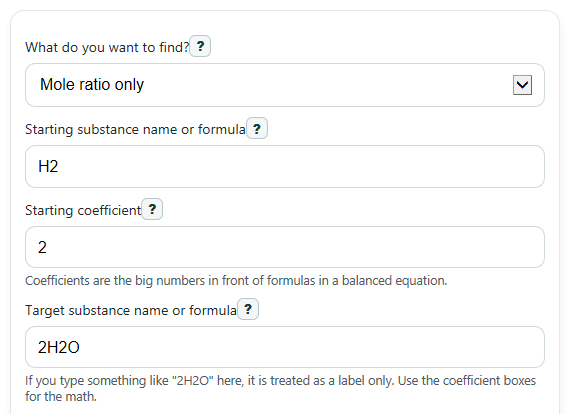
- Choose What do you want to find? and enter the Starting substance name or formula, Starting coefficient, Target substance name or formula, and Target coefficient from your balanced equation.
- If you picked convert mode, choose the Known amount type, enter the Known amount, and add Starting molar mass (g/mol) or Target molar mass (g/mol) only when grams are involved.
- Click Calculate to see the Mole ratio, the plain-language Conversion setup, and if needed the Target amount.
- Sanity-check the answer: if both coefficients are the same, the Mole ratio should be 1, and if your known and target units are both moles, the amount should scale only by the coefficient ratio.
Definitions
Starting coefficient: The big whole number in front of the starting substance in a balanced chemical equation.
Target coefficient: The big whole number in front of the substance you want to compare to or find.
Mole ratio: The target coefficient divided by the starting coefficient. It tells you how many moles of one substance match moles of the other.
Molar mass (g/mol): The mass of 1 mole of a substance, measured in grams per mole.
Particles: Tiny units such as atoms, molecules, or formula units. A mole contains 6.02214076 x 10^23 particles [2].
Conversion setup: The factor written in words and numbers, such as 2 mol H2O per 2 mol H2, so you can see exactly how the calculator changed one substance into another.
Common mistakes and quick fixes
Mistake: Typing a coefficient into Target substance name or formula , like 2H2O, and then also entering 2 in Target coefficient .
Fix: Use the name field as a label only and let Target coefficient be the number the calculator uses.
Mistake: Using coefficients from an unbalanced equation in Starting coefficient and Target coefficient .
Fix: Balance the equation first, then copy the whole-number coefficients into those two fields.
Mistake: Choosing Known amount type as mass but leaving Starting molar mass (g/mol) blank or entering 0.
Fix: Enter the correct positive molar mass in g/mol before calculating.
Mistake: Choosing Target amount type as mass but forgetting Target molar mass (g/mol) .
Fix: Enter the target substance molar mass so the calculator can convert target moles into grams.
Mistake: Entering 0 or a negative value for Known amount in convert mode.
Fix: Enter a positive amount greater than 0 in the unit you selected.
Mistake: Reading Target amount without checking Conversion setup .
Fix: Use Conversion setup to confirm the factor matches your balanced equation, such as 2 mol H2O per 2 mol H2.
Limitations & Key Assumptions / Boundary Conditions
- This tool does not balance equations. You must enter coefficients from an already balanced chemical equation.
- It uses the coefficient fields only. If you type something like 2H2O in a name field, the 2 is treated as part of the label, not as the coefficient.
- Coefficients must be positive whole numbers. Fractions, zeros, negatives, or blank values are not valid here.
- Gram conversions depend on the molar masses you enter. If those values are off, the mass result will also be off.
- Particle conversions use the Avogadro constant, so very large particle counts may be shown in scientific notation when that is easier to read.
- The calculator focuses on molar ratio and one-step amount conversion only. It does not handle limiting reactants, percent yield, or multi-step stoichiometry.
Methodology
How the calculator works
The calculator first reads the balanced-equation coefficients for the starting substance and the target substance. Those coefficients give the stoichiometric relationship, which is the fixed mole relationship in the reaction.
mole ratio = target coefficient / starting coefficient
If you choose ratio only, that ratio is the main result.
If you choose convert mode, the calculator changes the known starting amount into moles first when needed, because stoichiometry is done in moles.
starting moles = known mass in g / starting molar mass
starting moles = known particles / Avogadro constant
target moles = starting moles x (target coefficient / starting coefficient)
Then it converts target moles into the output unit you asked for.
target mass in g = target moles x target molar mass
target particles = target moles x Avogadro constant
The Avogadro constant used here is 6.02214076 x 10^23 per mole [2].
Worked mini-example
Suppose a balanced equation shows 2 for H2 and 2 for H2O. If the Known amount is 4.032 g of H2 and the Starting molar mass (g/mol) is 2.016, then starting moles = 4.032 / 2.016 = 2 mol. The coefficient ratio is 2 / 2 = 1, so target moles = 2 x 1 = 2 mol H2O. If the Target molar mass (g/mol) is 18.015, then target mass = 2 x 18.015 = 36.03 g H2O.
What the conversion setup means
The conversion setup is shown in plain language so you can see the exact factor used, such as 2 mol H2O per 2 mol H2. This helps you check that you picked the right coefficients and substances before trusting the final answer.
Assumptions used
This method assumes your equation is already balanced, your coefficients are correct whole numbers, and any molar masses entered are correct for the substances named. Real chemistry problems can also require limiting-reactant checks or percent-yield adjustments, which are outside this calculator.