
Convert a simple inorganic chemical formula to a name, or a name to a formula, and see the rule trail used.
Advanced options
How to use our Chemical Name Calculator
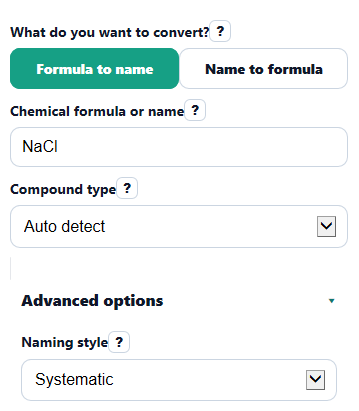
- Choose What do you want to convert?, then type your entry in Chemical formula or name using plain text such as NaCl, H2SO4, or iron(III) chloride.
- Set Compound type to Auto detect if you want the tool to classify it, or pick Ionic, Covalent, or Acid if you already know the family.
- If needed, open Advanced options and choose Naming style or whether to Show familiar common name when available, then click Calculate.
- Read Answer first, then check Detected compound type, How the answer was built, and Parts found to see why the result makes sense.
- Sanity-check the result before copying it: make sure prefixes match subscripts for covalent compounds, Roman numerals match the metal charge for ionic compounds, and any Warning or limit message is cleared or understood.
Definitions
Compound type: The rule family the tool uses: ionic, covalent, or acid.
Ionic compound: A compound made from positive and negative ions. The total positive and negative charge must balance to zero.
Covalent compound: A compound made from nonmetals that is named with prefixes such as di-, tri-, or penta-.
Acid: A hydrogen-containing compound named with acid rules, such as hydrochloric acid or sulfuric acid.
Roman numeral: The charge of a variable-charge metal in a name, such as iron(III) meaning iron has a 3+ charge.
Polyatomic ion: A charged group of atoms that acts like one ion, such as nitrate, sulfate, or ammonium [1].
Prefix: A count word used in binary covalent names. For example, di- means 2 and penta- means 5.
Parts found: The identified pieces of the entry, such as cation and anion or first and second element.
Common mistakes and quick fixes
Mistake: Typing subscripts or fancy symbols in Chemical formula or name , such as H2O with subscript characters or a centered dot hydrate.
Fix: Use plain text only in Chemical formula or name , like H2O, and avoid unsupported hydrate dot notation.
Mistake: Leaving Compound type on Auto detect for an entry that could fit more than one rule set.
Fix: If Warning or limit says the input is ambiguous, switch Compound type to Ionic , Covalent , or Acid and calculate again.
Mistake: Writing a variable-charge metal name without a valid Roman numeral in Chemical formula or name , such as iron chloride when you mean iron(III) chloride.
Fix: Enter the metal charge clearly in Chemical formula or name with a proper Roman numeral, then confirm it in How the answer was built .
Mistake: Expecting a familiar classroom label to replace the rule-based result in Answer .
Fix: Keep Naming style on the style your class uses, and turn on Show familiar common name when available if you want an extra note in Common name note .
Mistake: Treating an acid like a normal ionic compound, or the other way around.
Fix: If the entry is an acid, set Compound type to Acid so Detected compound type and Answer use acid naming rules.
Mistake: Ignoring Parts found and copying the result without checking the pieces.
Fix: Use Parts found to verify the cation and anion, or the first and second element, especially when prefixes, charges, or polyatomic ions are involved.
Limitations & Key Assumptions / Boundary Conditions
- This tool is limited to simple inorganic classroom nomenclature, including common ionic compounds, binary covalent compounds, common acids, and a curated set of common polyatomic ions.
- It does not support most organic compounds, coordination compounds, complex ions, or hydrate dot notation.
- Auto detect works best on common textbook-style entries. If the result is ambiguous, you may need to choose the correct Compound type yourself.
- For ionic names with variable-charge metals, the entry must include a valid Roman numeral when the charge is not obvious from the name alone.
- For ionic formulas, the formula must be electrically neutral under the selected interpretation or the tool will return an error instead of guessing.
- For formulas with parentheses, the grouped ion must be part of the built-in supported set. Unsupported grouped formulas may produce a warning.
- Spelling is checked loosely for spacing and capitalization, but major spelling errors are not auto-corrected because that could create the wrong compound.
Methodology
How the calculator decides what to do
The tool first reads What do you want to convert? to decide whether it should name a formula or build a formula from a name. Then it uses Compound type. If you choose Auto detect, it tries the most common classroom patterns first and stops if the input is too ambiguous.
Rule sets used
For ionic compounds, the tool identifies the positive ion and negative ion, checks that the charges balance, and then builds or reads the name.
sum(cation_charge * cation_count) + sum(anion_charge * anion_count) = 0
For binary covalent compounds, the tool matches prefixes to atom counts. It reads the first element, then the second element with an -ide ending.
formula_subscript = prefix_value
Prefix values used are mono = 1, di = 2, tri = 3, tetra = 4, penta = 5, hexa = 6, hepta = 7, octa = 8, nona = 9, and deca = 10 [2].
For variable-charge metals in Stock names, the tool uses the Roman numeral as the metal charge, or in some formula-to-name cases it infers one whole-number charge from the anion total.
metal_oxidation_state = absolute(total_anion_charge) / metal_count
For acids, the tool uses two standard classroom patterns. Binary acids use hydro- plus the anion root plus -ic acid. Oxyacids change -ate to -ic acid and -ite to -ous acid.
acid_name = hydro + anion_root + ic acid
anion ending ate -> acid ending ic; anion ending ite -> acid ending ous
Built-in ion list
The calculator includes a limited built-in table of common polyatomic ions, such as ammonium, hydroxide, nitrate, nitrite, sulfate, sulfite, carbonate, hydrogen carbonate, phosphate, acetate, permanganate, chlorate, perchlorate, chlorite, cyanide, chromate, and dichromate [1]. If your entry needs a less common ion, the tool may show a warning instead of guessing.
Worked mini-example
Example: name to formula for iron(III) chloride. The Roman numeral III means the iron ion is 3+. Chloride is 1-. To balance charge, one iron needs three chloride ions, so the formula is FeCl3. The rule trail would show variable-charge ionic naming and charge balance.
Example: formula to name for N2O5. The first element is nitrogen with 2 atoms, so it gets the prefix di-. The second element is oxygen with 5 atoms, so it becomes pentoxide. The final name is dinitrogen pentoxide.
Assumptions used by the calculator
The tool uses classroom naming conventions for simple inorganic compounds and gives the systematic answer first. If a common classroom name is available and you allow it, that appears only as an extra note. Results can differ from a teacher's preferred style if your class uses a special exception, omits a common name, or expects content outside the built-in ion list.