
Paste a protein or peptide sequence to get its theoretical molecular weight, cleaned residue count, and a clear report of how each letter was handled.
Advanced options
How to use our Protein Molecular Weight Calculator
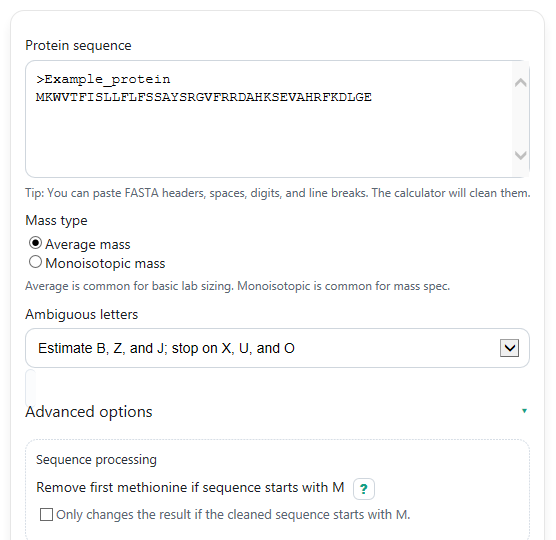
- Paste your sequence into Protein sequence. FASTA headers, line breaks, spaces, and digits are cleaned automatically before counting residues.
- Choose Mass type: use average mass for common lab planning, or monoisotopic mass for exact-isotope style work such as mass spectrometry.
- Choose Ambiguous letters. In estimate mode, B, Z, and J are estimated, while strict mode stops on any ambiguous letter so you can fix the sequence first.
- If needed, open Advanced options to use Remove first methionine if sequence starts with M, enter Sample amount, choose Sample amount type, or set Decimal places (results), then click Calculate.
- Sanity-check the output by reading Sequence cleanup and letter handling and comparing Residues counted with what you expected before using Molecular weight or Converted sample amount in the lab.
Definitions
Protein sequence: A chain of amino acids written with one-letter codes such as A, C, D, and E.
Residue: An amino acid after it has joined a peptide chain. The calculator uses residue masses, not separate free amino acid masses.
Mass type: The mass table used for each residue. Average mass uses natural isotope averages, while monoisotopic mass uses the most common exact isotopes.
Molecular weight (Da): The theoretical mass of one molecule in daltons. In practice, this is often called molecular weight, though the formal term is relative molecular mass or molar-mass related wording [1].
Molecular weight (kDa): The same value divided by 1,000. This is a convenient way to report larger proteins.
Molar mass (g/mol): The same numeric value as Da, written as grams per mole so you can convert between mass and amount.
Ambiguous letters: Letters that do not point to one exact standard residue. In this calculator, B, Z, and J can be estimated in estimate mode, while X, U, and O stop the calculation.
Remove first methionine if sequence starts with M: An optional mature-protein adjustment that removes the first residue only when the cleaned sequence begins with M.
Common mistakes and quick fixes
Mistake: Pasting a FASTA file and assuming the header line was counted as sequence in Protein sequence .
Fix: Check Sequence cleanup and letter handling to confirm header text was removed and only amino acid letters were used.
Mistake: Choosing the wrong Mass type for your task.
Fix: Use average mass for routine molar-mass conversion and monoisotopic mass when you need exact-isotope style peptide mass values.
Mistake: Leaving ambiguous letters in the sequence while Ambiguous letters is set to strict mode.
Fix: Replace the ambiguous letters in Protein sequence , or switch Ambiguous letters to the estimate option if B, Z, or J is acceptable for your use.
Mistake: Turning on Remove first methionine if sequence starts with M for a sequence that is already mature or does not start with M.
Fix: Use that option only when you specifically want the mass after initiator Met removal, and read Sequence cleanup and letter handling to see whether anything was removed.
Mistake: Entering a blank, zero, or nonnumeric Sample amount and expecting Converted sample amount to appear.
Fix: Enter a positive number in Sample amount and make sure Sample amount type matches the units you really have.
Mistake: Trusting Molecular weight without noticing that Residues counted is lower than expected.
Fix: Compare Residues counted with your intended sequence length and review Sequence cleanup and letter handling for removed characters or unsupported letters.
Limitations & Key Assumptions / Boundary Conditions
- This is a theoretical sequence-based calculation. It does not include post-translational modifications, glycosylation, phosphorylation, labels, adducts, salt forms, or isotopic enrichment.
- The method adds one water molecule back to the summed residue masses to represent the full chain termini. That matches an unmodified linear peptide or protein chain.
- Disulfide bonding, oxidation state, terminal blocking, signal peptide cleavage, and tag removal are not modeled unless you edit the sequence or use the initiator-methionine option where appropriate.
- In estimate mode, B, Z, and J are approximated by simple averages. That is useful for quick estimates but not a substitute for a known exact sequence.
- X, U, O, stop markers, and other unsupported letters are not assigned masses here because the result would depend on chemistry choices outside this tool.
- If Sample amount is used, the conversion assumes the calculated molar mass is the right one for your actual sample and that your entered unit in Sample amount type is correct.
Methodology
Calculation method
The calculator first cleans the pasted text. FASTA header lines are removed, non-letter characters such as spaces, tabs, digits, and line breaks are ignored, and remaining letters are converted to uppercase. It then checks the cleaned sequence against your Ambiguous letters setting.
For each accepted letter, the calculator looks up a residue mass and sums the residues. Because peptide chains are made by forming peptide bonds, residue masses represent amino acids after water has been removed during bonding. One water molecule is then added back once for the full chain so the final number matches the whole unmodified chain with normal termini.
MW = sum(residue_mass_i) + mass_H2O
For average mass, the calculator uses an average water mass of 18.01528 Da. For monoisotopic mass, it uses 18.01056 Da.
Ambiguous-letter handling
If Ambiguous letters is set to estimate mode, the calculator estimates B, Z, and J by averaging the two standard choices behind each code. If strict mode is selected, any ambiguous letter stops the calculation so you can correct the sequence.
mass(B) = (mass(D) + mass(N)) / 2
mass(Z) = (mass(E) + mass(Q)) / 2
mass(J) = (mass(I) + mass(L)) / 2
X, U, O, and other unsupported letters are not estimated in this tool. They trigger an error because the correct mass would depend on a specific chemistry choice.
Optional amount conversion
If you enter Sample amount, the calculator converts between sample mass and amount of substance using the calculated Molar mass. The Dalton result and g/mol result have the same numeric value for this purpose.
n_mol = m_g / MW_g_per_mol
m_g = n_mol * MW_g_per_mol
The tool then applies the selected metric prefix conversion for ug, mg, nmol, or umol.
Worked mini-example
Suppose the cleaned sequence is ACDE and you choose average mass. The calculator adds the residue masses for A, C, D, and E, then adds one water molecule. That gives about 436.44 Da, which is also 0.43644 kDa and 436.44 g/mol. If you then enter 10 ug as Sample amount, the amount is about 22.91 nmol.
Interpretation notes
Molecular weight in kDa is the easiest size estimate to scan quickly. Molecular weight in Da and Molar mass are the most useful forms for conversions. Always read Sequence cleanup and letter handling before trusting the final value, especially if the pasted text came from a FASTA file or contains uncommon letters.
Assumptions used here
This page reports a theoretical value for a linear, unmodified chain. Real measured mass can differ if the mature protein has cleavage, post-translational modifications, disulfides, oxidation changes, or sequence features not represented in the cleaned input.