
Estimate your dog's typical lifespan, years remaining, and life stage using either breed data or a clear size-based fallback.
Advanced options
How to use our Dog Life Expectancy Calculator
- Choose Use breed or size. Pick Breed if you know the breed well, or pick Size if your dog is mixed-breed or the breed is unknown.
- Enter the matching input: select Breed or Adult size, then type Current age (years). You can use decimals like 7.5 for 7 years and 6 months.
- If you want extra context, open Advanced options and set Mixed breed, Sex, and Number style.
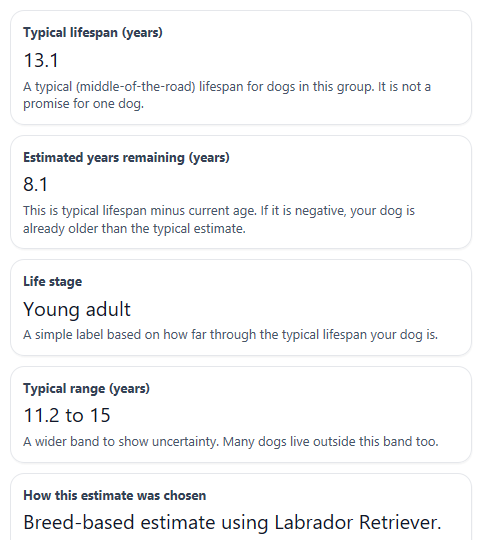
- Click Calculate, then read Typical lifespan first, followed by Estimated years remaining, Life stage, Typical range, and How this estimate was chosen.
- Sanity-check the result: if Estimated years remaining is negative, that means your dog is older than the central estimate, not that the calculator failed. Use Typical range and Important note to judge how cautious you should be.
Definitions
Typical lifespan: The central estimate for how long dogs in the same breed or size group often live, shown in years.
Estimated years remaining: Typical lifespan minus Current age (years). It can be negative if a dog is already older than the central estimate.
Typical range: A wider band around the central estimate that shows uncertainty, so one number is not treated like a promise.
Life stage: A simple age group based on what share of the expected lifespan has already passed, such as puppy, young adult, mature adult, or senior.
How this estimate was chosen: A plain-language note that says whether the calculator used breed data or the size fallback.
Adult size: The dog's expected full-grown size, not the dog's current puppy size.
Mixed breed: An extra context setting that warns you when a breed-specific estimate should be read more cautiously.
Common mistakes and quick fixes
Mistake: Leaving Use breed or size on Breed when you really need a mixed-breed estimate.
Fix: Switch Use breed or size to Size, then choose Adult size based on your dog's adult build.
Mistake: Picking a puppy's current size for Adult size .
Fix: Choose the size your dog will be when fully grown, because Typical lifespan is based on adult size groups.
Mistake: Typing months into Current age (years) , such as entering 6 for a 6-month-old puppy.
Fix: Enter age in years. For 6 months, use 0.5 in Current age (years) .
Mistake: Treating Typical lifespan like a promise for one dog.
Fix: Read Typical range and How this estimate was chosen together. The result is a population estimate, not a guaranteed age.
Mistake: Assuming a negative Estimated years remaining means the output is wrong.
Fix: Keep the signed value. A negative number means your dog is already older than the central estimate, which can happen.
Mistake: Using Breed for a mixed dog without checking Mixed breed in Advanced options.
Fix: If your dog is mixed, set Mixed breed to Yes and pay close attention to the Important note and How this estimate was chosen .
Limitations & Key Assumptions / Boundary Conditions
- This calculator gives a statistical estimate for groups of dogs, not a promise for one individual dog.
- If you choose Breed, the result depends on the built-in breed table for that breed. If breed data is missing or not a good fit, size-based estimating is safer.
- If you choose Size, the estimate is broader and less specific than a breed-based result.
- Mixed-breed dogs can vary a lot, so a breed result may be rough even when one breed seems dominant.
- Life stage is a practical interpretation based on share of expected lifespan, not a medical standard.
- Health history, body condition, genetics, daily care, and veterinary treatment can change real-world lifespan in ways this calculator does not model.
- Current age (years) must be entered in years, greater than 0, and not above 30 for the estimate to make sense.
- If Estimated years remaining is below 0, that does not mean something is wrong. It only means the dog's current age is above the central estimate.
Methodology
How the calculator works
The calculator first chooses a central lifespan estimate. In breed mode, it uses the selected breed's median lifespan from the built-in breed table. In size mode, it uses the selected adult size group's median lifespan from the built-in size table. This follows the page's two-path design so mixed-breed or unknown-breed dogs still get a usable estimate.
expected_lifespan = breed_table[breed_name].median_years
expected_lifespan = size_table[size_group].median_years
Next, it subtracts Current age (years) from the central estimate to find Estimated years remaining. The result stays signed. A negative number is allowed and means the dog is older than the central estimate.
years_remaining = expected_lifespan - current_age
The calculator also shows a Typical range around the central estimate. If breed-specific bounds are available, those can be used. Otherwise, the tool uses a documented fallback spread so users see uncertainty instead of one hard number.
range_low = expected_lifespan - spread
range_high = expected_lifespan + spread
For Life stage, the calculator compares the dog's age with its expected lifespan share. The stage labels are practical planning labels, not a diagnosis.
age_share = current_age / expected_lifespan
If age_share is under 0.15, the dog is labeled puppy. If it is 0.15 to under 0.5, the label is young adult. If it is 0.5 to under 0.75, the label is mature adult. If it is 0.75 or higher, the label is senior.
Worked mini-example
Suppose you choose Breed, select Labrador Retriever, and enter Current age (years) as 5. If the breed table value is 13.1 years, then the calculator reports a Typical lifespan of 13.1 years and calculates remaining years like this:
years_remaining = 13.1 - 5 = 8.1
The age share would be:
age_share = 5 / 13.1 = 0.3817
That falls in the young adult band, so Life stage would be young adult.
How the estimate basis note is chosen
If you use Breed and the breed is supported, the calculator says the estimate came from breed data. If you use Size, or if breed data is not available, it says the estimate came from size fallback data. If Mixed breed is Yes while Breed is used, the tool adds a caution note because mixed dogs may not match one breed table well.
Assumptions used here
This method assumes breed or size group gives a reasonable central estimate for a population of similar dogs. It does not adjust the main number for health status, spay or neuter status, body condition, or daily environment. The optional Sex field is for interpretation only and should not create a large numeric change by itself. Real dogs can live well below or well above these estimates.