
Compare a promotional APR deal with a cash rebate and regular auto loan to see which offer costs less.
Advanced options
Table of contents
How to use our 0% APR vs Cash Rebate Calculator
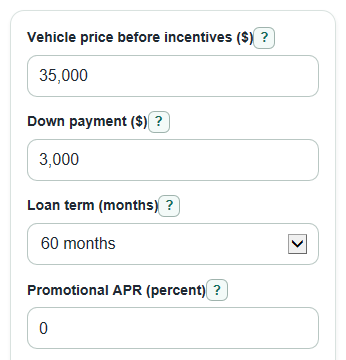
- Enter the Vehicle price before incentives ($), Down payment ($), Loan term (months), Promotional annual interest rate (percent), Cash rebate ($), and Regular loan annual interest rate (percent).
- Open Advanced options if you want to include Sales tax rate (percent), Other fees added to loan ($), or choose whether Does the rebate lower taxable price?
- Click Calculate and read Better offer first, then Estimated savings and Rebate needed to tie the promo APR.
- Compare Promo APR monthly payment with Rebate monthly payment to make sure the winning total cost also fits your monthly budget.
- Check that the contract interest rates, rebate, tax rate, fees, and loan term match the actual dealer or lender offer.
Definitions
APR describes borrowing cost and can include fees. This comparison uses each offer's contract annual interest rate for payment calculations, with entered fees handled separately. An advertised 0% APR offer can be entered as 0 when its contract interest rate is also 0.
Promotional APR: The special low-rate financing offer, often advertised as 0% APR, that you may have to choose instead of a rebate.
Cash rebate: A dollar discount or cash-back incentive that lowers the rebate offer price, but may be unavailable with the promotional APR.
Regular loan annual interest rate: The contract rate for the loan taken with the cash rebate. Do not use a fee-inclusive APR when it differs from the contract rate.
Amount financed: The part of the vehicle cost, tax, and financed fees that remains after the rebate, if used, and the down payment.
Total interest: The finance charge from scheduled loan payments, calculated as total loan payments minus the starting amount financed.
Break-even rebate: The rebate amount that would make the rebate option and the promotional APR option have about the same full-term total cost.
Common mistakes and quick fixes
Mistake: Entering the sale price after subtracting Cash rebate ($) in Vehicle price before incentives ($).
Fix: Put the negotiated price before incentives in Vehicle price before incentives ($), then enter the rebate only in Cash rebate ($).
Mistake: Using different cash down amounts for the two offers in Down payment ($).
Fix: Enter the same planned up-front cash in Down payment ($) so the comparison is fair.
Mistake: Entering a monthly rate or fee-inclusive APR in "Promotional annual interest rate (percent)" or "Regular loan annual interest rate (percent)". Fix: Enter each offer's contract annual interest rate as a percent; enter fees separately. Use 0 for a genuine zero-interest offer.
Mistake: Leaving Sales tax rate (percent) at 0 when you want an after-tax comparison.
Fix: Enter your local sales tax rate, or keep Sales tax rate (percent) at 0 only for a before-tax comparison.
Mistake: Guessing Yes for Does the rebate lower taxable price? without checking the deal or state rule.
Fix: Choose No unless the rebate actually reduces the taxable price used to calculate sales tax.
Mistake: Putting cash paid outside the loan into Other fees added to loan ($).
Fix: Use Other fees added to loan ($) only for fees you plan to finance with the vehicle.
Limitations & Key Assumptions / Boundary Conditions
- The calculator compares full-term scheduled costs. It does not include early payoff, refinancing, late fees, missed payments, or extra principal payments.
- Sales tax rules for rebates vary by state and deal. Use Does the rebate lower taxable price? only if you know how your taxable price is handled.
- Other fees added to loan ($) are treated as financed fees. Fees paid separately in cash are not modeled unless you include them in the down payment comparison yourself.
- The monthly payment formula assumes a fixed-rate, fully amortizing auto loan with equal monthly payments.
- Dealer quotes can include add-ons, lender fees, destination charges, trade-in value, negative equity, or incentive restrictions that are not entered here.
- The cheaper total cost is usually the better money choice, but monthly budget, cash needs, approval odds, and contract terms can still affect the final decision.
Methodology
How the calculator builds each offer
The promotional APR offer uses the Vehicle price before incentives ($), the promo tax, Other fees added to loan ($), Down payment ($), Loan term (months), and Promotional annual interest rate (percent). The rebate offer subtracts Cash rebate ($) and uses Regular loan annual interest rate (percent). Comparing total cost, not monthly payment alone, gives a fuller view of an auto loan offer [2].
promo_tax = max(0, vehicle_price) * sales_tax_percent / 100
taxable_rebate = cash_rebate if rebate_lowers_tax is yes, otherwise 0
rebate_tax = max(0, vehicle_price - taxable_rebate) * sales_tax_percent / 100
promo_amount_due = vehicle_price + promo_tax + other_fees
rebate_amount_due = vehicle_price + rebate_tax + other_fees - cash_rebate
amount_financed = max(0, amount_due - down_payment)
upfront_cash_used = min(down_payment, amount_due)
Monthly payment and total cost
The calculator converts each contract annual interest rate to a monthly rate by dividing its percentage by 100 and 12. The advertised APR and contract rate coincide only when their fee and rate assumptions match.
monthly_rate = annual_apr_percent / 100 / 12
if annual_apr_percent = 0, monthly_payment = amount_financed / loan_term_months
otherwise, monthly_payment = amount_financed * monthly_rate / (1 - (1 + monthly_rate)^(-loan_term_months))
total_cost = upfront_cash_used + monthly_payment * loan_term_months
total_interest = monthly_payment * loan_term_months - amount_financed
Total cost includes the down payment actually used plus all scheduled loan payments. This lines up with the auto loan ideas of monthly payment, finance charge, and total payments shown in lender disclosures [3].
Winner, savings, and break-even rebate
The signed cost gap is the rebate total cost minus the promo total cost. A positive gap means the rebate option costs more. A negative gap means the rebate option saves money.
cost_difference_rebate_minus_promo = rebate_total_cost - promo_total_cost
savings_amount = abs(cost_difference_rebate_minus_promo)
If the two total costs are within $0.01, the calculator shows a tie. For Rebate needed to tie the promo APR, it tests possible rebate amounts and uses a bisection search to find the rebate R where the rebate offer total cost equals the promo offer total cost.
find R where rebate_total_cost(R) - promo_total_cost = 0
Worked example
Suppose the vehicle price is $35,000, the down payment is $3,000, the term is 60 months, the promo APR is 0%, the cash rebate is $4,000, the regular APR is 6.5%, and tax and fees are $0. The promo offer finances $32,000, so the monthly payment is $533.33 and total cost is $35,000. The rebate offer finances $28,000, but the regular APR creates about $4,871.13 of interest, so the monthly payment is about $547.85 and total cost is about $35,871.13. The promotional APR offer saves about $871.13. Under those same inputs, the cash rebate would need to be about $4,742.04 to tie the promo APR.