
Use this work hours calculator to total a shift or full week, subtract unpaid breaks, and compare exact time with rounded paid hours.
Shift
Sunday
Monday
Tuesday
Wednesday
Thursday
Friday
Saturday
Advanced options
Payroll settings
Number display
Table of contents
How to use our Work Hours Calculator
- Choose "What do you want to calculate," pick your "Time format," and set "Workweek starts on" to match your employer's 7-day workweek.
- Enter your shift times: for one shift, fill in "Start time," "End time," and "Unpaid break (minutes)"; for a week, enter each day's start, end, and break.
- If you want pay and overtime details, enter "Hourly pay ($ per hour)." Open "Advanced options" if you also need "Time rounding," "Weekly overtime starts after (hours)," "Overtime pay rate multiplier," or a custom decimal display.
- Click "Calculate" to see total paid hours in HH:MM and decimal hours, plus regular hours, overtime hours, estimated gross pay, and any rounding difference.
- Sanity-check the result: make sure overnight shifts were intentional, confirm each unpaid break is shorter than that shift, and compare "Total paid hours" with "Rounding difference" so payroll rounding does not surprise you.
Definitions
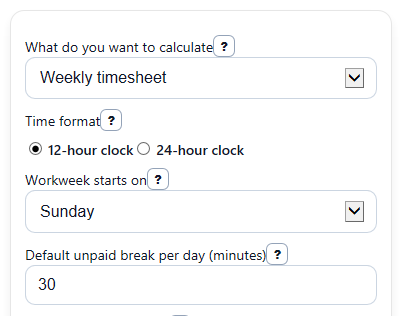
What do you want to calculate: Lets you choose one shift or a full 7-day weekly timesheet.
Time format: The clock style for your entries. Use 12-hour clock with AM or PM, or 24-hour clock like 22:00.
Workweek starts on: The first day of the fixed 7-day workweek used to group weekly hours and overtime.
Default unpaid break per day (minutes): The starting break value placed on each workday. Change a day's break if that day was different.
Time rounding: A payroll rule that rounds each day's paid minutes to a set step, such as 5, 6, or 15 minutes.
Total paid hours: Hours after subtracting unpaid breaks and applying any selected rounding rule.
Total paid hours (decimal): The same paid time shown as a decimal, such as 7.50 hours instead of 7:30.
Regular hours: Paid hours up to the weekly overtime threshold.
Overtime hours: Paid hours above the weekly overtime threshold, commonly over 40 in a workweek for covered nonexempt employees [2].
Rounding difference: The signed change between exact paid time and rounded paid time. Positive means rounding added time, and negative means it removed time.
Estimated gross pay: An estimate of pay before taxes and deductions based on regular and overtime hours.
Common mistakes and quick fixes
Mistake: Typing 12-hour times like 9:00 or 5:00 without AM or PM while "Time format" is set to 12-hour clock.
Fix: Add AM or PM to each "Start time" and "End time," or switch "Time format" to 24-hour clock.
Mistake: Entering an "Unpaid break (minutes)" that is equal to or longer than the shift.
Fix: Check What do you want to calculate and then recalculate. Reduce the break so it is shorter than that day's worked time, or correct the "Start time" and "End time."
Mistake: Forgetting that an end time earlier than the start time is treated as an overnight shift.
Fix: If the shift did not cross midnight, correct the "End time" so "Total paid hours" matches the same day you meant.
Mistake: Expecting "Estimated gross pay" to be exact when "Hourly pay ($ per hour)" is blank or when your job has extra premiums.
Fix: Enter a valid "Hourly pay ($ per hour)" for an estimate, and remember that "Estimated gross pay" does not include taxes, premiums, or special rules.
Mistake: Turning on "Time rounding" without checking how it changes paid time.
Fix: Review both "Total paid hours (decimal)" and "Rounding difference" to see whether rounding added or removed paid minutes.
Mistake: Using the wrong overtime setup, such as leaving "Weekly overtime starts after (hours)" or "Overtime pay rate multiplier" different from your payroll rule.
Fix: Match those fields to your employer's weekly policy before trusting "Regular hours," "Overtime hours," or "Estimated gross pay."
Limitations & Key Assumptions / Boundary Conditions
- This calculator uses wall-clock time only. It does not adjust for daylight saving time changes, so an overnight shift on a clock-change date may differ from real elapsed time.
- Breaks are treated as unpaid only when you enter them that way. Paid rest breaks, automatic meal deductions, and employer policies can change real payroll.
- Weekly overtime here is a simplified model based on one 7-day workweek and one threshold. It does not cover daily overtime, double time, exemptions, union rules, or state-specific laws.
- Rounding is applied to each included day before the weekly total, because that is the rule this calculator is built to compare. Your employer may use a different approved method.
- Estimated gross pay is only a gross estimate. It does not include taxes, tips, bonuses, shift differentials, commissions, benefits, or other additions and deductions.
- Blank days in weekly mode are skipped, but any day you do enter must have valid time values that match the selected time format.
- If your employer tracks actual clock punches to the minute or second, this calculator may not match payroll exactly when rounding or special policies are involved.
Methodology
How the calculator works
For each included day, the calculator finds the shift length from the start time and end time. If the end time is earlier than the start time, it treats the shift as crossing midnight into the next day.
shift_min = end_min - start_min; if shift_min < 0, shift_min = shift_min + 1440
It then subtracts the unpaid break for that day. If the break is equal to or longer than the shift, that day is invalid and the calculator shows an error instead of forcing a zero result.
paid_min_day = shift_min - unpaid_break_min
If you choose a rounding rule, rounding is applied to each day's paid minutes before the weekly sum.
rounded_paid_min_day = round(paid_min_day / increment_min) * increment_min
After that, the calculator adds all included days to get total paid minutes for the shift or week.
total_paid_min = sum(exact or rounded paid minutes across included days)
It converts minutes to decimal hours by dividing by 60.
decimal_hours = total_paid_min / 60
Weekly overtime is split from total decimal hours using the overtime threshold you entered. A common reference point is overtime pay for hours worked over 40 in a workweek [2].
regular_hours = min(decimal_hours, overtime_threshold)
overtime_hours = max(0, decimal_hours - overtime_threshold)
If you enter "Hourly pay ($ per hour)," estimated gross pay is based on regular hours plus overtime hours times the overtime multiplier.
gross_pay = (regular_hours * hourly_rate) + (overtime_hours * hourly_rate * overtime_multiplier)
Mini example
Suppose one shift starts at 8:00 AM, ends at 4:08 PM, and has a 0-minute unpaid break. The exact shift is 488 minutes, which is 8 hours 8 minutes. With "Time rounding" set to nearest 15 minutes, 488 minutes rounds to 495 minutes. That gives 8:15, or 8.25 hours. The rounding difference is +7 minutes.
Assumptions that affect results
This calculator assumes the break you enter is unpaid, uses one weekly overtime threshold for the whole 7-day workweek, and does not try to apply daily overtime, special state rules, or paid-break rules. Short breaks may count as compensable work time in some situations, so payroll records can differ from this simplified estimate [1].