
Estimate a used car loan payment, total cost, cash due, and extra-payment savings before you talk to a dealer or lender.
Table of contents
How to use our Used Car Loan Calculator
- Enter the Used car price ($), Down payment ($), Trade-in value ($), Interest rate (APR %), and Loan term (months).
- Open Advanced options if you need to add Amount still owed on trade-in ($), Sales tax rate (%), Tax calculation, Title, registration, and dealer fees ($), or Tax and fees payment.
- Use Extra paid each month ($) to test a faster payoff plan, then compare Payoff time with extra payment and Interest saved with extra payment.
- Check whether Amount borrowed compared with car price is over 100%; if it is, the loan starts higher than the car price because of negative equity or financed costs.
- Sanity-check the result by comparing Required monthly payment with your budget and Cash due at the start with the cash you actually plan to bring.
Definitions
Used car price ($): The negotiated price of the vehicle before sales tax, title, registration, dealer fees, insurance, and fuel.
Interest rate (APR %): APR means annual percentage rate. It is the yearly borrowing cost shown as a percent; lenders use APR in consumer loan disclosures [1].
Loan term (months): The number of monthly payments in the loan. A longer term usually lowers the required payment but can increase total interest.
Trade-in value ($): The credit the dealer gives for your current vehicle.
Amount still owed on trade-in ($): The payoff balance on your current vehicle loan. If this is larger than Trade-in value ($), the difference is negative equity.
Negative equity: The amount you still owe after the trade-in credit is applied. It can raise Amount borrowed above the car price [3].
Tax and fees payment: Your choice to add sales tax and fees to the loan or pay them at the start.
Amount borrowed: The starting loan balance after the down payment, trade-in credit, trade-in payoff, and any financed tax and fees.
Common mistakes and quick fixes
Mistake: Using the sticker price instead of the negotiated Used car price ($).
Fix: Enter the agreed car price before Sales tax rate (%) and Title, registration, and dealer fees ($).
Mistake: Leaving Amount still owed on trade-in ($) at 0 when your current car loan is not paid off.
Fix: Enter the trade-in payoff amount so Amount borrowed includes any negative equity.
Mistake: Picking the wrong Tax calculation for your quote or state rule.
Fix: Use Tax car price after trade-in credit only if the trade-in lowers the taxable price; otherwise use Tax full car price.
Mistake: Counting tax and fees twice by adding them into Used car price ($) and also using Sales tax rate (%) or Title, registration, and dealer fees ($).
Fix: If the car price already includes tax or fees, set the matching advanced field to 0.
Mistake: Treating Required monthly payment as the total monthly cost of owning the car.
Fix: Remember that insurance, gas, repairs, parking, and maintenance are not included in Required monthly payment.
Mistake: Entering a desired payment in Extra paid each month ($) instead of the extra amount above the required payment.
Fix: Enter only the added amount you plan to pay each month, such as 50 or 100.
Limitations & Key Assumptions / Boundary Conditions
- The estimate assumes a fixed-rate loan with equal monthly payments.
- State and local sales tax rules can differ, especially for trade-in credits, rebates, and dealer add-ons.
- The calculator does not include insurance, fuel, repairs, maintenance, parking, late fees, or prepayment penalties.
- Extra paid each month ($) assumes the lender applies the extra amount to principal and allows early payoff without a penalty.
- Displayed money is rounded to cents, so totals can differ by a few cents from a lender schedule.
- If Amount borrowed is 0, the calculator shows a $0 loan payment because no loan is needed in this simplified model.
- A real lender may include other fees, different first-payment timing, daily interest, credit insurance, or dealer products not entered here.
Methodology
How the calculator builds the loan
The calculator starts with the car price, subtracts cash and trade-in credit, adds any payoff still owed on the trade-in, then adds tax and fees only when you choose to finance them.
taxable_amount = max(vehicle_price - trade_in_value, 0) when Tax calculation is after trade-in credit
taxable_amount = vehicle_price when Tax calculation is full car price
sales_tax = taxable_amount * sales_tax_rate / 100
rolled_costs = sales_tax + title_fees when Tax and fees payment is Add tax and fees to the loan
amount_borrowed = max(vehicle_price - down_payment - trade_in_value + trade_in_owed + rolled_costs, 0)
Cash due at the start is the down payment plus tax and fees only when you choose to pay tax and fees at the start.
out_of_pocket_at_purchase = down_payment + upfront_costs
How the monthly payment is found
The calculator converts APR to a monthly rate, then uses the standard fixed-payment loan formula.
monthly_rate = apr_percent / 100 / 12
monthly_payment = amount_borrowed / loan_term_months when monthly_rate is 0
monthly_payment = amount_borrowed * monthly_rate / (1 - (1 + monthly_rate)^(-loan_term_months))
total_loan_payments = monthly_payment * loan_term_months
total_interest = total_loan_payments - amount_borrowed
Extra payment check
For Extra paid each month ($), the calculator loops month by month. It adds that month's interest, makes the required payment plus the extra payment, and uses a smaller final payment if the remaining balance is less than the planned payment.
interest = balance * monthly_rate
payment_this_month = min(monthly_payment + extra_monthly_payment, balance + interest)
new_balance = balance + interest - payment_this_month
interest_saved_with_extra = total_interest - interest_paid_with_extra
Mini-example
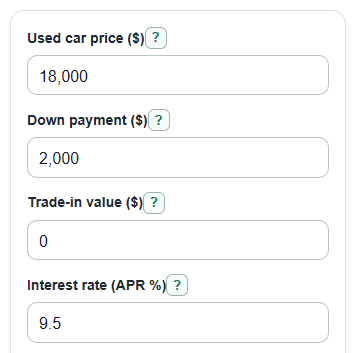
Suppose the Used car price ($) is $18,000, Down payment ($) is $2,000, Trade-in value ($) is $0, Sales tax rate (%) is 6.5%, Title, registration, and dealer fees ($) are $500, tax and fees are added to the loan, APR is 9.5%, and Loan term (months) is 60. Sales tax is $1,170, Amount borrowed is $17,670, Required monthly payment is about $371.10, Total interest with required payments is about $4,596.17, and Total of loan payments is about $22,266.17.
Calculation choices
Internal math keeps more precision than the displayed dollars. Money outputs are shown to the nearest cent, percentages are rounded for readability, and the payoff loop stops at the first month when the loan balance reaches zero.