
Check if your tires are due for rotation by miles or time, and get a simple tire move pattern.
Table of contents
How to use our Tire Rotation Calculator
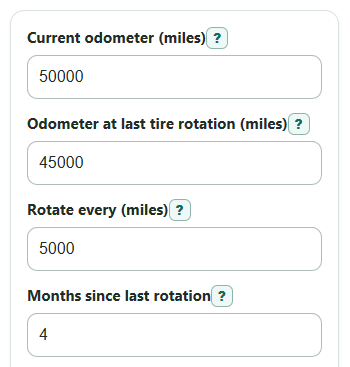
- Enter the Current odometer (miles) from your dashboard and the Odometer at last tire rotation (miles) from your receipt or record.
- Enter Rotate every (miles) and Months since last rotation; use your owner's manual first if it gives a tire rotation schedule.
- Open Advanced options if you want to change Rotate by time too (months), estimate timing with Average driving (miles per month), or get a pattern using Drive wheels and Tire setup.
- Click Calculate and read Rotation status first, then check Miles until rotation and Months until time limit; negative numbers mean you are overdue.
- Sanity-check the result: Next rotation mileage should equal the last rotation odometer plus the mileage interval, and it can be lower than today's odometer if you are overdue.
Definitions
Current odometer (miles): The total miles your vehicle shows today.
Odometer at last tire rotation (miles): The vehicle mileage when the tires were last moved to new positions.
Rotate every (miles): The mileage gap you want between tire rotations.
Months since last rotation: The time since the last tire rotation, written in months. A value like 4.5 means about 4 and a half months.
Drive wheels: The wheels that get power from the engine or motor. Front-wheel drive powers the front wheels, rear-wheel drive powers the rear wheels, and all-wheel or four-wheel drive can power more than one axle.
Tire setup: The tire type arrangement that affects the safe move pattern, such as directional tires, different front and rear sizes, or a full-size matching spare.
Directional tires: Tires made to roll in one direction. They usually move front to back on the same side unless a professional remounts them.
Miles until rotation: A signed result. Positive means miles left, 0 means due now, and negative means miles overdue.
Common mistakes and quick fixes
Mistake: Typing a Current odometer (miles) that is lower than Odometer at last tire rotation (miles) .
Fix: Recheck the dashboard and service record; the current reading must be the same or higher.
Mistake: Leaving Rotate every (miles) blank or entering 0.
Fix: Enter a positive mileage interval, such as the number in your owner's manual or tire warranty.
Mistake: Using years in Months since last rotation instead of months.
Fix: Convert years to months first; 1 year is 12 months.
Mistake: Treating Average driving (miles per month) as required.
Fix: Leave it blank if you do not know it; the calculator still gives Rotation status , but Estimated months until mileage limit may show N/A.
Mistake: Choosing the wrong Tire setup , especially for directional or different-size tires.
Fix: Check the tire sidewall, owner's manual, or tire shop note before using Suggested tire move pattern .
Mistake: Ignoring Check before rotating when it mentions staggered tires, directional tires, or a manual check.
Fix: Follow that caution before moving tires, because some setups should not use a normal pattern.
Limitations & Key Assumptions / Boundary Conditions
- Use your owner's manual, tire placard, or tire warranty before a general interval. Some vehicles have special tire rotation rules.
- The default 5,000-mile interval and 6-month time check are general planning values, not a vehicle-specific service schedule.
- The calculator assumes the odometer readings are correct and both readings use miles.
- Estimated months until mileage limit assumes your Average driving (miles per month) stays about the same.
- Suggested tire move pattern is general guidance. Directional tires, staggered tires, temporary spares, performance tires, and some all-wheel-drive systems may need vehicle-specific instructions.
- If you see uneven wear, vibration, a tire pressure warning, a bulge, cord showing, or a puncture, get the tires inspected instead of waiting for the calculated date or mileage.
Methodology
How the due check works
The calculator checks tire rotation two ways: miles driven since the last rotation and months since the last rotation. If either trigger is due, Rotation status says to rotate now.
miles_since = current_odometer - last_rotation_odometer
miles_to_rotation = rotation_interval_miles - miles_since
months_to_time_limit = time_limit_months - months_since_rotation
due_flag = 1 if miles_to_rotation <= 0 or months_to_time_limit <= 0 else 0
A positive Miles until rotation means miles remain before the mileage trigger. A negative value means the tire rotation is overdue by that many miles. The same signed idea is used for Months until time limit.
Next mileage and time estimate
Next rotation mileage is the last rotation odometer plus the chosen mileage interval.
next_rotation_odometer = last_rotation_odometer + rotation_interval_miles
If Average driving (miles per month) is positive, the calculator estimates how many months until the mileage trigger is reached.
projected_months_to_mileage_due = miles_to_rotation / avg_miles_per_month
If average driving is blank or 0, the estimate is shown as N/A instead of dividing by zero.
Pattern message
The pattern message uses Tire setup first, then Drive wheels. Tire rotation patterns depend on tire type, drive wheels, directional design, front and rear tire sizes, and spare-tire use [1].
if tire_setup == directional: use front to back on the same side
else if tire_setup == staggered: no normal front-to-rear pattern
else if tire_setup == spare: use a five-tire pattern only if the spare is full-size and matching
else if drive_wheels == fwd: front tires straight back, rear tires cross to the front
else: rear tires straight forward, front tires cross to the rear
Mini-example
If the current odometer is 61,250 miles, the last rotation was at 54,000 miles, and the interval is 5,000 miles, then miles since last rotation is 7,250. The miles until rotation is 5,000 - 7,250 = -2,250 miles, so the mileage trigger is overdue. If it has also been 8 months and the time limit is 6 months, months until time limit is -2, so the status is rotate now by both miles and time.