
Estimate how much a thermostat setting change or smart thermostat could save on heating and cooling bills.
Supply a measured, modeled, or explicitly assumed percentage. The heating setback rule is not used to predict cooling savings.
Advanced options
Table of contents
How to use our Thermostat Savings Calculator
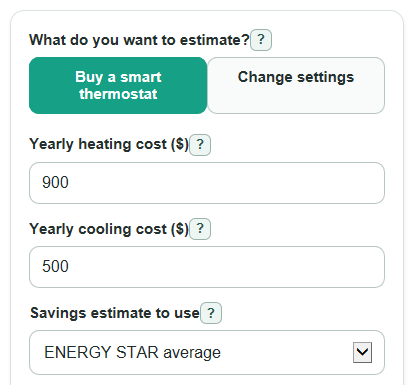
- Choose What do you want to estimate? to compare either buying a smart thermostat or changing your thermostat settings.
- Enter the heating, cooling, or selected seasonal bill cost that matches the inputs shown. Use yearly dollars, not monthly bills.
- If you are buying a smart thermostat, choose Savings estimate to use and enter Thermostat cost after tax and install ($). Add a rebate in Advanced options if you have one.
- If you are changing settings, enter Temperature change (degrees F) and Hours each day at the changed setting for the time the new setting is active.
- Check whether Estimated bill savings looks reasonable. For example, a small bill should not produce huge dollar savings unless you entered a large temperature change, many hours, or a high savings percent.
Definitions
Yearly heating cost ($): The estimated dollars you spend in one year to heat your home.
Yearly cooling cost ($): The estimated dollars you spend in one year to run air conditioning.
Savings estimate to use: The savings rate used for a smart thermostat. Presets use fixed heating and cooling percentages, while My own percent uses your entries.
Temperature change (degrees F): How many Fahrenheit degrees you lower heat or raise cooling during the changed period. Fahrenheit is the temperature scale commonly used in US home thermostats [4].
Hours each day at the changed setting: The daily time when the new lower heating setting or higher cooling setting is active.
Rebate or instant discount ($): Money taken off the thermostat cost before payback is calculated.
Payback: The time it takes estimated bill savings to equal the thermostat cost after rebate.
Yearly bill change (percent): The expected yearly rise or fall in heating and cooling costs used for the multi-year total.
Common mistakes and quick fixes
Mistake: Entering a total utility bill in Yearly heating cost ($) or Yearly cooling cost ($).
Fix: Use only the part of the bill caused by heating or cooling, or use your best yearly estimate for that part.
Mistake: Using a monthly cost in Yearly cost for that bill ($).
Fix: Multiply the monthly heating or cooling cost by the number of months it runs, then enter the yearly total.
Mistake: Putting a negative number in Temperature change (degrees F).
Fix: Enter the size of the change as a positive number, such as 8, whether you are setting heat lower or cooling higher.
Mistake: Counting the whole day in Hours each day at the changed setting when the change only happens overnight.
Fix: Enter the actual hours per day, such as 8 for sleep time or 10 if you also include away time.
Mistake: Forgetting to subtract a utility rebate from the purchase decision.
Fix: Enter the full price in Thermostat cost after tax and install ($), then enter the discount in Rebate or instant discount ($).
Mistake: Choosing My own percent under Savings estimate to use but leaving My heating savings (percent) or My cooling savings (percent) blank.
Fix: Enter a percent from 0 to 100 for each custom savings field.
Limitations & Key Assumptions / Boundary Conditions
- Thermostat savings are estimates. Real savings can change with weather, insulation, house size, equipment condition, energy prices, and how often people are home.
- The heating settings-change calculation is an approximate rule of thumb, with a maximum 15°F change. Longer setbacks and unusual systems still need a site-specific assessment. Cooling savings require a separate entered percentage; changing the season does not transfer the heating rule to cooling.
- Some heat pump systems, radiant floors, steam heat, and slow-response systems may not save as much from large setbacks, and recovery can take longer.
- Smart thermostat mode applies a preset or custom percent to the heating and cooling costs you enter. It does not model room-by-room comfort, utility rate plans, or demand charges.
- Payback is shown only for Buy a smart thermostat because Change settings has no thermostat purchase cost in this calculator.
- Net savings over time uses the same first-year savings pattern, adjusted only by Yearly bill change (percent). It does not include repairs, batteries, subscription fees, or thermostat replacement.
- If the rebate is larger than the thermostat cost, Thermostat cost after rebate can be negative, meaning the entered rebate is bigger than the entered upfront cost.
Methodology
Smart thermostat mode
The calculator first chooses heating and cooling savings rates from Savings estimate to use. ENERGY STAR average uses 8% for heating and 8% for cooling. Nest reported average uses 11% for heating and 15% for cooling. My own percent uses your custom percent entries divided by 100.
annual_savings = annual_heating_cost * heating_rate + annual_cooling_cost * cooling_rate
savings_percent = annual_savings / (annual_heating_cost + annual_cooling_cost) * 100
net_upfront_cost = thermostat_cost - rebate_amount
payback_years = net_upfront_cost / annual_savings
If net_upfront_cost is 0 or less, payback is 0 years. If annual_savings is 0 and the cost is positive, payback is not available because bill savings do not recover the cost.
Settings-change mode
For "Heating", this uses NYSERDA’s approximate 1% heating-bill saving per degree Fahrenheit per 8-hour setback [2], limited here to changes up to 15°F. It is a rough heating scenario, not a guarantee for every system. "Cooling" uses the separate expected cooling-bill percentage you enter.
heating_savings_rate = degrees_changed * hours_per_day / 800; cooling_savings_rate = entered_cooling_percent / 100
annual_savings = annual_season_cost * savings_rate
savings_percent = savings_rate * 100
Monthly and multi-year results
Average monthly savings divides the first-year estimate by 12.
monthly_average_savings = annual_savings / 12
For multi-year savings, the calculator either multiplies first-year savings by the selected years or applies the Yearly bill change (percent) as a growth rate.
if g = 0: total_savings = annual_savings * analysis_years
if g is not 0: total_savings = annual_savings * ((1 + g) ^ analysis_years - 1) / g
smart mode: net_savings_over_years = total_savings - net_upfront_cost
settings mode: net_savings_over_years = total_savings
Example
If Yearly heating cost ($) is 900, Yearly cooling cost ($) is 500, Savings estimate to use is ENERGY STAR average, Thermostat cost after tax and install ($) is 180, Rebate or instant discount ($) is 0, and Years to include is 5, first-year savings are 900 * 0.08 + 500 * 0.08 = 112 dollars. Payback is 180 / 112 = 1.61 years. Five-year savings after cost are 112 * 5 - 180 = 380 dollars.