
Estimate a nominal HVAC filter size from your filter or slot measurements. Confirm the manufacturer’s actual dimensions and equipment requirements before buying.
Table of contents
How to use our HVAC Filter Size Calculator
- Choose What did you measure? based on whether you measured the old filter itself or the empty filter slot.
- Enter Short side (inches), Long side (inches), and Depth (inches). Decimals and simple fractions are fine if the calculator accepts them.
- If you already have a package size, type it in Printed size to check (inches, optional) so the calculator can compare it with the suggested size.
- Open Advanced options only if you want to change tape-measure rounding, the custom-size warning point, or the loose-fit warning point.
- After you calculate, sanity-check the Suggested printed filter size against the Fit check. If the check warns about a tight, loose, odd, or depth mismatch, remeasure before buying.
Definitions
Printed filter size: The rounded size name printed on a filter package, such as 20x25x1. This is also called the nominal size. Nominal size is the printed, labeled, or rounded filter size [3].
Measured size: The size you read from a tape measure on the old filter or the empty slot. It can be smaller than the printed size.
Short side (inches): The smaller of the two flat front-face measurements.
Long side (inches): The larger of the two flat front-face measurements.
Depth (inches): The filter thickness, measured from the front face to the back face.
Rounded measured value: The measurement after the calculator rounds it to the selected tape-measure step, such as 1/8 inch.
Rounding amount: The printed size number minus the rounded measured number. A positive value means the printed size is larger. A negative value means it is smaller.
Printed size check: A code for the optional typed size: 1 means it matches, 0 means it does not match, and -1 means no printed size was entered.
Common mistakes and quick fixes
Mistake: Measuring the cardboard frame at an angle for Short side (inches) or Long side (inches).
Fix: Measure straight across the flat edge, then use the smaller flat side for Short side (inches) and the larger flat side for Long side (inches).
Mistake: Choosing Existing filter in What did you measure? when the old filter is missing and you measured the empty opening.
Fix: Change What did you measure? to Empty filter slot so the side sizes round the right way.
Mistake: Ignoring Depth (inches) because the length and width look right.
Fix: Measure the filter thickness and check Printed depth; a 1-inch filter is not the same as a 4-inch or 5-inch filter.
Mistake: Typing only two numbers in Printed size to check (inches, optional), such as 20x25.
Fix: Enter three numbers, such as 20x25x1, or leave Printed size to check (inches, optional) blank.
Mistake: Treating a warning in Fit check as a shopping recommendation.
Fix: Use Fit check as a remeasure prompt, then confirm the size on the HVAC cabinet label, old filter frame, or equipment manual.
Limitations & Key Assumptions / Boundary Conditions
- This tool is for home HVAC air filters, not photo filters, water filters, pool filters, engine filters, or specialty industrial filter sizing.
- The suggested size is a buying starting point. Always check the old filter frame, HVAC cabinet label, or equipment manual when available.
- For an Existing filter, the calculator assumes fractional measured sides usually round up to the printed whole-inch side.
- For an Empty filter slot, the calculator assumes the opening is normally named by a nearby whole-inch printed size, but odd openings may need a custom or less common size.
- Depth matching is simplified to the loaded depth choices of 1, 2, 3, 4, 4.5, 5, and 6 inches. Other depths may exist.
- A loose-fit or custom-size warning is not a failed calculation. It means the measurement is far enough from the suggested size that you should remeasure before buying.
- Filter efficiency ratings, including MERV, are not part of this size calculation. Higher-efficiency filters can affect airflow, so use a rating your HVAC system allows.
- Air filters can help reduce indoor particles in an HVAC system, but they do not remove every indoor air pollutant [1].
Methodology
How the calculator cleans the measurements
The calculator first parses the two flat-side measurements in inches. It strips extra spaces and can treat simple fraction-style entries as inch values when supported by the page UI. Then it sorts the two flat sides so an accidental swap does not change the suggested size.
short_side = min(parse(short_side_in), parse(long_side_in))
long_side = max(parse(short_side_in), parse(long_side_in))
Each required measurement is rounded to the selected tape-measure step before the printed size is chosen.
rounded_value = round(raw_value / rounding_step_in) * rounding_step_in
How the printed size is chosen
If you measured an existing filter, the calculator uses the next whole inch for each flat side. This follows the common idea that a printed, nominal size is a rounded size name, not always the exact measured size [3].
nominal_side = ceil(rounded_side)
If you measured an empty filter slot, the calculator rounds each flat side to the nearest whole inch.
nominal_side = round(rounded_side)
For depth, the calculator chooses the closest value from its loaded depth list.
common_depths = [1, 2, 3, 4, 4.5, 5, 6]
nominal_depth = common_depths[index_of_min(abs(common_depths[i] - rounded_depth))]
How warnings and checks are made
The signed rounding amounts show how far the suggested printed number is from the rounded measurement. The sign is kept because a negative number can matter, especially when an empty slot rounds down.
signed_rounding = nominal_value - rounded_measured_value
For an empty slot, a custom-size warning appears when a flat side is farther from a whole inch than Custom-size warning after (inches). A depth warning appears when the closest loaded depth is farther away than the same cutoff. Non-standard dimensions can happen in some homes and HVAC setups [2].
custom_warning = odd_slot_side_check OR depth_check
For an existing filter, a loose-fit warning appears when any positive rounding amount is greater than Loose-fit warning after (inches).
loose_warning = existing_filter AND any signed rounding amount is greater than max_loose_gap_in
If you enter Printed size to check (inches, optional), the calculator parses three positive numbers, sorts the two flat sides, and compares them with the suggested printed short side, long side, and depth within 0.01 inch.
printed_size_match_code = -1 if blank; else 1 if parsed printed size matches nominal values within 0.01 inch; else 0
Mini-example
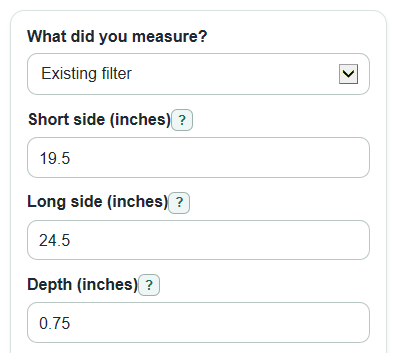
If you choose Existing filter and enter Short side (inches) = 19.5, Long side (inches) = 24.5, Depth (inches) = 0.75, and Round measurements to nearest (inch) = 1/8 inch, the rounded measurements stay 19.5, 24.5, and 0.75. The flat sides round up to 20 and 25, and the closest loaded depth is 1. The Suggested printed filter size is 20x25x1. The rounding amounts are 0.5 inch, 0.5 inch, and 0.25 inch.