
Use this mole fraction calculator to find a component's share of a mixture or solve for the moles needed to hit a target fraction.
How to use our Mole Fraction Calculator
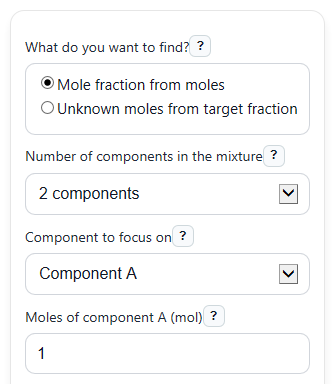
- Choose "What do you want to find?" and pick either "Mole fraction from moles" or "Unknown moles from target fraction."
- Select "Number of components in the mixture" and "Component to focus on," then enter the visible "Moles of component A (mol)," "Moles of component B (mol)," and any other visible component moles.
- If you are using target mode, enter "Target mole fraction of chosen component" as a decimal from 0 to 1, such as 0.25 for 25%.
- Click "Calculate" to see the chosen component result, "Total moles in the mixture," "All component mole fractions," and the "Fraction total check."
- Sanity-check the answer: the "Fraction total check" should be very close to 1, and the chosen fraction should make sense compared with the component's share of the total moles.
Definitions
Mole fraction: The part of the total moles that comes from one component. It is written as a decimal from 0 to 1.
Moles (mol): A unit for amount of substance used in chemistry [2].
Chosen component: The component you selected in "Component to focus on." Its fraction is the main value the calculator highlights.
Total moles in the mixture: The sum of the moles for all visible components.
All component mole fractions: The fraction for each visible component, found by dividing each component's moles by the total moles.
Fraction total check: The sum of all visible component fractions. It should be very close to 1.
Chosen component as percent: The mole fraction multiplied by 100, shown only as another way to read the same result.
Common mistakes and quick fixes
Mistake: Typing grams or liters into "Moles of component A (mol)" or another moles field.
Fix: Convert each amount to moles first, then enter only mol values in the visible moles inputs.
Mistake: Entering 25 instead of 0.25 in "Target mole fraction of chosen component."
Fix: Use a decimal from 0 to 1. For 25%, enter 0.25.
Mistake: Forgetting to change "Number of components in the mixture" before using component C or D.
Fix: Set the correct component count first so only the components in your mixture are included in "Total moles in the mixture" and "All component mole fractions."
Mistake: Thinking "Mole fraction of chosen component" should be a percent automatically.
Fix: Read it as a decimal unless you also checked "Also show mole fraction as percent," which displays the same value in % form.
Mistake: Being surprised by a negative "Unknown moles needed."
Fix: A negative value means the chosen component already makes up more than the target share, so the target cannot be reached by adding more of that same component.
Mistake: Assuming rounded values are wrong because "Fraction total check" is 0.9999 or 1.0001 instead of exactly 1.
Fix: Small differences usually come from rounding. Use more digits from "All component mole fractions" if you need a closer check.
Limitations & Key Assumptions / Boundary Conditions
- This calculator uses only the visible components in the total. Hidden component inputs are ignored completely.
- All entered moles must be 0 or greater. Negative moles are not physically meaningful here and are treated as an error.
- In "Mole fraction from moles" mode, "Total moles in the mixture" must be greater than 0 or the fraction does not exist.
- In "Unknown moles from target fraction" mode, "Target mole fraction of chosen component" must be between 0 and 1, inclusive.
- If the target fraction is 1 while other visible components have moles greater than 0, the target is impossible because a pure component mixture cannot also contain other components.
- If the target fraction is 1 and all other visible components are 0, there is no single answer for "Unknown moles needed" because any positive amount of the chosen pure component gives a mole fraction of 1.
- Displayed fractions may not add to exactly 1 after rounding, even when the unrounded values do.
Methodology
Core idea
Mole fraction tells you how much of the mixture comes from one component. It is the moles of that component divided by the total moles of all visible components [1].
x_i = n_i / n_total
n_total = n_a + n_b + n_c + n_d
Here, x_i is the mole fraction of the chosen component, n_i is that component's moles, and n_total is the sum of the visible component moles.
How each mode works
In "Mole fraction from moles" mode, the calculator adds the visible moles to get total moles, then divides the chosen component's moles by that total.
In "Unknown moles from target fraction" mode, the calculator solves for how many moles of the chosen component are needed when the other visible components are already known.
n_unknown = (x_target * n_other_total) / (1 - x_target)
If percent display is turned on, the calculator converts the decimal fraction to percent by multiplying by 100.
percent = mole fraction x 100
To help catch mistakes, it also adds all visible component fractions together.
x_sum = sum(x_i)
Worked mini-example
Suppose a 2-component mixture has 1.0 mol of component A and 3.0 mol of component B, and you focus on component A.
n_total = 1.0 + 3.0 = 4.0 mol
x_A = 1.0 / 4.0 = 0.25
percent = 0.25 x 100 = 25%
x_sum = 0.25 + 0.75 = 1.00
In target mode, if component B is 3.0 mol and you want component A to have a mole fraction of 0.25, then:
n_unknown = (0.25 x 3.0) / (1 - 0.25) = 0.75 / 0.75 = 1.0 mol
Assumptions used in the math
The calculator assumes your inputs are already in moles, uses only visible components in the mixture total, and reports small sum-to-1 differences when rounding changes the displayed decimals. For a target fraction of 1, the normal unknown-moles formula does not apply because dividing by 1 - x_target would divide by 0, so that case is handled separately.