
Convert milliseconds to hours fast and see the same time as a simple hours, minutes, seconds, and milliseconds breakdown.
Table of contents
How to use our Milliseconds to Hours Converter
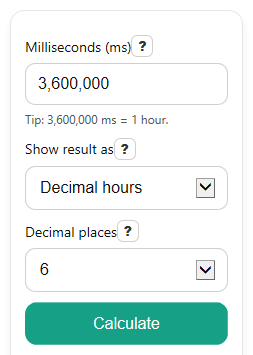
- Enter your value in Milliseconds (ms).
- Choose Show result as: use Decimal hours for a normal decimal or Scientific notation for very small hour values.
- Pick Decimal places to control how many digits appear in Hours.
- Click Calculate, then check Hours and Same time in hours, minutes, seconds, and milliseconds to make sure both views describe the same amount of time.
Definitions
Milliseconds (ms): A time unit equal to one-thousandth of a second.
Hours (h): Time measured in hours. One hour is 3,600 seconds [1].
Decimal hours: The hour result shown as a regular decimal number, such as 0.5 h.
Scientific notation: A compact way to show very small numbers, such as 7.222222e-6 h.
Decimal places: How many digits appear to the right of the decimal point in Hours.
Readable breakdown: The same entered time split into whole hours, leftover minutes, leftover seconds, and remaining milliseconds.
Conversion used: The fixed rule for this page: divide milliseconds by 3,600,000 to get hours.
Common mistakes and quick fixes
Mistake: Leaving Milliseconds (ms) blank.
Fix: Enter a number in Milliseconds (ms) before you click Calculate .
Mistake: Typing seconds or minutes into Milliseconds (ms) .
Fix: Convert your value to milliseconds first, then enter it in Milliseconds (ms) .
Mistake: Thinking a tiny Hours result means the calculator is wrong.
Fix: Switch Show result as to Scientific notation or raise Decimal places so the small value is easier to read.
Mistake: Expecting Same time in hours, minutes, seconds, and milliseconds to match a rounded Hours value digit for digit.
Fix: Treat Hours as the formatted answer and the breakdown as a friendlier view of the same time.
Mistake: Being surprised by a negative Hours result.
Fix: Check whether Milliseconds (ms) was entered with a minus sign; a negative value means a signed time offset below zero.
Limitations & Key Assumptions / Boundary Conditions
- The calculator converts by a fixed unit rule only: 1 hour = 3,600,000 milliseconds. It does not account for calendars, time zones, or daylight saving time.
- Hours can look like 0 at low precision when the true value is very small. If that happens, use more Decimal places or switch Show result as to scientific notation.
- Same time in hours, minutes, seconds, and milliseconds is a display breakdown of the same input. It does not change the underlying conversion.
- Negative inputs are allowed and are treated as signed time offsets, so the result may be negative.
- Very large or non-finite entries that overflow normal number handling should be treated as invalid input and recalculated with a smaller valid number.
- Fractional milliseconds are allowed, so the remaining milliseconds part of the breakdown can include decimals.
Methodology
Core conversion
The main result changes milliseconds into hours using one fixed factor.
hours = milliseconds / 3600000
This works because 1 second = 1,000 milliseconds and 1 hour = 3,600 seconds, so 1 hour = 3,600,000 milliseconds [1].
Readable breakdown
The breakdown shows the same time in easier pieces.
whole_hours = floor(milliseconds / 3600000)
rem1 = milliseconds - whole_hours x 3600000
whole_minutes = floor(rem1 / 60000)
rem2 = rem1 - whole_minutes x 60000
whole_seconds = floor(rem2 / 1000)
remaining_ms = rem2 - whole_seconds x 1000
This breakdown is only for display. The main Hours result still comes from dividing by 3,600,000.
Mini-example
If Milliseconds (ms) = 1,000, then:
hours = 1000 / 3600000 = 0.0002777778
The readable breakdown is 0 h, 0 min, 1 s, 0 ms.
Display choices
In decimal mode, the calculator shows a regular decimal and rounds it to your chosen Decimal places. In scientific mode, it shows the same value in scientific notation, which is often easier to read for tiny hour values.
Assumptions and limits
The page assumes standard time-unit definitions and does not use any date-based rules. Rounded display can hide tiny nonzero values, but the conversion math itself does not change.