
Convert miles to inches or inches to miles using the exact 63,360-inch-per-mile factor.
Table of contents
How to use our Miles to Inches Converter
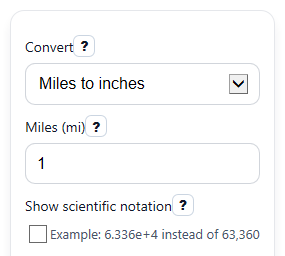
- Choose a direction in Convert: either Miles to inches or Inches to miles.
- Enter a number in the active field: Miles (mi) for miles to inches, or Inches (in) for inches to miles.
- Turn on Show scientific notation if you want a shorter way to read very large or very small results.
- Click Calculate to see Converted value, Formula used, Exact conversion factor, and Unit breakdown.
- Sanity-check the result: 1 mile should equal 63,360 inches, and 63,360 inches should equal 1 mile.
Definitions
Convert: The direction of the conversion, either miles to inches or inches to miles.
Miles (mi): A distance in miles. One mile equals 5,280 feet [1].
Inches (in): A distance in inches. There are 12 inches in 1 foot.
Converted value: The distance after changing it into the target unit.
Exact conversion factor: The fixed number used to convert between the units. For miles to inches, it is 63,360 inches per mile.
Formula used: The math rule applied to your input, either multiply by 63,360 or divide by 63,360.
Unit breakdown: A step-by-step explanation showing why 1 mile equals 63,360 inches.
Scientific notation: A compact way to write very large or very small numbers, such as 1.584 x 10^5.
Common mistakes and quick fixes
Mistake: Typing a value into Inches (in) while Convert is set to Miles to inches .
Fix: Enter your number in Miles (mi) for that direction, or switch Convert to Inches to miles .
Mistake: Leaving the active field blank and expecting Converted value to appear.
Fix: Fill in Miles (mi) or Inches (in) , depending on the direction you picked in Convert .
Mistake: Reading Converted value in the wrong unit.
Fix: Check the direction first: the result is in inches for Miles to inches and in miles for Inches to miles .
Mistake: Thinking the factor in Exact conversion factor changes with the number you entered.
Fix: The factor is fixed: 63,360 inches per mile, or 1 divided by 63,360 miles per inch.
Mistake: Seeing a long decimal in Converted value and assuming it is wrong.
Fix: Small mile values from Inches (in) often need many decimals. Turn on Show scientific notation if you want a shorter display.
Mistake: Entering a negative number and thinking the tool broke.
Fix: Negative values are allowed mathematically. Read Converted value as a signed change or direction, not a physical length.
Limitations & Key Assumptions / Boundary Conditions
- This converter uses the fixed statute-mile relationship of 1 mile = 5,280 feet and 1 foot = 12 inches, so 1 mile = 63,360 inches.
- It converts only between miles and inches. It does not switch to feet, yards, meters, or other units.
- Only the active field is used: Miles (mi) in miles-to-inches mode or Inches (in) in inches-to-miles mode.
- Negative values are allowed as signed math, but a negative physical length usually does not make sense unless you mean direction or change.
- Very large inputs may produce very long standard-number results. Scientific notation shortens the display but does not change the value.
- Results can show many decimal places or scientific notation for tiny mile values, especially when converting from a small number of inches.
Methodology
How the conversion works
The calculator uses one exact factor between miles and inches.
inches = miles x 63360
miles = inches / 63360
Why the factor is 63,360
The factor comes from smaller unit steps.
1 mile = 5280 feet
1 foot = 12 inches
1 mile = 5280 x 12 = 63360 inches
This matches the standard mile definition of 5,280 feet [1].
Worked example
If Miles (mi) is 2.5, multiply by 63,360.
inches = 2.5 x 63360 = 158400
If Inches (in) is 126,720, divide by 63,360.
miles = 126720 / 63360 = 2
Display choices
Converted value shows the main answer in the target unit. Scientific notation is shown when you turn it on, which helps when the number is awkwardly long or very small.
Calculation limits
The math is exact for the fixed mile-to-inch factor, but the display may round long decimals. Negative inputs stay negative, and blank or non-numeric entries in the active field should be corrected before calculating.