
Estimate payments from the amount you borrowed on a line of credit, including interest-only, pay-off, and rate-change stress checks.
Table of contents
How to use our Line of Credit Payment Calculator
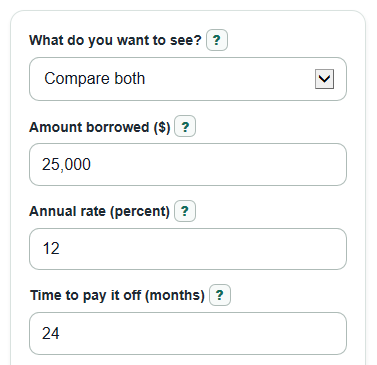
- Choose What do you want to see? to compare both payment types, show only the interest-only bill, or show only the pay-off plan.
- Enter Amount borrowed ($), not the full Credit limit ($) unless you used the whole line.
- Enter Annual rate (percent) and, when the pay-off plan is shown, Time to pay it off (months).
- Use Advanced options for Credit limit ($), Days in this bill (days), Test a rate increase (percentage points), and Decimal places (0 to 4).
- Check whether Interest-only payment for this bill is much lower than Monthly payment to pay it off; if it is, remember that interest-only payments do not reduce the borrowed balance.
Definitions
Amount borrowed ($): The part of the line of credit you have used. Interest is based on this drawn balance, not on the full credit limit for a typical line of credit [2].
Credit limit ($): The most the lender lets you borrow. The calculator uses it only for Credit still available and Credit line used.
Annual rate (percent): The yearly interest rate, often called APR. Divide it by 100 before using it in payment formulas.
Interest-only payment: A payment that covers estimated interest for the bill but does not reduce the Amount borrowed ($) [2].
Pay-off payment: A level monthly payment sized to reduce the borrowed balance to $0 over Time to pay it off (months).
Test a rate increase (percentage points): The number of points added to Annual rate (percent) for the stress check. A 2 point increase changes 12% to 14%, not to 12.24%.
Common mistakes and quick fixes
Mistake: Putting the full Credit limit ($) in Amount borrowed ($).
Fix: Enter only the money you actually used in Amount borrowed ($); use Credit limit ($) only to check Credit still available.
Mistake: Entering a monthly rate in Annual rate (percent).
Fix: Enter the yearly APR in Annual rate (percent), such as 12 for 12% APR.
Mistake: Using Time to pay it off (months) while What do you want to see? is set to Interest-only payment.
Fix: Choose Compare both or Pay off over a term if you want Monthly payment to pay it off.
Mistake: Leaving Days in this bill (days) at 30 when your statement has 28, 31, or another number of days.
Fix: Change Days in this bill (days) to match the billing cycle you are estimating.
Mistake: Treating Test a rate increase (percentage points) like a percent multiplier.
Fix: Enter percentage points; for example, 2 means Annual rate (percent) rises from 12% to 14%.
Mistake: Reading Interest-only payment for this bill as a pay-down plan.
Fix: Use Monthly payment to pay it off if you want a payment that reaches $0 by the end of Time to pay it off (months).
Limitations & Key Assumptions / Boundary Conditions
- The interest-only amount is a simple daily estimate using APR divided by 365 and Days in this bill (days). Your lender may use a different day-count rule, posting date, grace rule, or rounding method.
- The pay-off plan assumes equal monthly payments made at the end of each month, no new draws, no missed payments, and a rate that stays the same except for the separate stress check.
- The calculator does not include annual fees, draw fees, late fees, required minimum principal payments, insurance, taxes, or lender-specific minimum payment rules.
- Many lines of credit have variable rates, so real payments can change from month to month [1]. The stress check is a what-if test, not a rate forecast.
- Credit still available can be negative if Amount borrowed ($) is above Credit limit ($). That is a data check, not lender approval or a statement balance correction.
- Decimal places (0 to 4) changes displayed rounding only. It does not change the formulas used for the calculation.
Methodology
Calculation steps
The calculator starts with Amount borrowed ($), because a line of credit payment is based on the amount borrowed, not the full amount available [2]. It then applies the selected plan. Compare both shows the interest-only estimate and the pay-off payment. Interest-only payment shows only the bill interest estimate and does not read Time to pay it off (months). Pay off over a term uses Time to pay it off (months) to size a level monthly payment.
interest_only_payment = drawn_balance * (annual_apr_percent / 100) / 365 * billing_days
For the pay-off payment, the calculator first converts the annual percent rate to a monthly decimal rate.
monthly_rate = annual_apr_percent / 100 / 12
if monthly_rate = 0, amortizing_payment = drawn_balance / repayment_months
otherwise, amortizing_payment = drawn_balance * monthly_rate / (1 - (1 + monthly_rate)^(-repayment_months))
Total paid and total interest use the pay-off payment before display rounding.
total_paid_if_paid_off = amortizing_payment * repayment_months
total_interest_if_paid_off = total_paid_if_paid_off - drawn_balance
The payment shock compares the pay-off payment with the current interest-only estimate.
payment_shock = amortizing_payment - interest_only_payment
The rate stress check adds Test a rate increase (percentage points) to Annual rate (percent), then reuses the same interest-only and pay-off formulas with the tested APR. If the tested APR would be below 0%, the calculator shows an error instead of using a negative rate.
stressed_apr_percent = annual_apr_percent + rate_increase_percent
Credit use is shown only when Credit limit ($) is greater than 0.
available_credit = credit_limit - drawn_balance
credit_used_percent = drawn_balance / credit_limit * 100
Mini-example
For Amount borrowed ($) of $25,000, Annual rate (percent) of 12, Time to pay it off (months) of 24, Days in this bill (days) of 30, and Test a rate increase (percentage points) of 2, the interest-only estimate is $246.58. The monthly pay-off payment is $1,176.84, so Increase from interest-only to pay-off payment is $930.26. Total paid if paid off on schedule is $28,244.08, and Total interest if paid off on schedule is $3,244.08. After the tested rate increase to 14%, the pay-off payment becomes $1,200.32 and the interest-only payment becomes $287.67.