
Convert inches to centimeters quickly with clear rounding choices, an exact value, and an optional centimeters-and-millimeters view.
Table of contents
How to use our Inches to Centimeters Converter
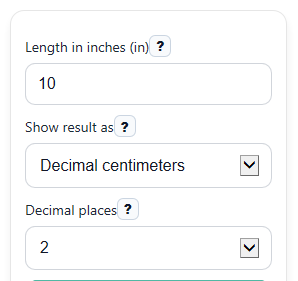
- Enter your value in Length in inches (in). You can use decimals like 5.5, and pasted commas or spaces are ignored.
- Choose Show result as to see either decimal centimeters or a centimeters-and-millimeters breakdown.
- Pick Decimal places to control the main Centimeters answer you want to read, copy, or compare.
- Click Calculate to see Centimeters, Exact value, Common rounded values, and any helpful Nearby common reference.
- Sanity-check the answer by estimating with 1 inch as about 2.5 cm, then confirm the exact result uses 2.54 cm per inch.
Definitions
Inch (in): A length unit used in the US customary system.
Centimeter (cm): A metric length unit equal to one hundredth of a meter.
Millimeter (mm): A metric length unit equal to one tenth of a centimeter.
Exact value: The conversion before rounding is applied for display.
Decimal places: How many digits appear after the decimal point in the main Centimeters result.
Centimeters and millimeters: A format that rewrites one decimal centimeter value as whole centimeters plus leftover millimeters.
Nearby common reference: A short comparison to a familiar length, such as near 30 cm or 1 meter, when the match is close enough to help.
Common mistakes and quick fixes
Mistake: Leaving Length in inches (in) blank.
Fix: Enter a number such as 10 or 5.5 before you calculate Centimeters .
Mistake: Typing text like 3in or 5..2 into Length in inches (in) .
Fix: Enter only a valid number, such as 3, 3.0, or 5.2.
Mistake: Thinking Decimal places changes the real conversion.
Fix: Use Exact value for the unrounded result and use Centimeters only as the display version you chose.
Mistake: Choosing the wrong Show result as format for your ruler or product spec.
Fix: Pick decimal output for simple copying, or choose Centimeters and millimeters when you need both units together.
Mistake: Ignoring the sign on a negative input in Length in inches (in) .
Fix: Read a negative Centimeters result as a signed difference or direction, not a physical object size.
Mistake: Treating Nearby common reference as the exact answer.
Fix: Use that note only for context, and use Centimeters or Exact value for the actual converted length.
Limitations & Key Assumptions / Boundary Conditions
- The converter assumes the exact rule 1 inch = 2.54 centimeters, so differences from a real measurement usually come from measuring error or rounding, not the formula.
- Decimal places changes only how the main answer is shown. For the unrounded conversion, use Exact value.
- Nearby common reference is only a context note. It may not appear for every value, and it should not replace the actual converted result.
- In Centimeters and millimeters view, the millimeter part is formatted for readability, so tiny display rounding can slightly change the shown split while keeping the same overall length.
- Negative inputs are allowed for math purposes, but a negative length usually represents a signed difference or direction rather than a real object size.
- This tool converts length only. It does not handle area, volume, screen size conventions, or mixed measurements like feet and inches entered together in one box.
Methodology
Conversion method
The calculator converts inches to centimeters with the exact factor 2.54 centimeters per inch [1].
cm = in * 2.54
Here, in means the length entered in inches, and cm is the exact length in centimeters.
Display rounding
The main Centimeters result is the exact conversion rounded to the number chosen in Decimal places.
display_cm = round(cm, d)
Here, d is the selected number of decimal places. The Exact value stays unrounded so you can see the original conversion.
Centimeters and millimeters format
When Show result as is set to centimeters and millimeters, the calculator first converts inches to total millimeters, then splits that into whole centimeters plus leftover millimeters.
total_mm = in * 25.4
whole_cm = floor(total_mm / 10)
rem_mm = total_mm - 10 * whole_cm
If rounding makes the remainder equal to 10.0 mm, the calculator carries that into 1 extra centimeter so the display stays natural.
Worked example
Suppose Length in inches (in) is 12.75.
cm = 12.75 * 2.54 = 32.385
If Decimal places is 1, the main Centimeters result shown is 32.4 cm, while Exact value remains 32.385 cm.
Input handling and assumptions
The calculator strips commas and spaces before parsing, so entries like 1,234.5 are treated as 1234.5. Blank entries and invalid text such as 3in or 5..2 are rejected with an error instead of guessed. Negative values are allowed because the conversion math still works, but they usually represent signed differences rather than physical sizes.