
Convert feet to centimeters from decimal feet or feet-and-inches entry, and quickly check whether your length was typed in the right style.
Table of contents
How to use our Feet to Centimeters Converter
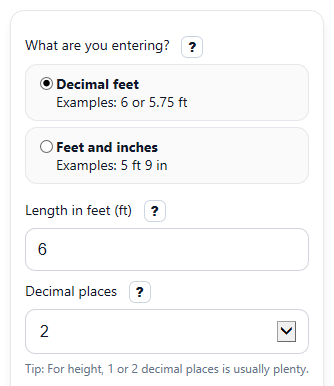
- Choose What are you entering? and pick Decimal feet for values like 5.75 ft or Feet and inches for values like 5 ft 8 in.
- Enter the active length fields: use Length in feet (ft) for decimal entry, or use Feet (ft) and Inches (in) for height-style entry.
- Select Decimal places to control how many digits appear in the centimeter result.
- Click Calculate to see Length in centimeters, the metric breakdown, and the equivalent values in both feet styles.
- Sanity-check the result by reading Same length as feet and inches and Quick check; if they do not match what you meant, switch the entry style and recalculate.
Definitions
Decimal feet: A length written as one number of feet, such as 5.75 ft.
Feet and inches: A length split into whole feet and extra inches, such as 5 ft 8 in.
Centimeter (cm): A metric unit of length. There are 100 centimeters in 1 meter.
Length in centimeters: The main converted result in metric units.
Same length as meters and centimeters: The same measurement rewritten as whole meters plus the leftover centimeters.
Same length in decimal feet: The full measurement shown as one decimal foot value.
Same length as feet and inches: The full measurement rewritten using feet and inches so you can check the entry style.
Decimal places: How many digits appear after the decimal point in the displayed result.
Common mistakes and quick fixes
Mistake: Typing 5.8 into Length in feet (ft) when you really mean 5 ft 8 in.
Fix: Change What are you entering? to Feet and inches , then enter 5 in Feet (ft) and 8 in Inches (in) .
Mistake: Filling in both Length in feet (ft) and the Feet (ft) plus Inches (in) fields and expecting all of them to be used together.
Fix: Only the fields for the active choice in What are you entering? are used, so enter your length in just that one style.
Mistake: Entering a negative number in Length in feet (ft) , Feet (ft) , or Inches (in) .
Fix: Use 0 or a positive length only, because this converter expects a physical length.
Mistake: Putting 14 in Inches (in) and forgetting that inches can roll into more feet.
Fix: The calculator normalizes extra inches into feet, but you can avoid confusion by entering whole feet in Feet (ft) and keeping Inches (in) under 12.
Mistake: Thinking more digits always means a better answer after changing Decimal places .
Fix: Decimal places only changes display rounding; the conversion factor stays the same, so pick the level of detail you actually need.
Mistake: Reading only Length in centimeters and missing the warning in Quick check .
Fix: If Quick check appears, compare it with Same length as feet and inches to make sure you entered decimal feet or feet-and-inches on purpose.
Limitations & Key Assumptions / Boundary Conditions
- This converter assumes the modern international foot, where 1 foot equals exactly 30.48 centimeters.
- It is for length only, so negative values are rejected and 0 is allowed.
- When Feet and inches entry is used, inches of 12 or more are carried into extra feet for the final result.
- The displayed answers are rounded to the selected Decimal places, so the shown value may differ slightly from the full unrounded value.
- The Quick check note is only a helpful warning for common cases like 5.8 ft; it cannot know your real intent every time.
- Very unusual formatting, text labels mixed into number boxes, or blank required fields for the active entry style will cause an error instead of a result.
Methodology
How the conversion works
The calculator first finds the total length in feet, then converts that value to centimeters using the exact factor 30.48 centimeters per foot.
cm = ft x 30.48
If you enter feet and inches separately, the inches are turned into part of a foot before converting.
ft_total = ft_whole + in / 12
cm = (ft_whole + in / 12) x 30.48
Extra outputs
To show the metric breakdown, the calculator splits centimeters into whole meters and leftover centimeters.
m = floor(cm / 100)
cm_remainder = cm - 100 x m
To show the value as feet and inches, it keeps the whole feet and converts the leftover part of a foot into inches.
ft_whole = floor(ft_total)
in = (ft_total - ft_whole) x 12
Mini example
Example: if you choose Feet and inches and enter 5 feet 8 inches, the total feet are 5 + 8/12 = 5.6667 feet. Then 5.6667 x 30.48 = 172.72 cm, so the main result is 172.72 cm.
Checks and rounding
If you enter a decimal-feet value that looks like a common height shortcut, such as 5.8, the calculator shows a Quick check note because 5.8 ft is not the same as 5 ft 8 in. For display, results are rounded to the selected number of decimal places, and if the feet-and-inches display rounds to 12 inches, those 12 inches are carried into the next foot so the breakdown stays consistent.
Assumptions used
This method assumes modern standard unit definitions, uses 12 inches per foot, and treats the input as a physical non-negative length. Real-world measuring differences come from how the original length was measured, not from the conversion factor itself.