
Convert a whole decimal number to hexadecimal and format it for coding with optional prefixes, letter case, and leading zeros.
Advanced options
How to use our Decimal to Hexadecimal Converter Calculator
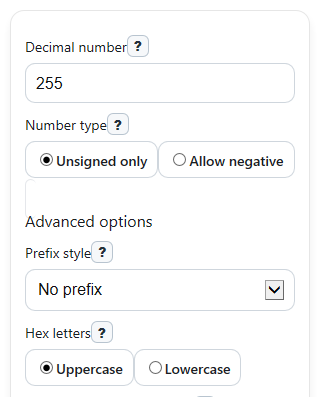
- Enter a whole number in Decimal number. You can type commas or spaces, but do not enter decimals like 12.5.
- Choose Number type. Pick Unsigned only for 0 or larger, or Allow negative if you want negative values to keep a minus sign.
- Open Advanced options if needed and set Prefix style, Hex letters, and Minimum hex digits for the display you want.
- Click Calculate to see Hex value, Hex digits used, 4-bit groups, and the Place-value breakdown.
- Sanity-check the result: each hex digit should match one 4-bit group, and Hex digits used should count the raw hex digits before any added prefix or extra leading zeros.
Definitions
Decimal number: A base-10 whole number, which is the normal counting system most people use every day.
Hexadecimal: A base-16 number system that uses digits 0-9 and letters A-F, where A=10 through F=15.
Hex value: The converted base-16 form of your Decimal number, shown with any prefix, letter case, or padding you selected.
Hex digits used: The number of actual hex digits in the unpadded result. It does not count a minus sign or prefix.
4-bit groups: Binary digits grouped in sets of 4. One hex digit matches exactly one 4-bit group.
Minimum hex digits: The smallest display width allowed. If the raw hex result is shorter, zeros are added on the left.
Prefix style: An optional start added to the displayed hex result, such as 0x or #, often used in code or color values.
Common mistakes and quick fixes
Mistake: Leaving Decimal number blank or typing words like "ten".
Fix: Enter a whole numeric value in Decimal number , such as 10 or 255.
Mistake: Entering 12.5 in Decimal number and expecting a result.
Fix: This converter accepts whole numbers only, so change Decimal number to a whole value like 12 or 13.
Mistake: Typing a negative value while Number type is set to Unsigned only .
Fix: Either remove the minus sign from Decimal number or switch Number type to Allow negative .
Mistake: Thinking Hex digits used counts the 0x prefix, # prefix, or minus sign.
Fix: Read Hex digits used as the raw digit count only. Prefixes and the minus sign are not included.
Mistake: Setting Minimum hex digits and assuming the number's value changed.
Fix: Leading zeros only change how Hex value is displayed. Check Place-value breakdown to see the actual value.
Mistake: Expecting Hex letters to change the number itself.
Fix: Hex letters only switches A-F between uppercase and lowercase. The numeric value stays the same.
Limitations & Key Assumptions / Boundary Conditions
- This converter accepts whole decimal numbers only. Fractional values like 12.5 are rejected.
- When Number type is Unsigned only, negative input is an error and is not converted.
- When negative values are allowed, the result uses a leading minus sign with the hex magnitude. It does not use two's complement.
- Minimum hex digits adds leading zeros for display only and does not change the numeric value.
- Hex digits used counts the raw hex digits before left-padding and does not include any minus sign or prefix.
- Very large values may be limited for safety and input validation, so extremely long integers may return an error instead of a result.
Methodology
How the conversion works
The calculator converts the absolute value of the entered whole number from base 10 to base 16. For positive values and zero, it finds the hex digits directly. For allowed negative values, it converts the magnitude and then adds a leading minus sign.
For n >= 0: repeatedly divide n by 16, record each remainder r where 0 <= r <= 15, map 10-15 to A-F, then read the remainders in reverse order.
hex_value = sum(d_i * 16^i)
1 hex digit = 4 binary bits
If signed_mode = signed and n < 0, output = '-' + hex(abs(n))
display_digits = max(raw_digits, min_digits)
Worked mini-example
Suppose Decimal number is 255. Divide 255 by 16 to get 15 remainder 15. Then divide 15 by 16 to get 0 remainder 15. Remainder 15 maps to F, so reading upward gives FF. The raw result has 2 hex digits.
The place-value check is FF = 15 x 16^1 + 15 x 16^0 = 240 + 15 = 255. Its binary groups are 1111 1111, because each F matches 1111.
If you set Minimum hex digits to 4 and choose Prefix style as 0x, the displayed Hex value becomes 0x00FF. The number is still 255, and Hex digits used stays 2 because padding does not change the raw digit count.
How each output is built
Hex value shows the converted result after applying the selected prefix, uppercase or lowercase letters, and any left-padding.
Hex digits used counts only the unpadded hex digits of the magnitude.
4-bit groups converts each hex digit to a 4-bit binary chunk, so users can verify the hex one digit at a time.
Place-value breakdown expands each hex digit by its power of 16, which helps explain why the result has that value.
Note is used for special cases such as zero, added padding, or a displayed minus sign for signed input.
Assumptions used
The method assumes the input is a whole decimal integer. It treats negative values as signed text output with a minus sign, not as fixed-width binary storage. Prefixes and leading zeros are display choices only, so they do not change the underlying number.