
Calculate projector lens distance, throw ratio, or image width and check whether a published projector range fits your planned screen.
Table of contents
How to use our Projector Throw Ratio and Distance Calculator
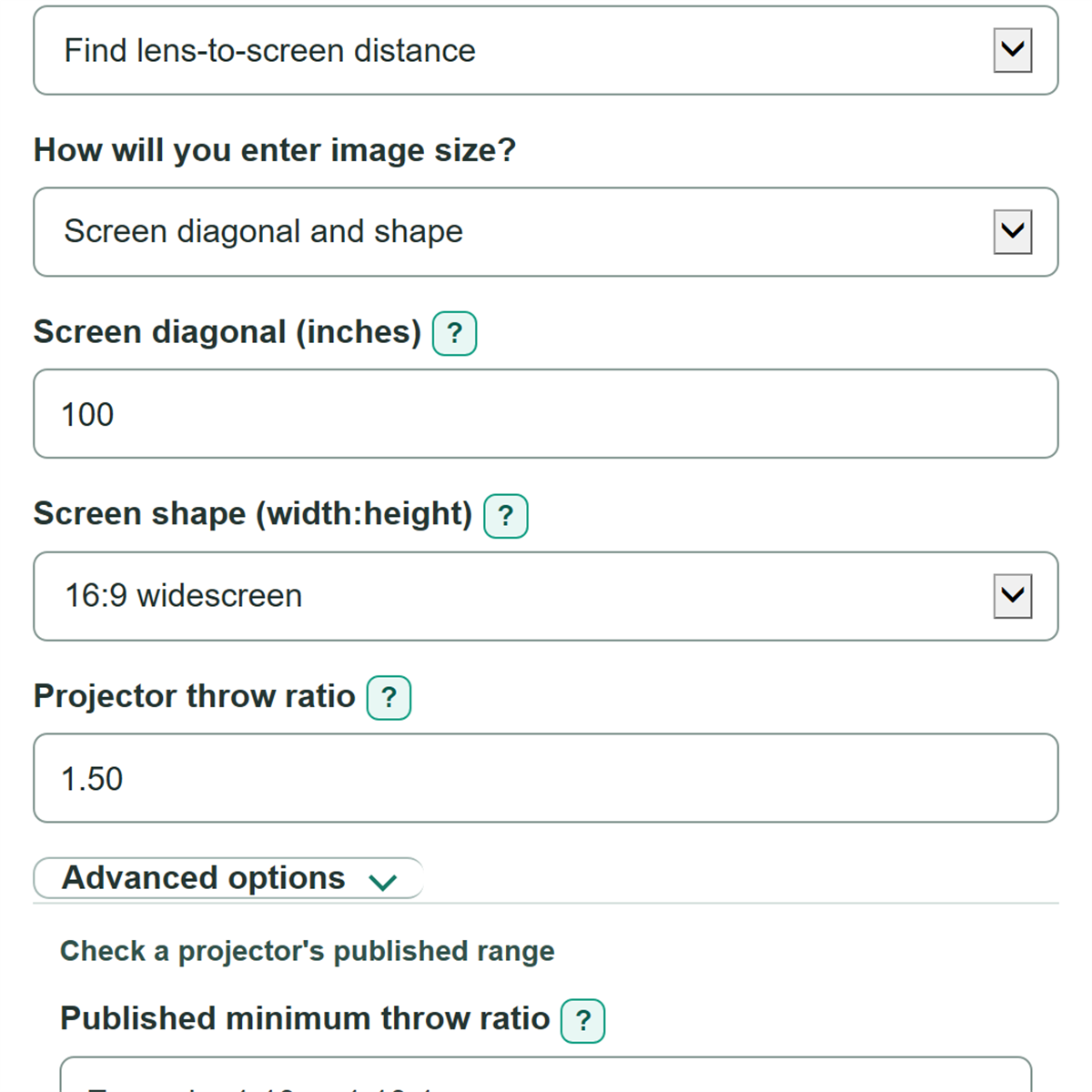
- Choose what you want to find under "What do you want to find?"
- Under "How will you enter image size?", choose a screen diagonal and "Screen shape" or enter "Projected image width" directly.
- Enter the visible image measurement and the needed "Projector throw ratio" or "Lens-to-screen distance" for the selected task.
- Click Calculate, then confirm that the displayed "Projected image width used" matches your screen or planned wall area.
- For a zoom projector, open Advanced options and enter both published throw-ratio endpoints to see "Projector range fit" and the nearest and farthest lens positions.
Definitions
Throw ratio: Lens-to-screen distance divided by projected image width. A lower ratio places the projector closer for the same image width. [1]
Lens-to-screen distance: The straight distance from the front lens to the screen surface, not to the projector body or mount.
Projected image width: The visible left-to-right width of the image. Throw-ratio math uses width, not diagonal.
Screen diagonal: The corner-to-corner image size commonly printed on a screen listing or label.
Screen shape: The width-to-height proportion, such as 16:9. It determines width when you enter a diagonal.
Published minimum and maximum throw ratio: The two endpoints of a zoom projector or lens range. They set the nearest and farthest geometry-based lens positions for an image width.
Common mistakes and quick fixes
Mistake: Entering a 100-inch screen size as "Projected image width".
Fix: A 100-inch screen is usually a diagonal. Choose "Screen diagonal" and the correct "Screen shape", or enter the actual left-to-right width.
Mistake: Measuring "Lens-to-screen distance" from the projector cabinet, ceiling mount, or back wall.
Fix: Measure straight from the projector lens to the screen surface.
Mistake: Pasting a range such as 1.13-1.47:1 into "Projector throw ratio".
Fix: Enter one ratio in "Projector throw ratio", or enter both endpoints in "Published minimum throw ratio" and "Published maximum throw ratio".
Mistake: Using only one published zoom endpoint.
Fix: Fill in both "Published minimum throw ratio" and "Published maximum throw ratio", or clear both fields to skip the range check.
Mistake: Assuming the same diagonal has the same width for every screen.
Fix: Set "Screen shape" to match the screen. A 16:9 and 4:3 screen with the same diagonal have different widths.
Limitations & Key Assumptions / Boundary Conditions
- The calculation uses ideal straight-line geometry. Measure from the projector lens to the screen surface.
- A "Projector range fit" result checks throw ratio only. It does not confirm focus range, lens shift, zoom position, image offset, mount clearance, cabinet depth, or cable clearance.
- Screen diagonal is converted using the selected "Screen shape". A screen with a different actual aspect ratio will have a different projected image width.
- Throw distance does not predict brightness, image quality, screen gain, room light, or whether the projector has enough light for the room.
- Published specifications can vary by lens, zoom setting, and projector mode. Use the specification for the exact projector and lens you plan to install.
Methodology
Throw-ratio math
The calculator treats throw ratio as lens-to-screen distance divided by projected image width. It uses inches inside the formulas, then changes a distance result to feet. [1]
throw_ratio = lens_to_screen_inches / projected_image_width_inches
lens_to_screen_inches = lens_to_screen_feet * 12
Finding image width
If you enter a diagonal, the calculator uses the selected screen shape to find the width of that rectangle. If you enter "Projected image width" directly, it uses that value and does not use the diagonal or screen shape.
image_width_inches = diagonal_inches * aspect_width / sqrt(aspect_width^2 + aspect_height^2)
Solving the selected value
To find distance, the calculator multiplies image width by throw ratio. To find image width, it divides lens distance by throw ratio.
throw_distance_feet = throw_ratio * image_width_inches / 12
calculated_image_width_inches = lens_to_screen_inches / throw_ratio
Published range check
When both published endpoints are entered, the calculator compares the active throw ratio with that inclusive range. It also multiplies each endpoint by the active image width to show the nearest and farthest lens positions.
near_distance_feet = minimum_throw_ratio * active_image_width_inches / 12
far_distance_feet = maximum_throw_ratio * active_image_width_inches / 12
fits = active_throw_ratio >= minimum_throw_ratio and active_throw_ratio <= maximum_throw_ratio
Worked example
A 100-inch 16:9 image has a calculated width of about 87.16 inches. With a 1.50 throw ratio, the required lens-to-screen distance is 1.50 times 87.16 divided by 12, or about 10.89 feet.