
Enter your payout, online time, miles, gas price, and MPG to estimate cash profit and profit per online hour.
Table of contents
How to use our Rideshare and Delivery Driver Profit Calculator
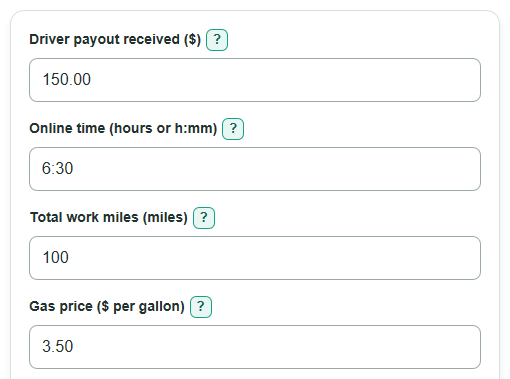
- Enter Driver payout received after platform fees, including tips, bonuses, and adjustments for one shift, week, or other matching period.
- Enter Online time, including waiting time, as decimal hours such as 6.5 or time such as 6:30.
- Enter Total work miles, including pickup, delivery, passenger, deadhead, repositioning, and work-related return miles, then add gas price and MPG.
- Open Advanced options only if you want to add extra vehicle costs, other cash expenses, choose the dated IRS rate, or set a tax reserve percentage.
- Check that estimated gas used is close to your trip-computer reading when available, and make sure cash costs and payout cover the same period before using the hourly profit.
Definitions
Cash operating profit: Driver payout minus fuel, optional extra vehicle cost, and other entered cash work expenses.
Online time: All time you were available in the app, including waiting time, not only time on a trip or delivery.
Deadhead miles: Work-related miles driven without a passenger or order, such as pickup and repositioning miles.
MPG: Miles per gallon, the vehicle's average fuel economy. Higher MPG uses fewer gallons for the same miles.
Business-mile deduction: A tax deduction estimate found by multiplying work miles by the selected IRS business mileage rate. The IRS rate is date-specific. [1]
Tax reserve: A user-chosen amount set aside from positive cash profit for tax planning. It is not a calculated tax bill.
Common mistakes and quick fixes
Mistake: Entering customer fares before platform fees in Driver payout received.
Fix: Use the payout you actually received after platform fees, including tips and bonuses.
Mistake: Using only active-trip time for Online time.
Fix: Include all time you were online, including waiting between trips or deliveries.
Mistake: Counting only passenger or delivery miles in Total work miles.
Fix: Include pickup, deadhead, repositioning, and work-related return miles too.
Mistake: Entering fuel again in Other cash work expenses.
Fix: Fuel is already calculated from Gas price and Vehicle fuel economy; use this field for items such as tolls, parking, or supplies.
Mistake: Treating Estimated business-mile deduction as cash added to Cash operating profit.
Fix: Keep the deduction separate. It may reduce taxable business income, but it is not cash income or a second vehicle expense.
Mistake: Treating Estimated tax reserve as a tax bill.
Fix: It is only the percentage you chose of positive cash profit. Use your tax records or tax professional for an actual tax calculation.
Limitations & Key Assumptions / Boundary Conditions
- Fuel cost is an estimate from the entered gas price and average MPG. Traffic, idling, weather, driving style, and fuel purchases can make actual fuel cost different.
- Cash operating profit includes only fuel, Extra vehicle cost, and Other cash work expenses entered here. Insurance, registration, phone service, loan payments, subscriptions, and other costs are excluded unless you include a period share in Other cash work expenses.
- Loan principal is not depreciation. A vehicle payment should not automatically be treated as a per-mile operating cost.
- The selected IRS business mileage rate estimates a deduction, not cash kept. Mileage eligibility, records, and the choice between standard mileage and actual-expense methods are tax issues outside this calculator.
- The IRS rate choices apply only to the listed 2026 date ranges. Choose the rate that matches your work records.
- Tax reserve uses only your chosen percentage of positive cash operating profit. Actual estimated taxes can depend on other income, deductions, credits, withholding, filing status, and state or local rules. [2]
- Cash work cost per mile is unavailable when Total work miles is zero because a per-mile cost cannot be calculated.
Methodology
Cash profit calculation
First, the calculator estimates gallons from Total work miles and Vehicle fuel economy. It then finds fuel cost from gallons and Gas price.
estimated gas used = total work miles / vehicle fuel economy
estimated fuel cost = estimated gas used x gas price
Optional Extra vehicle cost is a per-mile allowance. A blank value counts as zero. Blank Other cash work expenses also count as zero.
extra vehicle cost = total work miles x extra vehicle cost per mile
cash operating profit = driver payout received - estimated fuel cost - extra vehicle cost - other cash work expenses
Cash profit per online hour uses all Online time, including waiting. A negative profit stays negative so a loss is visible.
cash profit per online hour = cash operating profit / online time
cash work cost per mile = (estimated fuel cost + extra vehicle cost + other cash work expenses) / total work miles
Deduction and reserve
The Estimated business-mile deduction is separate from cash profit. It multiplies Total work miles by the selected dated IRS business mileage rate. [1]
estimated business-mile deduction = total work miles x IRS business mileage rate
If Tax reserve is entered, the calculator applies it only to positive cash operating profit. It uses zero reserve for zero or negative profit, then subtracts the reserve from cash profit.
estimated tax reserve = positive cash operating profit x tax reserve percent / 100
cash left after tax reserve = cash operating profit - estimated tax reserve
Worked example
With a $150 payout, 100 work miles, $3.50 gas, 28 MPG, 6:30 online time, and no optional costs, estimated gas used is about 3.57 gallons and fuel cost is $12.50. Cash operating profit is $137.50, and cash profit per online hour is about $21.15. At the Jul-Dec 2026 rate of $0.76 per mile, the separate business-mile deduction estimate is $76.00.
Calculation boundaries
The calculator rejects negative work miles, negative costs, zero MPG, invalid time, and a Tax reserve outside 0 through 100 percent. It shows per-mile cost as unavailable at zero work miles. The results are planning estimates based on the values entered, not a tax return or a complete vehicle-cost analysis.