
Estimate how long your EV can run home backup loads while saving battery charge for driving.
Table of contents
How to use our Vehicle-to-Home Backup Runtime Calculator
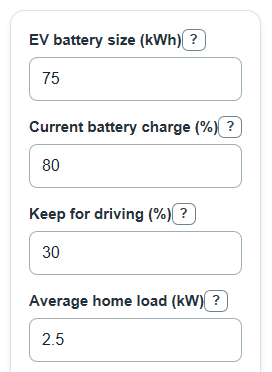
- Enter EV battery size using the battery capacity shown for your car, usually in kWh.
- Enter Current battery charge and Keep for driving as percents, so the calculator only uses energy above your chosen driving reserve.
- Enter Average home load for the circuits you plan to run, then enter the V2H export limit from your car, charger, or backup equipment.
- Enter V2H system efficiency; use a lower percent when you want to include conversion losses between the EV battery and the house.
- Click Calculate, then sanity-check the result: Estimated backup time should drop when Average home load rises, and V2H power limit room left should be positive for a workable plan.
Definitions
Vehicle-to-Home (V2H): A setup that lets an EV send power to selected home circuits during an outage.
EV battery size: The battery capacity of the vehicle, measured in kilowatt-hours (kWh).
Current battery charge: The EV state of charge right now, shown as a percent in the car or app.
Keep for driving: The percent of the EV battery you want to save instead of using for home backup.
Average home load: The average power used by the circuits you plan to run, measured in kilowatts (kW).
V2H export limit: The highest steady power the EV and home backup equipment can send to the house.
V2H system efficiency: The percent of battery energy expected to reach home loads after conversion losses.
Home-ready energy above driving reserve: The usable backup energy after saving the driving reserve and applying efficiency.
Common mistakes and quick fixes
Mistake: Entering EV battery size in watts or miles instead of kWh.
Fix: Use EV battery size in kWh, such as 75 for a 75 kWh pack.
Mistake: Setting Keep for driving higher than Current battery charge and expecting backup time.
Fix: Lower Keep for driving or charge the EV until Current battery charge is above the reserve.
Mistake: Using a short startup spike for Average home load.
Fix: Enter the steady average kW for the backed-up circuits, and check surge needs separately with your equipment specs.
Mistake: Ignoring V2H export limit when choosing loads.
Fix: Make sure Average home load is at or below V2H export limit; a negative V2H power limit room left means the plan is too large.
Mistake: Leaving V2H system efficiency at 100 when you want a real-world estimate.
Fix: Use a lower V2H system efficiency percent to account for conversion losses.
Limitations & Key Assumptions / Boundary Conditions
- The estimate uses average home load, not short startup surge. Motors, pumps, compressors, and HVAC equipment may need more power for a moment than the average load shows.
- The calculator does not check whether your V2H system supports specific circuits, split-phase loads, 240 V loads, transfer equipment, or local electrical-code rules.
- EV battery size may be nameplate capacity or usable capacity. If you enter nameplate capacity, runtime may be higher than what the vehicle actually allows.
- The V2H system efficiency value is a planning input. Real efficiency can change with load level, temperature, equipment, and vehicle behavior.
- The calculation assumes no charging during the outage. Solar, grid return, generator charging, or driving the vehicle would change the available energy.
- The backup time is not treated as workable when the average home load is above the V2H export limit or when the EV is at or below the chosen driving reserve.
Methodology
Calculation steps
The calculator first finds how much EV battery energy is above the driving reserve. Percent values are divided by 100 before they are used.
ev_battery_energy_above_driving_reserve_kwh = battery_capacity_kwh * (current_soc_percent - keep_soc_percent) / 100
It then applies V2H system efficiency to estimate energy that can reach the home loads.
home_ready_energy_above_driving_reserve_kwh = ev_battery_energy_above_driving_reserve_kwh * system_efficiency_percent / 100
Backup time is energy divided by average power. A kilowatt-hour divided by a kilowatt gives hours.
estimated_backup_runtime_hours = home_ready_energy_above_driving_reserve_kwh / average_home_load_kw
The power-limit check compares your average load with the steady V2H export limit.
v2h_power_headroom_kw = v2h_export_limit_kw - average_home_load_kw
Mini example
For a 75 kWh EV at 80% charge with 30% kept for driving, the EV battery energy above reserve is 75 * (80 - 30) / 100 = 37.5 kWh. With 90% efficiency, home-ready energy is 37.5 * 90 / 100 = 33.75 kWh. If the home load averages 2.5 kW, estimated backup time is 33.75 / 2.5 = 13.5 hours, or about 13 hours 30 minutes. If the V2H export limit is 9.6 kW, power limit room left is 9.6 - 2.5 = 7.1 kW.
Status handling
Signed values are kept because they explain the problem. Negative EV battery energy above driving reserve means the current charge is already below the reserve. Negative V2H power limit room left means the planned average load is above the V2H limit. The calculator blocks invalid entries such as blank fields, zero load, percent values outside 0 to 100, and efficiency above 100%.
Sources
- Powering New Electric Vehicle Mobility Choices Through Utility Collaboration Joint Office of Energy and Transportation - Driveelectric
- [2605.16765] A Coupled V2G Equilibrium Model of Electric Vehicle and Power System Interactions - Arxiv
- [2605.17723] Residential Battery Pooling Under Backup Commitments - Arxiv