
Estimate how long a UPS can keep your router, modem, ONT, or small network setup running during an outage.
Table of contents
How to use our Router and Modem UPS Runtime Calculator
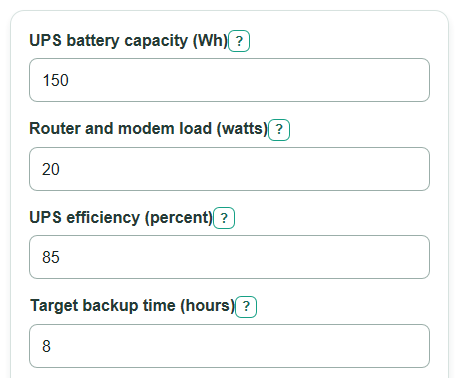
- Enter UPS battery capacity in Wh, not VA. Wh means stored battery energy.
- Enter Router and modem load in watts. Add every device plugged into the UPS, such as the router, modem, ONT, switch, or access point.
- Enter UPS efficiency and Target backup time. If you do not know the efficiency, 85 percent is a reasonable planning estimate.
- Open Advanced options if the battery is old or the UPS is stored in a hot or cold area, then adjust Battery health left and Capacity left because of temperature.
- Check the result quality by comparing Estimated runtime after battery losses with Runtime with no age or temperature loss. A big gap means the loss settings are driving the answer.
Definitions
Watt: A measure of how fast your gear uses power. A 20 watt load uses energy twice as fast as a 10 watt load.
Watt-hour: Stored energy. A 150 Wh battery can deliver 150 watts for 1 hour in an ideal no-loss case, or 15 watts for 10 hours in an ideal no-loss case.
UPS battery capacity: The stored battery energy entered in Wh. It is not the same as the UPS VA rating.
Router and modem load: The total watts used by all network gear plugged into the UPS.
UPS efficiency: The percent of stored battery energy that reaches your devices after UPS conversion losses.
Battery health left: Your estimate of how much usable battery capacity remains because of age and condition.
Capacity left because of temperature: Your estimate of how much capacity remains after temperature or storage effects.
Usable energy after all losses: The Wh left after efficiency, battery health, and temperature capacity settings are applied.
Common mistakes and quick fixes
Mistake: Entering a VA rating in UPS battery capacity .
Fix: Use Wh from the UPS specs or battery pack. VA is an output rating, not stored battery energy.
Mistake: Using only the router watts for Router and modem load when the modem, ONT, or switch is also plugged in.
Fix: Add the watts for every network device powered by the UPS.
Mistake: Leaving UPS efficiency blank or treating a percent like 0.85.
Fix: Enter the percent number, such as 85, and keep it above 0 and at or below 100.
Mistake: Setting Battery health left to 100 for an old or weak UPS battery.
Fix: Lower the percent if the battery is aged, has failed a self-test, or has much shorter runtime than it used to.
Mistake: Ignoring Capacity left because of temperature for a UPS stored in a hot garage, cold room, or poor storage conditions.
Fix: Use a lower percent when temperature may reduce battery capacity.
Mistake: Reading Best-case runtime if losses are lighter as a guaranteed outage time.
Fix: Plan closer to Estimated runtime after battery losses or Conservative runtime if losses are worse if internet uptime matters.
Limitations & Key Assumptions / Boundary Conditions
- The calculator uses a steady-load Wh divided by watts model. Real UPS runtime can differ because discharge curves, battery chemistry, low-voltage cutoff, and self-consumption are not modeled.
- UPS battery capacity must be entered in Wh. The calculator does not convert VA to Wh because that requires battery and UPS design data.
- The calculator does not check whether Router and modem load exceeds the UPS watt output rating.
- Battery health left and Capacity left because of temperature are user estimates. A real battery test is more reliable than a guessed percent.
- Very small loads can be affected by UPS idle draw and automatic shutdown behavior, so actual runtime may be shorter than the estimate.
- The low-to-high range changes the two battery loss settings by 10 percentage points. It is a sensitivity check, not a manufacturer runtime table.
Methodology
Calculation method
The calculator first converts percent inputs into decimal factors.
efficiency_factor = UPS efficiency / 100
health_factor = Battery health left / 100
temp_factor = Capacity left because of temperature / 100
It then estimates the battery energy that reaches the connected network gear.
Usable energy after all losses = UPS battery capacity * efficiency_factor * health_factor * temp_factor
The main runtime is usable energy divided by the connected load.
Estimated runtime after battery losses = Usable energy after all losses / Router and modem load
Estimated runtime in minutes = Estimated runtime after battery losses * 60
The target-size answer works backward from the backup time you want.
Battery capacity needed for target time = (Target backup time * Router and modem load) / (efficiency_factor * health_factor * temp_factor)
The battery capacity left output combines age and temperature only, before UPS efficiency is applied.
Battery capacity left after age and temperature = health_factor * temp_factor * 100
The low-to-high range adjusts battery health and temperature capacity by 10 percentage points each, capped from 0 percent to 100 percent.
Conservative runtime if losses are worse = UPS battery capacity * efficiency_factor * max(0, health_factor - 0.10) * max(0, temp_factor - 0.10) / Router and modem load
Best-case runtime if losses are lighter = UPS battery capacity * efficiency_factor * min(1, health_factor + 0.10) * min(1, temp_factor + 0.10) / Router and modem load
For comparison, the no-loss runtime keeps UPS efficiency but ignores age and temperature loss.
Runtime with no age or temperature loss = UPS battery capacity * efficiency_factor / Router and modem load
Mini-example
With a 150 Wh UPS battery, a 20 watt router and modem load, 85 percent UPS efficiency, 100 percent battery health, 100 percent temperature capacity, and an 8 hour target, usable energy is 150 * 0.85 * 1 * 1 = 127.5 Wh. Runtime is 127.5 / 20 = 6.375 hours, or 382.5 minutes. The starting battery capacity needed for 8 hours is (8 * 20) / 0.85 = 188.24 Wh. The conservative range value is 5.16 hours, and the best-case value stays 6.38 hours because the health and temperature factors cannot go above 100 percent.