
Enter your discount rate and cash flows to calculate NPV with a row-by-row present value breakdown.
Table of contents
How to use our Net Present Value Calculator
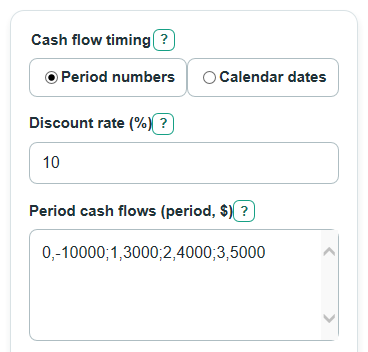
- Choose Cash flow timing: use Period numbers for simple period 0, period 1 entries, or Calendar dates for real payment dates.
- Enter Discount rate (%) as your target return; in Period numbers mode it is per period, and in Calendar dates mode it is per year.
- Fill the matching cash flow box: Period cash flows (period, $) or Dated cash flows (date, $), with one period or date and one dollar amount per row.
- If using dates, set Value as of date and Day count for dates so the calculator knows how far each cash flow is from today.
- Click Calculate, then sanity-check the Cash flow present value breakdown: period 0 or same-day cash flows should have a discount factor of 1, and later inflows should usually have smaller present values than their entered cash amounts when the rate is positive.
Definitions
Net present value: The total value today of all entered cash flows after discounting future amounts.
Discount rate: The return you want the cash flows to beat, entered as a percent.
Discounting: Turning future money into today's value by reducing it for time and the chosen discount rate.
Cash flow: Money moving in or out. Positive amounts are inflows, and negative amounts are outflows.
Period number: The timing number used in Period numbers mode. Period 0 means today, period 1 means one full period later, and so on.
Value as of date: The date that all dated cash flows are discounted back to.
Day count: The rule used to turn calendar days into part of a year for dated cash flows.
Discount factor: The multiplier applied to a cash flow to convert it into present value.
Running present value: The step-by-step total after each row's present value is added.
Common mistakes and quick fixes
Mistake: Putting a percent sign or text in Discount rate (%) in a way that creates more than one number.
Fix: Enter one rate such as 10 or 7.5 in Discount rate (%).
Mistake: Using Calendar dates but leaving Dated cash flows (date, $) blank.
Fix: Enter rows like 2025-01-01,-10000; 2026-01-01,6000 in Dated cash flows (date, $).
Mistake: Using Period numbers but entering a date in Period cash flows (period, $).
Fix: Enter a nonnegative period number and a dollar amount, such as 0,-10000 or 2,4000.
Mistake: Setting Value as of date after a cash flow date without realizing that the row is before the valuation date.
Fix: Check Value as of date and each Dated cash flows (date, $) row so the timing matches your decision date.
Mistake: Choosing the wrong Day count for dates and expecting the same answer.
Fix: Use Actual days / 365 when you want real calendar days, or 30/360 estimate when you need the simplified 30-day-month method.
Mistake: Reading Cash in minus cash out before discounting as the same thing as Net present value.
Fix: Use Net present value for the discounted answer and Cash in minus cash out before discounting only as the simple total before discounting.
Limitations & Key Assumptions / Boundary Conditions
- The calculator uses the cash flow signs you enter. Costs are usually negative, and money received is usually positive.
- In Period numbers mode, Discount rate (%) is per period. If your periods are years, enter an annual rate; if your periods are months, enter a monthly rate.
- In Calendar dates mode, Discount rate (%) is treated as an annual rate.
- Actual days / 365 divides the real day difference by 365. It does not make a special leap-year adjustment.
- 30/360 estimate uses a simplified 30-day-month, 360-day-year method, so it can differ from actual calendar-day timing.
- Duplicate periods or duplicate dates are allowed and are shown as separate rows in the breakdown.
- A positive Net present value means the entered cash flows beat the chosen discount rate, not that a project is risk-free or guaranteed.
- Taxes, inflation changes, financing costs, reinvestment returns, and uncertain future cash flows are not modeled unless you include them directly as cash flow rows.
Methodology
How the calculator discounts cash flows
The calculator first converts Discount rate (%) to a decimal rate by dividing by 100. Discounting means each future cash flow is multiplied by a discount factor so it is stated in today's dollars.
r = discount_rate_percent / 100
discount_factor_i = 1 / (1 + r) ^ t_i
PV_i = CF_i * discount_factor_i
CF_i is the cash flow in row i. t_i is the timing for that row. In Period numbers mode, t_i is the period number. In Calendar dates mode, t_i is the year fraction from Value as of date to the row date.
Period numbers mode
For period-based cash flows, the calculator adds the present value of every entered row.
NPV = sum(CF_i / (1 + r) ^ p_i)
p_i is the period number for row i. Period 0 is not discounted because the exponent is 0, so the discount factor is 1.
Calendar dates mode
For dated cash flows, the calculator uses the row date and Value as of date to find a year fraction, then applies the same present value idea.
XNPV = sum(CF_i / (1 + r) ^ y_i)
y_i = actual_days_between_dates / 365
y_i = days360 / 360
Actual days / 365 uses the real calendar day difference. The 30/360 estimate uses this structure:
days360 = 360 * (year2 - year1) + 30 * (month2 - month1) + (day2_adjusted - day1_adjusted)
If the start day is 31, it is adjusted to 30. If the end day is 31 and the adjusted start day is 30, the end day is adjusted to 30.
Supporting totals
The present value breakdown table shows each entered cash flow, its timing, discount factor, present value, and running present value. The first future cash flow present value is the first row after period 0 or after the Value as of date.
future_pv_total = sum(PV_i where t_i > 0)
undiscounted_net_cash_flow = sum(CF_i)
Mini example
With Discount rate (%) = 10 and Period cash flows (period, $) = 0,-10000; 1,3000; 2,4000; 3,5000, the present values are -10000.00, 2727.27, 3305.79, and 3756.57. Their total Net present value is -210.37. The Present value of future cash flows is 9789.63, and Cash in minus cash out before discounting is 2000.00.