
Estimate a fixed-rate land loan payment, total interest, and the down payment amount used in the calculation.
Table of contents
How to use our Land Loan Calculator
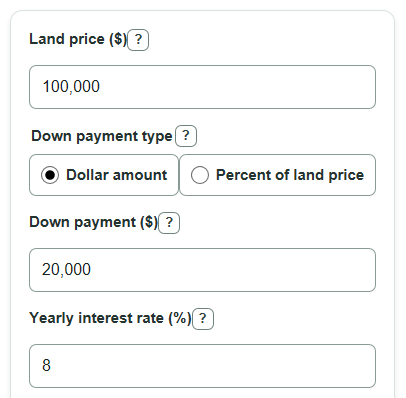
- Enter the Land price as the agreed purchase price before interest, taxes, closing costs, or lender fees.
- Choose Down payment type, then enter either Down payment in dollars or Down payment as a percent of the land price.
- Enter the Yearly interest rate and Loan term in years, then select Calculate.
- Check Down payment used and Amount borrowed first; if they do not match what you expected, switch the Down payment type or correct the entry.
- Use Monthly loan payment for the monthly estimate, and compare Total interest paid with Total land cost after interest to see how much the loan adds over time.
Definitions
Land price: The agreed purchase price of the land before loan interest and extra costs.
Down payment type: The choice between entering the down payment as a dollar amount or as a percent of the land price.
Down payment used: The dollar down payment the calculator subtracts from the land price. If you choose percent, the calculator converts the percent to dollars first.
Amount borrowed: The starting loan balance after the down payment is subtracted from the land price.
Yearly interest rate: The annual rate charged for borrowing money, entered as a percent.
Loan term: The length of time used to pay off the loan with monthly payments.
Total interest paid: The extra money paid for borrowing over the full loan term.
Common mistakes and quick fixes
Mistake: Entering Land price with taxes, closing costs, or future improvements included.
Fix: Use only the agreed Land price for the land itself, then handle other costs separately.
Mistake: Choosing the wrong Down payment type, such as entering 20 as dollars when you meant 20%.
Fix: Pick the correct Down payment type and confirm that Down payment used matches your intent.
Mistake: Typing a monthly rate in Yearly interest rate.
Fix: Enter the annual rate, such as 8 for 8% per year.
Mistake: Using a Loan term that does not match the repayment plan.
Fix: Enter the number of years payments last, not the number of months or the land ownership period.
Mistake: Reading Monthly loan payment as the full monthly cash cost.
Fix: Treat Monthly loan payment as principal and interest only, before taxes, insurance, dues, or lender fees.
Limitations & Key Assumptions / Boundary Conditions
- The estimate uses a fixed-rate monthly payment loan. It does not model adjustable rates, interest-only land loans, balloon payments, or changing payment amounts.
- Total land cost after interest excludes closing costs, taxes, insurance, appraisal fees, recording fees, lender fees, and prepayment penalties.
- The calculator treats the Yearly interest rate as the loan interest rate entered by the user, not a legally calculated annual percentage rate.
- Loan term can be a decimal number of years. The calculator converts it to months by multiplying by 12 and does not force whole-year terms.
- If the down payment equals the Land price, the Amount borrowed, Monthly loan payment, and Total interest paid are all $0.
- Actual lender quotes can differ because lenders may use different fee structures, payment schedules, rounding rules, or underwriting terms.
Methodology
How the payment is calculated
The calculator first turns the selected down payment entry into dollars. If Down payment type is Dollar amount, it uses the entered Down payment. If Down payment type is Percent of land price, it multiplies Land price by the percent and divides by 100.
down_payment_used = down_payment_dollars
down_payment_used = land_price * down_payment_percent / 100
Next, it subtracts the down payment from the land price to get the starting loan balance.
amount_borrowed = land_price - down_payment_used
The yearly rate is converted to a monthly rate, and the term in years is converted to the number of monthly payments.
monthly_rate = annual_interest_rate / 100 / 12
number_of_payments = loan_term_years * 12
For a positive interest rate, the calculator uses the standard fixed-payment amortization formula. Amortization means the payment is set so the loan balance is paid down over time.
monthly_payment = amount_borrowed * monthly_rate / (1 - (1 + monthly_rate)^(-number_of_payments))
If the Yearly interest rate is 0%, the payment is the amount borrowed divided evenly across the payment count.
monthly_payment = amount_borrowed / number_of_payments
Total interest and total cost are then calculated from the monthly payment schedule.
total_interest_paid = monthly_payment * number_of_payments - amount_borrowed
total_land_cost_after_interest = down_payment_used + monthly_payment * number_of_payments
Mini-example
For a $10,000 Land price, a $2,000 Down payment, a 12% Yearly interest rate, and a 1-year Loan term, the Amount borrowed is $8,000. The monthly rate is 0.01 and the number of payments is 12. The Monthly loan payment is about $710.79, Total interest paid is about $529.48, and Total land cost after interest is about $10,529.48.
Sources
- Is there such a thing as a no-cost or no-closing cost loan or refinancing? | Consumer Financial Protection Bureau - Consumerfinance
- [2306.17467] On the Behavior of the Payoff Amounts in Simple Interest Loans in Arbitrage-Free Markets - Arxiv
- [2307.08861] An effective interest rate cap: a clarification - Arxiv
- 1026.22 Determination of annual percentage rate. | Consumer Financial Protection Bureau - Consumerfinance