
Enter your current tax-time estimate and your target result to see how much each remaining paycheck could change.
Advanced options
Table of contents
How to use our Tax Refund vs Bigger Paycheck Calculator
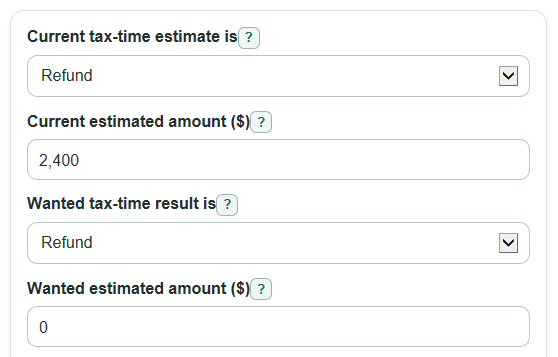
- Choose whether your Current tax-time estimate is a refund or a bill, then enter the positive dollar amount in Current estimated amount.
- Choose what your Wanted tax-time result is and enter the Wanted estimated amount. Use a refund of $0 if you want to aim near break-even.
- Enter Paychecks left this tax year. Count only paychecks that can still be changed by a new withholding setting.
- Open Advanced options only if you want the W-4 Step 4(c) helper or the savings-interest estimate. Blank optional money and rate fields are treated as $0 or 0 percent.
- Check the sign of Change in take-home pay each paycheck. Positive means bigger paychecks now; negative means smaller paychecks now and a larger refund or smaller bill later.
Definitions
Tax-time estimate: The refund or bill amount you expect when you file your federal return if nothing else changes.
Refund: Money returned to you because your payments and credits are more than your final tax.
Bill to pay: Money you still expect to owe at tax time because your payments and credits are less than your final tax.
Federal withholding: Federal income tax taken from your paycheck before you receive it. Withholding can be checked and changed through payroll or Form W-4 [1].
W-4 Step 4(c): The extra federal tax amount, per paycheck, that you ask your employer to withhold on Form W-4.
Take-home pay: The paycheck amount you keep after withholding and other payroll deductions. This calculator only estimates the change caused by federal withholding.
Paychecks left this tax year: The number of remaining paychecks that can still use the new withholding amount.
Common mistakes and quick fixes
Mistake: Entering a negative number in Current estimated amount because the estimate is a bill.
Fix: Choose Bill to pay in Current tax-time estimate is and enter the amount as a positive number.
Mistake: Counting every paycheck in the year in Paychecks left this tax year instead of only the paychecks that can still change.
Fix: Count the remaining pay dates after your new withholding setting can start.
Mistake: Reading a negative Change in take-home pay each paycheck as an error.
Fix: Treat a negative value as a smaller paycheck caused by more federal withholding.
Mistake: Assuming Possible new W-4 Step 4(c) amount can be below $0.
Fix: Use $0 as the floor for Step 4(c), then review Extra take-home not handled by Step 4(c) for the part that may need another W-4 or payroll change.
Mistake: Using If saved, yearly interest rate as if it changes your tax estimate.
Fix: Use it only to estimate Possible interest from saving bigger paychecks ; it does not change withholding.
Mistake: Ignoring Possible underpayment warning when the wanted result is a large bill.
Fix: If the warning appears, check IRS safe-harbor rules or a full withholding estimator before lowering withholding.
Limitations & Key Assumptions / Boundary Conditions
- This is a federal withholding planning tool. It does not calculate your actual federal tax, state tax, local tax, payroll tax, deductions, credits, or refund.
- The current refund or bill estimate must come from another source, such as a tax estimator, pay stub review, or tax plan. If that estimate is wrong, the paycheck change will also be wrong.
- The calculator assumes the withholding change applies evenly to each remaining paycheck entered in Paychecks left this tax year.
- Changing W-4 Step 4(c) alone can only reduce extra withholding down to $0. If Extra take-home not handled by Step 4(c) is above $0, another W-4 or payroll change may be needed.
- The underpayment warning is limited. A target bill of $1,000 or more does not prove a penalty will apply, and a smaller bill does not guarantee no penalty.
- The savings-interest estimate assumes the extra take-home amount is saved after each paycheck at the entered yearly rate. It is not a bank quote or tax advice.
Methodology
How the calculator treats a refund or bill
The calculator first turns the current estimate and wanted result into signed amounts. A refund is positive because it means too much was paid in during the year. A bill is negative because it means more tax is expected at filing time.
current_signed_result = current_amount if current_result_type = refund; current_signed_result = -current_amount if current_result_type = bill
target_signed_result = target_amount if target_result_type = refund; target_signed_result = -target_amount if target_result_type = bill
Paycheck change math
The total withholding change is the target signed result minus the current signed result. A positive value means more federal tax should be withheld over the rest of the year. A negative value means less federal tax should be withheld.
annual_withholding_change = target_signed_result - current_signed_result
withholding_change_per_paycheck = annual_withholding_change / paychecks_left
paycheck_take_home_change = -withholding_change_per_paycheck
This sign flip is important. If withholding goes down by $100 per paycheck, take-home pay goes up by $100 per paycheck.
W-4 Step 4(c) helper
Step 4(c) is extra withholding per paycheck, so the suggested amount cannot go below $0. The calculator shows any paycheck increase that is not handled by reducing Step 4(c) alone.
new_step_4c_suggestion = max(0, current_extra_4c + withholding_change_per_paycheck)
extra_take_home_not_handled_by_4c = max(0, -(current_extra_4c + withholding_change_per_paycheck))
Quick target scenarios
The three scenario cards reuse the same current estimate and paycheck count. The built-in targets are about $0 at tax time, a $500 refund, and a $1,000 refund.
scenario_take_home_change = -((scenario_signed_result - current_signed_result) / paychecks_left)
Savings-interest estimate
If the chosen target gives bigger paychecks and the yearly interest rate is above 0, the calculator estimates interest as if the extra take-home amount is saved after each paycheck. Pay periods per year are 52 for weekly, 26 for every 2 weeks, 24 for twice a month, and 12 for monthly.
deposit = max(0, paycheck_take_home_change)
periodic_rate = (annual_savings_rate_percent / 100) / pay_periods_per_year
saved_paycheck_interest = 0 if deposit = 0 or periodic_rate = 0
saved_paycheck_interest = deposit * (((1 + periodic_rate) ^ paychecks_left - 1) / periodic_rate) - (deposit * paychecks_left)
Underpayment warning
The warning flag turns on when the wanted tax-time result is a bill of $1,000 or more. It is only a prompt to check safe-harbor rules or a full withholding estimator; it does not calculate a penalty.
underpayment_warning_flag = 1 if target_signed_result <= -1000; otherwise 0
Mini example
Suppose your current estimate is a $2,400 refund, you want about $0 at tax time, and you have 24 paychecks left. The signed current result is 2400 and the signed target is 0.
annual_withholding_change = 0 - 2400 = -2400
withholding_change_per_paycheck = -2400 / 24 = -100
paycheck_take_home_change = -(-100) = 100
Your federal withholding would fall by $100 per paycheck, so take-home pay would rise by about $100 per paycheck. If your current Step 4(c) amount is $25, the possible new Step 4(c) amount is $0 and $75 per paycheck remains not handled by Step 4(c) alone.