
Estimate real estate commission from a sale price and see the split, effective rate, and seller amount after commission.
Advanced options
Table of contents
How to use our Real Estate Commission Calculator
- Choose the Commission setup that matches your written quote: one total percent, separate percents, or a flat listing fee.
- Enter the Sale price ($), then fill in only the fee rows that appear for that setup.
- Open Advanced options if you want to include Loan payoff ($), Other seller costs ($), or an agent split estimate.
- Click Calculate and compare Total commission cost, Seller amount after commission, and Effective total rate.
- Sanity-check the result by making sure the visible fee rows match your agreement and that a flat fee was not also entered as a percent somewhere else.
Definitions
Commission setup: The way the fee is quoted: one combined percent, two separate percents, or a flat listing fee plus a buyer-agent percent.
Sale price ($): The contract price for the property before subtracting commission, loan payoff, credits, or other seller costs.
Listing-side fee: The part of the commission or flat fee assigned to the listing agent or listing brokerage.
Buyer-agent amount seller pays: The seller-paid amount assigned to the buyer-agent side in this estimate. It can be 0.
Effective total rate: Total commission cost divided by sale price, shown as a percent. It helps compare a flat-fee plan with percentage-based plans.
Loan payoff ($): Property debt paid from the sale proceeds at closing, such as a mortgage payoff.
Agent keeps after broker split (percent): For an agent estimate, the percent of the listing-side fee kept by the agent after the brokerage split.
Concessions: Separate seller credits or payments that are not the same thing as commission, even though both may appear in a real estate deal [1].
Common mistakes and quick fixes
Mistake: Choosing One total percent split between sides in Commission setup when the quote lists separate listing and buyer-agent percents.
Fix: Choose Separate listing and buyer-agent percents so Listing agent fee (percent) and Buyer-agent amount seller pays (percent) are added once.
Mistake: Entering the whole home price after subtracting costs in Sale price ($) .
Fix: Use the expected contract sale price before commission, payoff, credits, or closing costs.
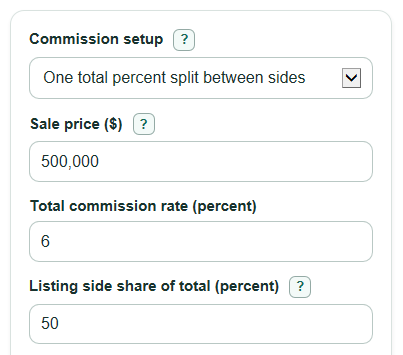
Mistake: Typing 3 in Total commission rate (percent) and 50 in Listing side share of total (percent) when the actual total fee is 6 percent split evenly.
Fix: Enter 6 for the total rate and 50 for the listing-side share, or switch setups if your agreement lists each side separately.
Mistake: Using Flat listing fee ($) and also entering that same listing charge as Listing agent fee (percent) in a different setup.
Fix: Pick the one setup that matches the quote and let hidden rows stay out of the math.
Mistake: Expecting Seller amount after commission to be final cash at closing.
Fix: Add Loan payoff ($) and Other seller costs ($) if you want Cash after payoff and other costs .
Mistake: Filling Agent fixed fees ($) but leaving Agent keeps after broker split (percent) blank and expecting an agent payout.
Fix: Enter the keep percent to show Listing agent take-home estimate .
Limitations & Key Assumptions / Boundary Conditions
- This is an estimate from the numbers you enter. It does not read your listing agreement, buyer agreement, settlement statement, state forms, or local rules.
- Commission, compensation, and concessions can be negotiated, and the party who pays each item depends on the written agreement.
- Seller amount after commission subtracts commission only. It is not final cash at closing unless there is no loan payoff and no other seller cost.
- Cash after payoff and other costs includes only Loan payoff ($) and Other seller costs ($) that you enter. Taxes, prorations, HOA fees, title fees, escrow fees, and credits may change the final amount.
- Percent inputs are treated as simple percentages of the sale price. The calculator does not model tiered commissions, minimum fees, bonuses, rebates, or referral agreements unless you include them manually in another cost field.
- Negative dollar results are kept signed. A negative cash result means the entered commission, payoff, and costs are larger than the sale price.
- The agent take-home result is only a rough agent-side estimate. It does not include taxes, team splits, caps, insurance, marketing costs, or later brokerage adjustments.
Methodology
How the calculator picks the fee math
The calculator first uses Commission setup to decide which inputs are active. Hidden rows are ignored, so a flat listing fee is not mixed with a percent listing fee. Percent values are converted to decimals by dividing by 100.
Formulas
For One total percent split between sides:
Total commission cost = Sale price ($) * Total commission rate (percent) / 100
Listing-side fee = Total commission cost * Listing side share of total (percent) / 100
Buyer-agent amount seller pays = Total commission cost - Listing-side fee
For Separate listing and buyer-agent percents:
Listing-side fee = Sale price ($) * Listing agent fee (percent) / 100
Buyer-agent amount seller pays = Sale price ($) * Buyer-agent amount seller pays (percent) / 100
Total commission cost = Listing-side fee + Buyer-agent amount seller pays
For Flat listing fee plus buyer-agent percent:
Listing-side fee = Flat listing fee ($)
Buyer-agent amount seller pays = Sale price ($) * Buyer-agent amount seller pays (percent) / 100
Total commission cost = Listing-side fee + Buyer-agent amount seller pays
The seller and comparison outputs use these formulas:
Seller amount after commission = Sale price ($) - Total commission cost
Cash after payoff and other costs = Sale price ($) - Total commission cost - Loan payoff ($) - Other seller costs ($)
Effective total rate = Total commission cost / Sale price ($) * 100
Listing agent take-home estimate = Listing-side fee * Agent keeps after broker split (percent) / 100 - Agent fixed fees ($)
Mini example
If the sale price is $500,000 and the commission setup is one total percent at 6 percent with a 50 percent listing-side share, the total commission cost is $500,000 * 6 / 100 = $30,000. The listing-side fee is $30,000 * 50 / 100 = $15,000, and the buyer-agent amount seller pays is $15,000. The seller amount after commission is $500,000 - $30,000 = $470,000.
Validation and signed results
The sale price must be greater than $0. Active required percent fields must be from 0 to 100 and cannot be blank. Dollar cost fields must be 0 or greater. The calculator does not floor seller amount, cash after payoff, or agent take-home at $0 because a negative result has meaning: the entered costs are larger than the amount they are being compared with.