
Calculate cash-on-cash return from annual cash flow or build cash flow from rent, vacancy, expenses, and mortgage payments.
Table of contents
How to use our Cash on Cash Return Calculator
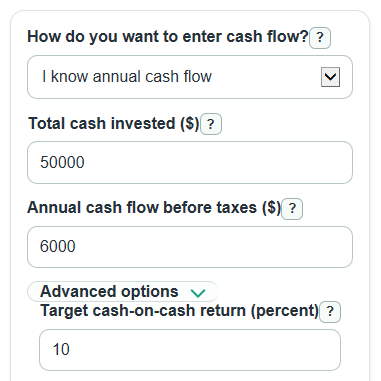
- Choose How do you want to enter cash flow? Pick I know annual cash flow if you already have the yearly amount, or Build it from rent and expenses if you want the calculator to subtract vacancy, expenses, and mortgage payments.
- Enter Total cash invested ($). Include the cash you put into the deal, such as down payment, closing costs, repairs, and other upfront cash.
- Fill in the cash-flow inputs for your mode. In known mode, enter Annual cash flow before taxes ($). In build mode, enter Monthly rent ($), Other monthly income ($), Vacancy rate (percent), Annual operating expenses ($), and Monthly mortgage payment ($).
- Open Advanced options if you want to change Target cash-on-cash return (percent) or add Property value or price ($) for a cap rate check in build mode.
- Use the results as a sanity check. If Monthly cash flow before taxes is negative or the Annual cash-flow gap is below zero, the deal is not meeting that target based on cash flow alone.
Definitions
Cash-on-cash return: Annual cash flow before taxes divided by Total cash invested ($), shown as a percent. It estimates yearly cash flow for each dollar of cash invested [1].
Annual cash flow before taxes: The yearly money left after operating expenses and mortgage payments, before income taxes.
Total cash invested ($): The cash you put into the property, such as down payment, closing costs, repairs, and other upfront cash.
Vacancy rate (percent): The percent of expected rent and other income lost because the unit is empty or unpaid.
Yearly income after vacancy: Rent plus other income for the year after subtracting vacancy loss.
Yearly income before mortgage: Yearly income after vacancy minus operating expenses, before mortgage payments. This is net operating income, or NOI.
Cap rate: Yearly income before mortgage divided by Property value or price ($), shown as a percent. It ignores loan payments.
Annual cash-flow gap: Your annual cash flow before taxes minus the annual cash flow needed for the target return. Negative means the deal is short of the target.
Common mistakes and quick fixes
Mistake: Entering 0 for Total cash invested ($) because the purchase is financed.
Fix: Enter the actual cash you put in, such as down payment, closing costs, and repairs; the calculator needs a positive Total cash invested ($).
Mistake: Putting mortgage payments inside Annual operating expenses ($).
Fix: Keep Annual operating expenses ($) for operating costs only, and enter debt payments in Monthly mortgage payment ($).
Mistake: Treating a negative Annual cash flow before taxes ($) as an input error.
Fix: Negative Annual cash flow before taxes ($) is allowed and means the property loses cash before taxes.
Mistake: Typing Vacancy rate (percent) as 0.05 when you mean 5 percent.
Fix: Enter 5 in Vacancy rate (percent), not 0.05, unless you truly mean five hundredths of one percent.
Mistake: Using monthly cash flow in Annual cash flow before taxes ($).
Fix: Annual cash flow before taxes ($) should be the full yearly amount; multiply the average monthly cash flow by 12 first.
Mistake: Leaving Target cash-on-cash return (percent) at 10 when your personal target is different.
Fix: Change Target cash-on-cash return (percent) so Annual cash-flow gap and Monthly cash-flow gap compare the deal to your own target.
Limitations & Key Assumptions / Boundary Conditions
- The calculator uses pre-tax cash flow. It does not estimate income taxes, depreciation rules, tax credits, or passive loss limits.
- Cash-on-cash return looks at cash flow, not property appreciation, future sale price, loan payoff, refinance proceeds, or your total return over time.
- Monthly Cash flow before taxes is an average. Real months can differ because repairs, insurance, taxes, vacancies, and other bills may not happen evenly.
- Annual operating expenses ($) should exclude mortgage payments. If debt is counted twice, Annual cash flow before taxes will be too low.
- Cap rate appears only in build mode when Property value or price ($) is greater than 0. It uses Yearly income before mortgage and ignores financing.
- Negative cash flow and negative target gaps are valid results. They mean the property is losing cash or is below the chosen target, not that the math failed.
- The tool does not decide if a property is a good deal. It only calculates the cash-flow metrics from the numbers entered.
Methodology
Core formula
Cash-on-cash return is calculated as annual pre-tax cash flow divided by total cash invested, then multiplied by 100 to show a percent [1].
cash_on_cash_return_percent = (annual_cash_flow_before_tax / total_cash_invested) * 100
Total cash invested must be greater than 0 because dividing by zero does not give a meaningful return.
When you build cash flow from rent and expenses
The calculator first turns monthly income into yearly income and reduces it by the vacancy rate.
effective_gross_income = (monthly_rent + other_monthly_income) * 12 * (1 - vacancy_rate_percent / 100)
Next, it subtracts annual operating expenses to get yearly income before mortgage.
noi = effective_gross_income - annual_operating_expenses
Then it subtracts yearly mortgage payments. Mortgage payments lower annual pre-tax cash flow [2].
annual_cash_flow_before_tax = noi - (monthly_mortgage_payment * 12)
monthly_cash_flow = annual_cash_flow_before_tax / 12
Target comparison
The target comparison turns your chosen Target cash-on-cash return (percent) into the annual cash flow needed, then compares your actual annual cash flow with that target. Signed gaps are kept, so negative values show the shortfall.
target_annual_cash_flow = total_cash_invested * (target_return_percent / 100)
gap_to_target_annual = annual_cash_flow_before_tax - target_annual_cash_flow
gap_to_target_monthly = gap_to_target_annual / 12
Cap rate cross-check
In build mode, if Property value or price ($) is entered and is greater than 0, the calculator also shows cap rate.
cap_rate_percent = (noi / property_value) * 100
Mini-example
Suppose Total cash invested ($) is $75,000, Monthly rent ($) is $2,500, Other monthly income ($) is $100, Vacancy rate (percent) is 5, Annual operating expenses ($) is $9,000, Monthly mortgage payment ($) is $1,300, and Target cash-on-cash return (percent) is 8. Yearly income after vacancy is $29,640, Yearly income before mortgage is $20,640, yearly mortgage payments are $15,600, and Annual cash flow before taxes is $5,040. Cash-on-cash return is 6.72%. The target annual cash flow is $6,000, so the Annual cash-flow gap is -$960 and the Monthly cash-flow gap is -$80.
Calculation notes
The calculator strips commas, spaces, and common dollar signs before reading money inputs. It rejects ranges, formulas, missing required values, invalid percentages, and infinite values. It does not floor negative cash flow because a property can truly lose cash before taxes.