
Estimate a high-yield savings balance after deposits, APY growth, monthly fees, estimated taxes, and a comparison APY.
Advanced options
Table of contents
How to use our High Yield Savings Calculator
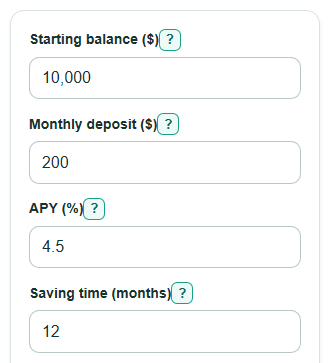
- Enter your Starting balance ($), Monthly deposit ($), APY (%), and Saving time (months).
- Open Advanced options if you want to change Add monthly deposit timing, compare an Other account APY (%), include a Monthly account fee ($), or add an Estimated tax rate on interest (%).
- Select Calculate to see the Projected ending balance first, then interest, net gain, comparison, deposits, tax, and fees.
- Sanity-check the results by comparing Total money you put in with Projected ending balance. If fees are high or APY is low, Gain after tax and fees can be small or negative.
Definitions
APY (%): Annual percentage yield is the yearly percent earned after compounding is included.
Compounding: Earning interest on money that already includes earlier interest.
Starting balance ($): The money already in the savings account before the monthly deposits in this estimate begin.
Monthly deposit ($): The amount added each month. The Add monthly deposit choice controls whether it starts earning interest at the beginning or end of each month.
Interest earned before tax: The savings growth from APY before estimated tax is removed.
Gain after tax and fees: Projected ending balance minus Total money you put in. A negative value means fees and estimated tax are larger than the interest earned.
Other account APY (%): A second APY used to compare another savings account under the same deposit, time, timing, and monthly fee settings.
Common mistakes and quick fixes
Mistake: Entering an APR or interest rate in APY (%) when the account advertises APY.
Fix: Use the advertised APY (%) for the savings account because this calculator already converts APY to a monthly rate.
Mistake: Leaving Saving time (months) as 0 or typing years into that field.
Fix: Enter the number of months, such as 12 for one year or 60 for five years.
Mistake: Putting a negative Monthly deposit ($) to model withdrawals.
Fix: Use 0 or a positive Monthly deposit ($). This calculator is built for adding money, not scheduled withdrawals.
Mistake: Forgetting Monthly account fee ($) when the account charges one.
Fix: Enter the monthly fee so Gain after tax and fees shows a more realistic estimate.
Mistake: Treating Extra balance vs other APY as an after-tax number.
Fix: Read Extra balance vs other APY as a before-tax comparison using the same deposits, time, timing, and monthly fee.
Mistake: Using Estimated tax rate on interest (%) as a tax on the whole account balance.
Fix: Enter only the rate you want applied to Interest earned before tax, not to Starting balance ($) or deposits.
Limitations & Key Assumptions / Boundary Conditions
- APY can change after you open an account, so the Projected ending balance is an estimate, not a bank promise.
- The calculator uses one effective monthly rate from APY and does not model daily balance rules, promotional rates, or tiered APYs.
- Monthly account fee ($) is subtracted after monthly interest. A real bank may have different fee timing or fee waivers.
- Estimated tax rate on interest (%) is applied at the end to total interest. Real taxes can depend on your full income, state, filing status, and timing.
- Other account APY (%) comparison is before estimated tax, so it isolates the rate difference instead of mixing in tax assumptions.
- If the projected balance goes below $0, the calculator keeps the signed result. Real banks may close the account, reject fees, or apply other rules.
Methodology
How the monthly rate is found
The calculator starts with APY because savings accounts usually advertise APY rather than a nominal annual rate. It converts APY to an equivalent monthly growth rate.
monthly_rate = (1 + apy_percent / 100)^(1 / 12) - 1
If APY (%) is 0, the monthly rate is 0 and no interest is added.
How each month is projected
The balance starts as Starting balance ($). For each month, the calculator applies the Add monthly deposit timing choice, adds interest, subtracts Monthly account fee ($), and then adds the deposit at the end if that timing was chosen.
if deposit_timing = beginning, balance = balance + monthly_deposit
interest = balance * monthly_rate
balance = balance + interest - monthly_fee
if deposit_timing = end, balance = balance + monthly_deposit
Interest from each month is added to Interest earned before tax.
Tax, net gain, and comparison
Estimated tax is a simple percent of gross interest. It is subtracted after the monthly loop.
estimated_tax = gross_interest_earned * tax_rate_percent / 100
projected_balance = balance_after_monthly_loop - estimated_tax
Total money you put in is the starting balance plus all monthly deposits.
total_added = starting_balance + monthly_deposit * time_months
net_gain_after_tax_and_fees = projected_balance - total_added
For Extra balance vs other APY, the same monthly loop runs again with Other account APY (%). Estimated tax is not subtracted from either side of that comparison.
extra_balance_vs_other_apy = balance_before_tax_at_apy - balance_before_tax_at_other_apy
average_interest_per_month = gross_interest_earned / time_months
Mini-example
With Starting balance ($) of $10,000, Monthly deposit ($) of $200, APY (%) of 5%, Saving time (months) of 12, end-of-month deposits, no fee, and no estimated tax, the projected ending balance is about $12,954.52. Total money you put in is $12,400, so Interest earned before tax and Gain after tax and fees are both about $554.52.