
Enter your balances and credit limits to find your overall credit use and target balance gap.
Advanced options
Table of contents
How to use our Credit Utilization Calculator
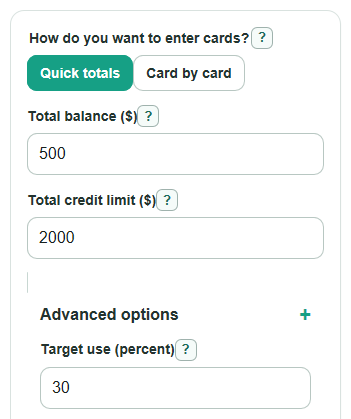
- Choose How do you want to enter cards?: use Quick totals for combined numbers, or Card by card if you want the highest-card result.
- Enter either Total balance ($) and Total credit limit ($), or add each card under Cards: balance and limit ($).
- Open Advanced options if you want to change Target use (percent), test a Planned payment before reporting ($), or test a Planned credit limit increase ($).
- Select Calculate, then read Overall credit use first and use Target balance gap to see the dollar amount above or below your target.
- Sanity-check the answer: if your balance is one quarter of your limit, Overall credit use should be about 25%, and Credit left right now should equal limit minus balance.
Definitions
Credit utilization: The part of your revolving credit limit that is currently used. A $500 balance on a $2,000 limit is 25% use.
Revolving credit: Credit you can borrow, repay, and use again, such as credit cards. Installment loans are not entered in this calculator.
Total balance ($): The combined balance on the revolving accounts you want to include.
Total credit limit ($): The combined full credit limit for those accounts, not the credit left after spending.
Target use (percent): The utilization percent you want to compare against. The default is 30%, a common guideline, not a promise of an ideal score result.
Target balance gap: Current balance minus the target balance. Positive means the balance is above target. Negative means room remains.
Credit left right now: Total credit limit minus total balance. This can be negative if the entered balance is above the entered limit.
Common mistakes and quick fixes
Mistake: Entering available credit in Total credit limit ($) instead of the full limit.
Fix: Use the full credit line, such as 2000 for a card with a $2,000 limit.
Mistake: Putting a monthly payment amount in Total balance ($) or Cards: balance and limit ($) .
Fix: Enter the current balance that may be reported, then use Planned payment before reporting ($) for a payment what-if.
Mistake: Choosing Card by card but leaving one side blank in Cards: balance and limit ($) .
Fix: Each card row needs both a balance and a full credit limit, or remove the row.
Mistake: Reading a negative Target balance gap as an error.
Fix: A negative gap means you are below the target and have that much room before reaching it.
Mistake: Setting Target use (percent) to 0 or leaving it blank.
Fix: Enter a target from 0.1 to 100, such as 30 for a 30% comparison.
Mistake: Expecting Use after planned changes to predict an exact credit score move.
Fix: Use it to compare credit use before and after your planned change, not as a score forecast.
Limitations & Key Assumptions / Boundary Conditions
- This calculator uses revolving credit balances and limits, such as credit cards. Do not include installment loans such as auto loans, student loans, or mortgages.
- Credit reports may use balances and limits reported by the issuer, which can differ from the numbers you see in your online account on a given day.
- The calculator does not predict an exact credit score change. Credit scores can use different models and many other factors.
- The 30% default target is only a comparison point. Some users may aim lower, and score effects are not guaranteed.
- Planned payment before reporting ($) is capped at the current balance for the what-if result, so the after-payment balance cannot go below $0.
- Planned credit limit increase ($) assumes the balance does not also increase.
- Card by card mode finds the highest single-card percent among the rows entered. It does not rank every card unless the calculator display shows those details.
Methodology
Core calculation
The calculator first gets total balance and total credit limit. In Quick totals mode, it uses Total balance ($) and Total credit limit ($). In Card by card mode, it adds the balances and limits from Cards: balance and limit ($), and the hidden quick-total fields do not affect the result.
overall_utilization_pct = (total_balance / total_limit) * 100
available_credit = total_limit - total_balance
Overall credit use is the total balance divided by the total full limit, shown as a percent. Credit left right now keeps the signed value, so a negative number means the entered balance is above the entered limit.
Target comparison
The calculator compares your balance with the balance allowed by Target use (percent).
target_balance_gap = total_balance - (total_limit * target_utilization_pct / 100)
A positive Target balance gap means the current balance is above the target by that many dollars. A negative gap means the current balance is below the target and has that much room before reaching it.
Planned changes
Use after planned changes tests a payment and a limit increase without changing the original result.
after_balance = max(0, total_balance - planned_payment)
after_limit = total_limit + planned_limit_increase
after_change_utilization_pct = (after_balance / after_limit) * 100
The payment floor at $0 is intentional for this what-if, because a payment cannot make the reported card balance negative in this simplified calculation.
Card by card mode
For each entered card, the calculator divides that card's balance by that card's full limit. It then finds the row with the highest percent.
card_utilization_pct = (card_balance / card_limit) * 100
highest_card_target_gap = highest_card_balance - (highest_card_limit * target_utilization_pct / 100)
Single-card use can matter even when overall use is lower, so Card by card mode shows Highest single-card use and Highest card target gap separately [2].
Worked mini-example
If the total balance is $2,500 and the total credit limit is $10,000, overall credit use is 25% because 2500 / 10000 * 100 = 25. With a 30% target, the target balance is $3,000, so the target balance gap is -$500. That negative gap means there is $500 of room before the 30% target.
Rounding and validation
Dollar outputs are displayed to the nearest cent. Percent outputs are displayed to one decimal place when needed. The calculator blocks division by zero by requiring every total or card credit limit used in the current mode to be greater than $0. It also requires nonnegative balances, a target from 0.1 to 100, and nonnegative planned change amounts when those fields are filled.