
Estimate a credit card payoff plan from your balance, APR, payment choice, and minimum payment rule.
Table of contents
How to use our Credit Card Payment Calculator
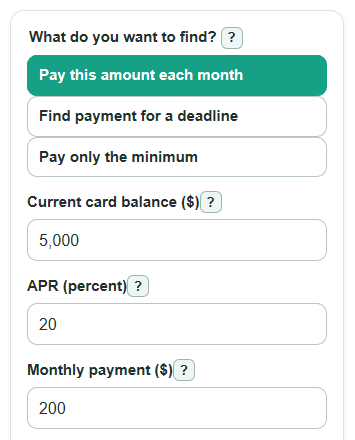
- Choose What do you want to find?: use a set Monthly payment ($), find the payment for a Payoff deadline (months), or estimate paying only the minimum.
- Enter Current card balance ($) and APR (percent). Use the balance you want to pay off, and do not include new purchases you plan to make later.
- Fill in the payment fields shown for your choice, plus Minimum payment (percent of balance) and Minimum payment floor ($) so the calculator can show the minimum-payment and 36-month comparison values.
- Click Calculate, then compare Time to pay off, Total interest paid, and Payment to finish in 36 months. If interest looks high or payoff takes too long, try a higher monthly payment or a shorter deadline.
Definitions
APR (percent): APR is the yearly cost of borrowing on the card balance, stated as a percent. The calculator divides it by 12 to estimate a monthly rate.
Current card balance ($): The starting balance being paid off. The calculation assumes this amount is not increased by new purchases, cash advances, fees, or balance transfers.
Monthly payment ($): The fixed amount you plan to pay each month until the last smaller payment.
Minimum payment: The smallest payment the card company asks for that month. This calculator estimates it from Minimum payment (percent of balance) and Minimum payment floor ($).
Payment to finish in 36 months: A fixed monthly payment estimate that would pay off the entered balance in 36 months under this calculator's monthly interest model.
Total interest paid: The extra cost paid above the starting balance by the time the balance reaches zero.
Common mistakes and quick fixes
Mistake: Entering a future spending amount in Current card balance ($) .
Fix: Enter only the balance you want this payoff plan to cover, because the calculator assumes no new purchases.
Mistake: Typing the monthly interest rate in APR (percent) instead of the yearly APR.
Fix: Use the annual rate shown on your statement, such as 20 for 20% APR.
Mistake: Setting Monthly payment ($) so low that it does not cover the first month's interest.
Fix: Increase the payment until the calculator can show a payoff, or use Find payment for a deadline .
Mistake: Leaving Minimum payment (percent of balance) blank because you are not using minimum-only mode.
Fix: Enter the percent from your statement or card terms so First estimated minimum payment can be calculated.
Mistake: Using years in Payoff deadline (months) .
Fix: Convert years to months first, such as 2 years = 24 months.
Limitations & Key Assumptions / Boundary Conditions
- The calculator uses a simple monthly interest model: APR divided by 12. Many card issuers use daily balance methods, so your statement can differ.
- It assumes no new purchases, fees, late payments, cash advances, balance transfers, promotional rates, or penalty APR changes.
- The minimum-payment rule is an estimate based only on a percent of balance and a dollar floor. Your issuer may add interest, fees, or other amounts to the required minimum.
- The 36-month payment is a planning comparison. It is not a promise from your card issuer, and it changes if your balance, rate, fees, or purchases change.
- The simulation stops at 1200 months. If a payoff would take longer, the calculator reports that the payment is too low or beyond the supported range.
- Rounding on real statements can cause small differences from the displayed totals.
Methodology
Monthly rate
The calculator treats APR as the yearly borrowing rate and converts it to a simple monthly rate. The CFPB describes APR as the price of borrowing money stated as an annual percentage rate [2].
monthly_rate = apr_percent / 100 / 12
Fixed monthly payment
For a fixed payment, the calculator adds one month of interest, pays the smaller of the planned payment or the amount due, and repeats until the balance reaches zero.
interest = balance * monthly_rate
amount_due = balance + interest
payment = min(monthly_payment, amount_due)
new_balance = amount_due - payment
If the fixed monthly payment is less than or equal to the first month's interest when APR is above 0, the balance cannot be paid off under that plan.
Payment for a deadline
For a target payoff time, the calculator uses the standard fixed-payment formula. If the monthly rate is 0, it divides the balance by the number of months.
if monthly_rate = 0: payment = balance / target_months
otherwise: payment = balance * monthly_rate / (1 - (1 + monthly_rate)^(-target_months))
The same formula is used for Payment to finish in 36 months. Credit card repayment disclosures use a 36-month comparison concept, so this page includes that benchmark for every mode [1].
Minimum payment simulation
For minimum-only mode, the calculator estimates the payment each month from the balance before that month's interest is added, then applies the dollar floor.
estimated_minimum = max(balance * minimum_percent / 100, minimum_floor)
payment = min(estimated_minimum, balance + interest)
new_balance = balance + interest - payment
Totals
All payments are added together. Interest is the amount paid above the starting balance.
total_paid = sum(all_payments)
total_interest = total_paid - starting_balance
Mini example
With a $5,000 balance, 20% APR, and a $200 monthly payment, the monthly rate is 20 / 100 / 12, or about 1.6667% per month. The first month adds about $83.33 of interest, so $200 reduces the balance to about $4,883.33. Repeating that process gives an estimated payoff of 33 months, about $1,522.10 of total interest, about $6,522.10 paid in all, and a last payment of about $122.10.