
Enter your debts to estimate a debt avalanche payoff plan, total interest, debt-free date, and needed extra payment.
Advanced options
Table of contents
How to use our Debt Avalanche Calculator
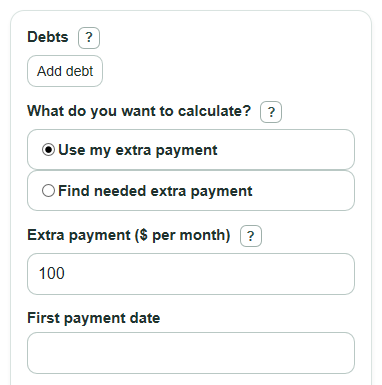
- Add each item in Debts with a name, balance, APR, and required monthly payment.
- Choose Use my extra payment if you know the extra amount, or choose Find needed extra payment if you have a target payoff time.
- Enter Extra payment or Target payoff time, then set the First payment date.
- Use Advanced options only if you want a daily interest estimate or a smallest-balance comparison.
- Check whether Time to pay off all debts, Total interest paid, and Plan note make sense; if the payoff is very long, raise the extra payment or recheck each minimum payment.
Definitions
Debt avalanche: A payoff plan that sends extra money to the active debt with the highest APR first.
APR: The annual percentage rate, or yearly interest rate, entered as a percent.
Minimum payment: The required monthly payment for a debt. In this calculator, each minimum comes from the Debts table.
Extra payment: Money paid each month on top of all entered minimum payments.
Debt-free date: The estimated calendar month when the last debt reaches $0.
Smallest-balance plan: A comparison plan that sends extra money to the active debt with the lowest balance first.
Total interest paid: The estimated interest charged during the simulated payoff plan.
Common mistakes and quick fixes
Mistake: Entering a card's monthly rate in the APR spot inside Debts .
Fix: Use the yearly APR percent shown by the lender, such as 24 for 24% APR.
Mistake: Putting the total monthly payment into Extra payment .
Fix: Enter only the extra amount above all minimum payments; the calculator adds the minimums from Debts .
Mistake: Changing Target payoff time while Use my extra payment is selected and expecting the result to change.
Fix: Select Find needed extra payment when you want the target month to control the plan.
Mistake: Using the wrong First payment date for a daily interest estimate.
Fix: Set the date for the first payment in the plan, especially when Interest estimate is set to daily.
Mistake: Reading Interest saved vs minimum payments as a guaranteed lender quote.
Fix: Treat it as an estimate based on your entered balances, APRs, minimums, and selected Interest estimate .
Mistake: Turning off Compare with smallest-balance plan? and then looking for Smallest-balance plan extra interest .
Fix: Set that option to Yes if you want to compare avalanche with the smallest-balance payoff order.
Limitations & Key Assumptions / Boundary Conditions
- The calculator estimates a payoff schedule; it is not a lender statement and does not replace the exact terms in your account agreement.
- The monthly interest option uses APR divided by 12. The daily option uses APR divided by 365 and the number of days in each calendar month.
- Real credit cards may use average daily balance rules, grace periods, fees, promotional APRs, late payments, or payment allocation rules that this plan does not model.
- The plan keeps the total monthly budget constant by rolling freed minimum payments to the next active debt.
- The simulation stops at 1200 months, equal to 100 years. If the plan does not finish by then, the result should be treated as not feasible with those inputs.
- The target-date mode finds the smallest extra payment to the next cent within the calculator's safety search range.
- A balance can grow for a while if its minimum payment is less than its monthly interest and it is not the current target debt.
Methodology
Payoff order
The avalanche order starts with the highest APR debt. If two debts have the same APR, the smaller starting balance comes first. If those are also tied, the earlier row comes first.
sort by APR_percent descending, then starting_balance ascending, then original row number ascending
Monthly interest
For the monthly estimate, each active debt gets one month of interest before payments are applied.
monthly_rate = APR_percent / 100 / 12
month_interest = balance * monthly_rate
For the daily estimate, the calculator uses the date in the schedule to count days in the month.
month_interest = balance * ((1 + APR_percent / 100 / 365) ^ days_in_month - 1)
Monthly payment loop
The total monthly budget is the sum of the original minimum payments plus the extra payment. This budget stays the same until all debts are paid off.
monthly_budget = sum(original_minimum_payments) + extra_payment
Each month, the calculator adds interest to every active debt, pays each active debt up to its entered minimum, then sends any remaining budget to active debts in avalanche order. Each payment is capped at the debt's balance after interest, so the schedule does not overpay a debt. If a final payment uses less than the normal amount, the leftover money can move to the next active debt in the same month.
Minimum-only baseline and savings
The minimum-only baseline pays each debt separately with its entered minimum and does not roll freed payments to another debt. The savings number compares that baseline with the avalanche plan.
interest_saved_vs_minimum = minimum_only_total_interest - avalanche_total_interest
A positive value means the avalanche plan is estimated to save interest compared with paying only the entered minimums. A negative value is possible in unusual input combinations and is shown as a negative number instead of being forced to $0.
Smallest-balance comparison
When the comparison is on, the calculator runs the same monthly budget again but sends extra money to the smallest active balance first. The comparison output is snowball interest minus avalanche interest.
snowball_interest_difference = snowball_total_interest - avalanche_total_interest
A positive value means the avalanche plan costs less interest than the smallest-balance plan for the entered debts.
Finding the needed extra payment
In target mode, the calculator searches extra payments in cents. It keeps the lowest cent amount that makes the avalanche plan finish on or before the target month.
Use binary search on extra_payment in cents until avalanche payoff_months <= target_months; return the smallest cent value that passes.
Mini example
Suppose one debt has a $1,000 balance, 12% APR, and a $100 minimum payment. With the monthly estimate and no extra payment, the monthly rate is 0.12 / 12 = 0.01, so the first month's interest is $1,000 * 0.01 = $10. The first payment reduces the balance from $1,010 to $910. The loop repeats until the balance reaches $0, capping the last payment to the remaining balance.