
Estimate the return grille face area you need, or check if your current grille is large enough for the airflow.
Advanced options
Air speed and grille opening
Fit limits
Table of contents
How to use our Return Air Grille Size Calculator
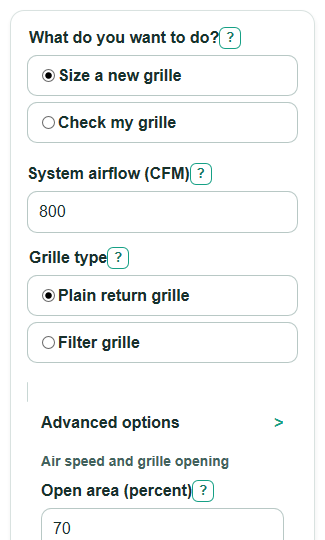
- Choose What do you want to do?: Size a new grille for a new opening, or Check my grille for a grille you already have.
- Enter System airflow (CFM). CFM means cubic feet per minute, or how much air moves through the grille each minute.
- Pick Grille type. Use Plain return grille for a grille without a filter, or Filter grille when air passes through a filter at the grille.
- If checking an existing grille, enter Existing grille width (inches) and Existing grille height (inches) using the listed opening size, not the outside trim.
- Use Advanced options only when you know Open area (percent), need a Custom air speed limit (FPM), or must limit Largest allowed width (inches) or Largest allowed height (inches). After calculating, sanity-check that Suggested standard size is practical and that Air speed margin is not negative.
Definitions
CFM: Cubic feet per minute. It is the amount of air moving through the grille each minute.
FPM: Feet per minute. It is air speed through the open part of the grille.
Open area (percent): The part of the grille face that air can pass through after bars, louvers, or decoration block part of the opening.
Minimum grille face area: The smallest gross width times height area the calculator estimates for the selected airflow, open area, and air speed limit.
Air speed margin: The percent room between the selected air speed limit and the calculated air speed. Positive is below the limit. Negative is above the limit.
Face area gap: Required face area minus existing face area. Positive means more grille face area is needed. Negative means the grille is larger than the calculated minimum.
Filter grille: A return grille that holds a filter. It usually needs a lower air speed target because the filter adds resistance.
Common mistakes and quick fixes
Mistake: Entering equipment tons instead of System airflow (CFM).
Fix: Convert tons to airflow first if needed, then enter the airflow in CFM.
Mistake: Measuring Existing grille width (inches) and Existing grille height (inches) from the outside trim.
Fix: Use the listed grille size or the duct opening size, not the decorative frame.
Mistake: Leaving Open area (percent) at 70 when the grille has a product data sheet with a different value.
Fix: Enter the manufacturer's open area percent so Minimum grille face area and Air speed through your grille are closer to the real product.
Mistake: Using Plain return grille when the return has a filter at the grille.
Fix: Choose Filter grille so the calculator uses the lower default air speed target unless you enter Custom air speed limit (FPM).
Mistake: Adding Largest allowed width (inches) or Largest allowed height (inches) limits that are smaller than any useful standard size.
Fix: Remove the limit, allow a larger Suggested standard size, or plan for more than one return grille.
Mistake: Treating Size check result as a full duct design approval.
Fix: Use it as a first-pass grille check, then verify duct size, filter pressure drop, and blower performance when accuracy matters.
Limitations & Key Assumptions / Boundary Conditions
- This is a grille face sizing check only. It does not replace Manual D duct design, blower table checks, filter pressure drop data, or a field airflow test.
- The default air speed limits are editable starting points: 500 FPM for a plain return grille and 300 FPM for a filter grille. Use a project target or manufacturer table when you have one.
- The default Open area (percent) is 70 percent. Decorative, stamped, egg-crate, or high-performance grilles can have different open area and pressure drop.
- Suggested standard size is chosen from a loaded list of common grille sizes, so a real catalog may have other sizes that work.
- Largest allowed width (inches) and Largest allowed height (inches) only filter the size suggestion. They do not check wall framing, duct transitions, clearances, or cabinet fit.
- More face area usually lowers estimated air speed, but noise and airflow also depend on grille shape, duct connection, filter type, and blower operation.
- If one grille cannot meet the needed area, splitting airflow across multiple return grilles may be more practical than forcing one large opening.
Methodology
How the calculator sizes a grille
The calculator first chooses the air speed limit. If Custom air speed limit (FPM) is entered and greater than 0, that value is used. Otherwise it uses 500 FPM for Plain return grille or 300 FPM for Filter grille.
target_fpm = custom_target_fpm if custom_target_fpm > 0, else 500 for plain return grille, else 300 for filter grille
Open area is converted from a percent to a decimal fraction.
free_fraction = free_area_percent / 100
The minimum face area is based on airflow divided by allowed air speed, then adjusted upward for the blocked part of the grille. The factor 144 converts square feet to square inches.
required_face_area_sq_in = system_airflow_cfm / (target_fpm * free_fraction) * 144
How an existing grille is checked
In Check my grille mode, the calculator uses Existing grille width (inches) and Existing grille height (inches) to estimate air speed through the open part of the grille.
existing_actual_velocity_fpm = system_airflow_cfm / ((existing_width_in * existing_height_in * free_fraction) / 144)
Air speed margin stays signed so a negative result clearly shows the grille is above the selected target.
speed_margin_percent = (target_fpm - actual_velocity_fpm) / target_fpm * 100
The face area gap also stays signed. Positive means the existing grille is short on area. Negative means it is larger than the calculated minimum.
face_area_gap_sq_in = required_face_area_sq_in - (existing_width_in * existing_height_in)
Size check result is shown as a friendly pass or needs more area message.
pass_score = 1 if existing_actual_velocity_fpm <= target_fpm, else 0
How the suggested size is picked
For Size a new grille mode, the calculator scans a loaded list of common return grille sizes. It keeps sizes with face area at least as large as Minimum grille face area and also applies Largest allowed width (inches) and Largest allowed height (inches) when those limits are entered. It then sorts by smallest face area first, then by smaller maximum side, then by width.
choose first size where width_in * height_in >= required_face_area_sq_in and optional size limits are met
Mini-example
For 800 CFM, Plain return grille, 70 percent open area, and no custom speed, the target is 500 FPM and the open-area fraction is 0.70.
required_face_area_sq_in = 800 / (500 * 0.70) * 144 = 329.14 sq in
The first loaded standard size that meets that area is 24 x 14, which has 336 sq in of face area.
suggested_actual_velocity_fpm = 800 / ((24 * 14 * 0.70) / 144) = 489.80 FPM
speed_margin_percent = (500 - 489.80) / 500 * 100 = 2.04 percent