
Estimate brake rotor replacement cost with parts, labor, tax, fees, axle count, and an optional shop quote check.
Table of contents
How to use our Brake Rotor Replacement Cost Calculator
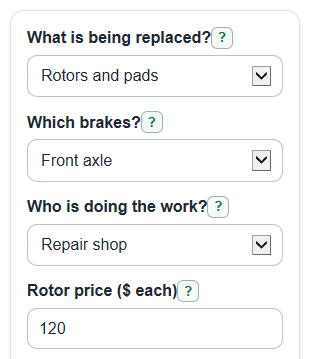
- Choose What is being replaced?, Which brakes?, and Who is doing the work? so the calculator counts the right axles, parts, and labor.
- Enter Rotor price ($ each) and, for a repair shop estimate, Shop labor rate ($ per hour).
- Open Advanced options if you want to change Labor time (hours per axle), Pad set price ($ per axle), Extra fees ($), Sales tax (percent), or add a Shop quote to check ($).
- Click Calculate and read Estimated total cost first, then use Parts total, Labor total, Tax and extra fees, and Estimated cost per axle to see where the money goes.
- Sanity-check the answer by confirming that one axle uses two rotors, both axles use four rotors, and a rotors-only job does not include Pad set price ($ per axle).
Definitions
Rotor: The round metal disc that the brake pads squeeze to slow the wheel.
Axle: The front pair or rear pair of brakes. In this calculator, Front and rear axles counts as two axles.
Rotor price ($ each): The cost of one rotor, not a pair.
Pad set price ($ per axle): The cost of the brake pads for one axle, usually the left and right wheel together.
Labor time (hours per axle): The shop time charged for one axle before multiplying by the shop labor rate.
Quote compared with estimate: The shop quote minus the calculator estimate. A positive number means the quote is higher; a negative number means it is lower.
Common mistakes and quick fixes
Mistake: Entering the price for two rotors in Rotor price ($ each).
Fix: Enter the price for one rotor only; the calculator multiplies it by two rotors per axle.
Mistake: Leaving Who is doing the work? on Repair shop when you are doing a DIY job.
Fix: Choose DIY so Shop labor rate ($ per hour) and Labor time (hours per axle) do not add labor cost.
Mistake: Choosing Rotors only but expecting Pad set price ($ per axle) to be included.
Fix: Set What is being replaced? to Rotors and pads if pads are part of the job.
Mistake: Typing sales tax as 0.07 in Sales tax (percent).
Fix: Enter 7 for 7 percent, or 6.25 for 6.25 percent.
Mistake: Comparing a full front-and-rear quote to Estimated cost per axle.
Fix: Compare a full quote to Estimated total cost, or compare a per-axle quote to Estimated cost per axle.
Mistake: Treating Quote compared with estimate as the final right-or-wrong answer.
Fix: Use it as a difference check; a higher quote may include better parts, warranty coverage, extra repairs, or local shop fees.
Limitations & Key Assumptions / Boundary Conditions
- The estimate uses the values you enter. It does not know your vehicle trim, rotor type, local parts markup, shop minimum charges, warranty terms, or any needed caliper or brake fluid work.
- The calculator treats one axle as two rotors and both axles as four rotors. It is not for unusual brake setups that use a different count.
- Sales tax is applied to parts plus Extra fees ($), not to labor. Some states, cities, or shops may tax labor or fees differently.
- DIY mode sets Labor total to $0. It does not price tools, brake cleaner, grease, jack stands, torque tools, or your time.
- Rotors-only mode ignores Pad set price ($ per axle). If your quote includes pads, choose Rotors and pads.
- A low Shop quote to check ($) is not automatically better. Compare the part brand, warranty, included services, and whether the quote covers both sides of the selected axle.
Methodology
How the estimate is built
The calculator prices brake work by axle, because many brake pad and rotor prices are discussed per axle [2]. It first turns your brake choice into an axle count, then counts rotors, adds pads when selected, adds shop labor when selected, and applies tax and fees.
axle_count = 2 if Which brakes? is Front and rear axles; otherwise axle_count = 1
rotor_count = axle_count * 2
pad_cost_total = axle_count * Pad set price ($ per axle) when What is being replaced? is Rotors and pads; otherwise pad_cost_total = 0
parts_total = rotor_count * Rotor price ($ each) + pad_cost_total
labor_total = axle_count * Labor time (hours per axle) * Shop labor rate ($ per hour) when Who is doing the work? is Repair shop; otherwise labor_total = 0
tax_amount = (parts_total + Extra fees ($)) * Sales tax (percent) / 100
taxes_and_fees = tax_amount + Extra fees ($)
estimated_total_cost = parts_total + labor_total + taxes_and_fees
cost_per_axle = estimated_total_cost / axle_count
Quote check
If Shop quote to check ($) is entered, the calculator subtracts the estimate from the quote. The sign is kept because it matters.
quote_difference = Shop quote to check ($) - estimated_total_cost
A positive Quote compared with estimate means the quote is above the estimate. A negative value means the quote is below the estimate.
Mini example
For one front axle at a repair shop with rotors and pads, suppose Rotor price ($ each) is $120, Pad set price ($ per axle) is $90, Labor time (hours per axle) is 1.5, Shop labor rate ($ per hour) is $130, Extra fees ($) is $25, and Sales tax (percent) is 7.
parts_total = 2 * 120 + 90 = 330
labor_total = 1 * 1.5 * 130 = 195
taxes_and_fees = (330 + 25) * 7 / 100 + 25 = 49.85
estimated_total_cost = 330 + 195 + 49.85 = 574.85
Displayed dollar results are rounded to cents. Large numbers are shown with comma separators. If a required number is blank, negative, outside its allowed range, or cannot be read as a number, the calculator stops and shows an error instead of partial results.
Sources
- Cost to Replace Brake Pads and Rotors (2026 Guide | ConsumerAffairs - Consumeraffairs
- How Much Does Brake Pad Replacement Cost? (2026 Prices) | Direct Brakes - Directbrakes
- How Much Does a Brake Job Cost in 2026? - Directbrakes
- Brake Rotor Replacement Cost: Average Price, Vibration Symptoms & Brake Guide - Torquemech