
Use this battery C rating calculator to find C-rate, current, run time, or needed capacity from battery and load specs.
Advanced options
Table of contents
How to use our Battery C Rating Calculator
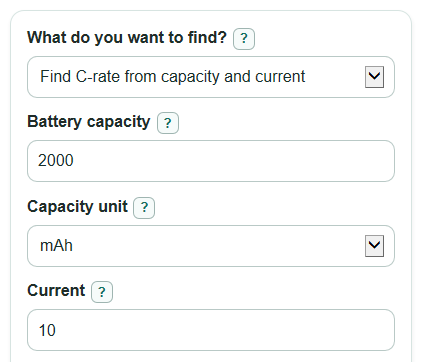
- Choose What do you want to find? so the calculator shows only the Battery capacity, Current, and C rating fields needed for that mode.
- Enter Battery capacity and Capacity unit exactly as printed, such as 2000 mAh or 2 Ah, and enter Current with the matching Current unit.
- Open Advanced options if you want to change Usable capacity, add Battery label continuous C rating and Safety buffer, choose Number format, or enter Nominal voltage for watts.
- Click Calculate, then check Main answer first and compare Capacity used and Current used with your original numbers to catch mAh versus Ah or mA versus A mistakes.
- If Current room left is negative, treat the entered Current as above the buffered label limit and recheck the battery datasheet before using that setup.
Definitions
C rating: A rate that compares current with battery capacity. A 1C discharge of a 2 Ah battery is 2 A in ideal math.
Battery capacity: The stored charge rating printed on the battery, usually in mAh for small packs or Ah for larger batteries.
Current: The charge, discharge, or load flow in amps. Higher current means the battery is being used faster.
Usable capacity: The percent of rated capacity you plan to use in the run time calculation.
Battery label continuous C rating: The manufacturer's steady C limit, not a short burst rating.
Buffered label current: The continuous label current after subtracting the Safety buffer.
Current room left: Buffered label current minus Current. A positive value is room left; a negative value is over the buffered limit.
Nominal voltage: The battery's named voltage used for the optional Ideal electrical power estimate.
Common mistakes and quick fixes
Mistake: Entering 2000 in Battery capacity but choosing Capacity unit as Ah.
Fix: If the label says 2000 mAh, choose mAh so Capacity used becomes 2 Ah.
Mistake: Typing 500 in Current but leaving Current unit set to A when the load is 500 mA.
Fix: Choose mA, or enter 0.5 with Current unit set to A.
Mistake: Using a burst value for Battery label continuous C rating.
Fix: Enter only the continuous C rating from the battery label or datasheet before trusting Buffered label current.
Mistake: Setting Safety buffer to 100 percent.
Fix: Use a value below 100 percent; 20 percent means the check uses 80 percent of the label's continuous current.
Mistake: Leaving Usable capacity at 100 percent when you only plan to use part of the pack.
Fix: Set Usable capacity to your planned percent so Ideal run time is based on the usable part of the battery.
Mistake: Reading Main answer as a safety approval.
Fix: Use Main answer as ideal math, then compare Current room left and the battery manufacturer's limits.
Limitations & Key Assumptions / Boundary Conditions
- The C-rate, current, capacity, and run time results are ideal math estimates. Real batteries can run shorter because of voltage sag, heat, battery age, chemistry, cutoff voltage, and load changes.
- The safety check only works when Battery label continuous C rating is entered from a real label or datasheet. The calculator does not infer a safe rating from battery type or brand.
- Safety buffer is a user choice. A larger buffer lowers Buffered label current and makes Current room left more conservative.
- Ideal electrical power uses Nominal voltage times Current. It does not include motor, controller, charger, wiring, or converter losses.
- Needed capacity is the minimum ideal capacity for the chosen Current and C rating. It does not choose a battery chemistry, cell count, connector, fuse, wire size, or thermal design.
- Very high C-rate use can create heat and stress that this calculator does not model. Follow the battery manufacturer's limits and safety instructions.
Methodology
Core calculation
The calculator first converts Battery capacity to amp-hours and Current to amps. Then it applies the formula for the selected mode. C-rate is current normalized to battery capacity [3].
Q_Ah = capacity_mAh / 1000
I_A = current_mA / 1000
C_rate = I_A / Q_Ah
I_A = C_rate * Q_Ah
Q_needed_Ah = I_A / C_rate
Run time and optional outputs
Ideal run time uses the Usable capacity setting. With 100 percent usable capacity, the full-capacity shortcut is 1 divided by C-rate in hours.
runtime_hours = (Q_Ah * usable_capacity_percent / 100) / I_A
runtime_minutes = runtime_hours * 60
If Nominal voltage is entered, the calculator also estimates ideal electrical power.
power_W = nominal_voltage_V * I_A
Buffered label check
When Battery label continuous C rating is entered, the calculator multiplies that rating by capacity, then subtracts the Safety buffer. Battery safety guidance should be followed for continuous current limits and handling precautions [1].
I_buffered_A = Q_Ah * label_continuous_c * (1 - safety_buffer_percent / 100)
current_margin_A = I_buffered_A - I_A
Current room left is signed. A positive value means the entered Current is below the buffered limit. A negative value means it is above the buffered limit.
Mini example
For a 2000 mAh battery drawing 10 A, capacity is 2 Ah. The C-rate is 10 / 2 = 5C. Full-capacity ideal run time is 2 / 10 = 0.2 hours, or 12 minutes. If the label continuous rating is 8C and Safety buffer is 20 percent, Buffered label current is 2 * 8 * 0.8 = 12.8 A, so Current room left is 12.8 - 10 = 2.8 A. With Nominal voltage of 11.1 V, Ideal electrical power is 11.1 * 10 = 111 W.