
Convert inches to kilometers or reverse the conversion, with decimal, scientific notation, and meter helper results for tiny values.
Table of contents
How to use our Inches to Kilometers Converter
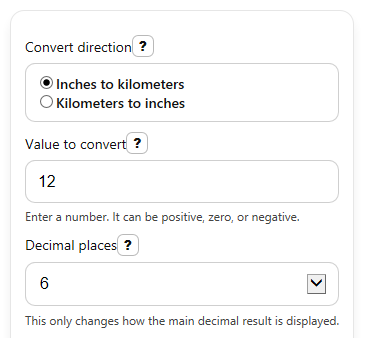
- Choose Convert direction so the tool knows whether your starting number is in inches or kilometers.
- Enter your number in Value to convert. You can use decimals, zero, or a negative value if needed.
- Pick Decimal places to control how many digits show in the main decimal answer.
- Click Calculate to see Converted value, Scientific notation, and, for inch-to-kilometer conversions, Also in meters.
- Sanity-check the result: if you convert a small inch value, the kilometer answer should be a very small number, while the meter helper is often easier to picture.
Definitions
Convert direction: Tells the calculator which way to convert, either inches to kilometers or kilometers to inches.
Value to convert: The starting length you type into the calculator.
Decimal places: How many digits appear after the decimal point in the main result.
Scientific notation: A short way to write very small or very large numbers, such as 2.54 x 10^-5.
Meter: A metric unit of length. One kilometer equals 1,000 meters.
Conversion factor: The fixed ratio used to change one unit into another, such as 0.0000254 kilometers per inch.
Common mistakes and quick fixes
Mistake: Leaving Value to convert blank and expecting 0.
Fix: Enter a number in Value to convert before you calculate.
Mistake: Typing words like "twelve" into Value to convert.
Fix: Use digits only in Value to convert, such as 12 or 12.5.
Mistake: Forgetting to change Convert direction and reading the answer in the wrong unit.
Fix: Check Convert direction first, then read Converted value in the shown output unit.
Mistake: Thinking a tiny Converted value in kilometers means the tool is wrong.
Fix: Compare it with Scientific notation or Also in meters to make the size easier to understand.
Mistake: Choosing too few digits in Decimal places so a small kilometer result looks like 0.
Fix: Increase Decimal places to 8 or 10 when converting small inch values.
Mistake: Expecting Also in meters to appear when converting kilometers to inches.
Fix: Use inch-to-kilometer mode if you want the Also in meters helper output.
Limitations & Key Assumptions / Boundary Conditions
- The calculator uses fixed unit definitions, so it converts length only. It does not handle area, volume, or square or cubic units.
- The result depends on the selected Convert direction. If the direction is wrong, the number can be off by a very large amount.
- Rounding depends on Decimal places. With too few digits, a very small kilometer value can look like 0 even when it is not.
- Also in meters is shown only for inches to kilometers because that helper is meant to make tiny kilometer results easier to read.
- Very large inputs that are not finite cannot be converted safely and should be entered as smaller finite numbers.
- Negative values are allowed mathematically and stay negative in the outputs, but they may not make sense for every real-world measuring situation.
Methodology
How the conversion is calculated
The calculator uses exact length relationships. One inch equals 0.0254 meters, and one kilometer equals 1,000 meters.
km = in x 0.0000254
in = km / 0.0000254
m = km x 1000
Worked mini-example
If Convert direction is inches to kilometers and Value to convert is 12, the calculator multiplies 12 by 0.0000254.
km = 12 x 0.0000254 = 0.0003048 km
With 6 decimal places, the main Converted value shows 0.000305 km. The helper output converts that to meters.
m = 0.0003048 x 1000 = 0.3048 m
The Scientific notation view shows the same answer in compact form, which helps when the decimal result is very small.
Display choices
The main result is rounded to the selected Decimal places. Scientific notation is shown separately so small answers do not get mistaken for zero. Large values should stay in ordinary decimal form in the main result, with separators for readability.
Assumptions and limits
This tool assumes standard modern inch and kilometer definitions. It converts one numeric length at a time, keeps negative signs if you enter a negative value, and rejects blank, non-numeric, or non-finite input instead of guessing what you meant.