
Convert kilometers to yards or yards to kilometers with a clear formula, adjustable rounding, and an exact value for checking your work.
Table of contents
How to use our Kilometers to Yards Converter
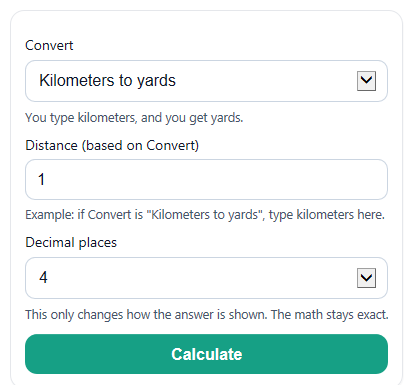
- Choose a direction in Convert: either Kilometers to yards or Yards to kilometers.
- Enter your number in Distance using the unit that matches the direction you picked.
- Pick how many digits you want to show in Decimal places.
- Click Calculate to see Converted distance, Equation used, Conversion factor, and More exact value.
- Sanity-check the answer by making sure the unit changed the way you expected and that More exact value rounds to the same number shown in Converted distance.
Definitions
Convert: The direction of the conversion, either kilometers to yards or yards to kilometers.
Distance: The number you type in before conversion.
Decimal places: How many digits appear after the decimal point in the rounded display.
Converted distance: The main answer after changing the input to the other unit.
Conversion factor: The fixed rate used to change one unit into the other. For this tool, 1 kilometer = 1093.6132983377 yards.
More exact value: The converted result shown with higher precision before your chosen rounding is applied.
Yard: A length unit defined as exactly 0.9144 meter [1].
Common mistakes and quick fixes
Mistake: Entering miles or meters in Distance when Convert is set to kilometers or yards.
Fix: Enter only kilometers for Kilometers to yards or only yards for Yards to kilometers .
Mistake: Leaving Distance blank or typing text instead of a number.
Fix: Enter a real numeric value in Distance , such as 1, 5.2, 0, or -2.5.
Mistake: Reading Converted distance as if it kept the same unit as the input.
Fix: Check the unit shown with Converted distance ; it changes to yards when you start with kilometers and to kilometers when you start with yards.
Mistake: Thinking the answer is wrong because Converted distance looks slightly different from manual work.
Fix: Compare your work to Equation used , Conversion factor , and More exact value since different rounding choices can change the last digits.
Mistake: Setting Decimal places too low for homework or careful measurement checks.
Fix: Use more digits in Decimal places and compare with More exact value before rounding your final answer.
Mistake: Treating a negative Distance as a normal path length without thinking about what it means.
Fix: A negative input is allowed, but read Converted distance as a signed change or direction, not as an ordinary walked distance.
Limitations & Key Assumptions / Boundary Conditions
- This converter only switches between kilometers and yards. It does not convert miles, meters, feet, or other units.
- The math uses a fixed factor based on exact unit definitions, so it does not account for measurement uncertainty in your original distance.
- Converted distance is rounded to the number chosen in Decimal places, so the displayed value may differ slightly from hand work that uses different rounding.
- Negative values are allowed because the conversion math is linear, but negative distance usually describes a signed change or direction, not a physical path length.
- Very large values are supported for display, but if your original measurement was already rounded, the converted result cannot be more accurate than the starting value.
Methodology
How the conversion is calculated
The calculator uses one exact relationship for length:
1 yard = 0.9144 meter [1]. It also uses 1 kilometer = 1000 meters, so 1 kilometer in yards is 1000 / 0.9144 = 1093.6132983377 yards.
yards = kilometers * 1093.6132983377
kilometers = yards / 1093.6132983377
1 kilometer in yards = 1000 / 0.9144
Worked mini-example
If Convert is set to kilometers to yards and Distance is 5, the tool multiplies 5 by 1093.6132983377.
5 * 1093.6132983377 = 5468.0664916885 yards
If Decimal places is 2, the displayed Converted distance becomes 5468.07 yards, while More exact value keeps the longer number for checking.
Rounding and display
The calculator keeps full internal precision until the final display step. That means Converted distance is rounded only at the end, while More exact value shows extra digits so small differences are easier to spot. This follows standard conversion practice where rounding is handled after conversion, not during the middle of the math [2].
Assumptions used
This tool assumes the input is already in the unit required by the selected direction, uses a constant conversion factor, and treats zero and negative numbers as valid mathematical inputs. If the original measurement was estimated or rounded, the converted result will reflect that same limit in accuracy.