
Convert cubic feet to US liquid, US dry, or Imperial pints and see the exact factor and reverse check at the same time.
Table of contents
How to use our Cubic Feet to Pints Converter
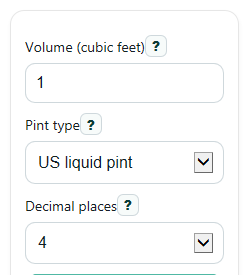
- Enter your value in Volume (cubic feet). Decimals and negative signed values are allowed.
- Choose the right Pint type: US liquid pint, US dry pint, or Imperial pint.
- Pick Decimal places if you want shorter or more detailed results, then click Calculate.
- Read Pints as the main answer, then use Same volume in cubic feet as a quick check that the conversion stayed consistent after rounding.
- If the number looks off, switch Pint type and compare Conversion factor used, because different pint definitions give different answers.
Definitions
Volume (cubic feet): The starting volume in cubic feet, written as ft^3.
Pint type: The pint system used for the conversion. This calculator uses US liquid, US dry, or Imperial pints.
Pints: The converted volume in the pint system you selected.
Same volume in cubic feet: A back-converted check value made from the pint result and the same pint factor.
Conversion factor used: How many selected pints fit into 1 cubic foot, shown in pt per ft^3.
Decimal places: How many digits appear after the decimal point in the displayed results.
US liquid pint: A US pint used for liquid measure, equal to 28.875 cubic inches [3].
US dry pint: A different US pint used for dry measure, so it does not match the US liquid pint.
Imperial pint: The British pint definition, which is larger than a US liquid pint [1].
Common mistakes and quick fixes
Mistake: Leaving Volume (cubic feet) blank or typing text instead of a real number.
Fix: Enter a numeric value such as 1, 0.75, or -3 in Volume (cubic feet) .
Mistake: Picking the wrong Pint type and expecting the same answer for every system.
Fix: Choose the pint family you actually need, then recheck Pints and Conversion factor used .
Mistake: Treating US liquid pint and US dry pint as the same unit.
Fix: Use US liquid pint for most liquid volume cases and compare the Pint type note if you are unsure.
Mistake: Thinking Same volume in cubic feet should be different from what you entered.
Fix: It is a reverse-check output, so it should match your starting Volume (cubic feet) except for display rounding.
Mistake: Changing Decimal places and assuming the actual conversion changed.
Fix: Decimal places only changes how the result is shown; the internal math for Pints stays the same.
Mistake: Seeing a negative Pints value and thinking the calculator is broken.
Fix: A negative result means your Volume (cubic feet) was entered as a signed difference, not a physical container size.
Limitations & Key Assumptions / Boundary Conditions
- The result depends completely on the selected Pint type. US liquid, US dry, and Imperial pints are different units, so the same cubic feet value gives different answers.
- Decimal places changes display rounding only. Small differences can appear in the shown Same volume in cubic feet value when fewer decimals are displayed.
- Negative Volume (cubic feet) values are allowed for signed math, but they do not represent the size of a real container.
- This converter assumes exact fixed unit relationships and does not account for packing, settling, headspace, or product-specific fill conditions.
- Very large inputs are still converted directly, but rounded display output may hide tiny fractional differences.
Methodology
How the conversion is calculated
The calculator first picks the cubic-inch size of the selected pint, then turns 1 cubic foot into pints using one consistent method.
pints = cubic_feet * factor_pt_per_ft3
reverse_cubic_feet = pints / factor_pt_per_ft3
factor_pt_per_ft3 = 1728 / cubic_inches_per_pint
There are 1,728 cubic inches in 1 cubic foot because 12 x 12 x 12 = 1,728.
Constants used
US liquid pint = 28.875 in^3 per pt [3]
US dry pint = 33.6003125 in^3 per pt
Imperial pint = 34.6774296875 in^3 per pt [3]
From those values, the conversion factors are about 59.8441558442 US liquid pt/ft^3, 51.4280972994 US dry pt/ft^3, and 49.8307019991 Imperial pt/ft^3.
Mini example
If Volume (cubic feet) is 2.5 and Pint type is US dry pint, the factor is about 51.4280972994 pt per ft^3.
pints = 2.5 * 51.4280972994 = 128.5702432485
reverse_cubic_feet = 128.5702432485 / 51.4280972994 = 2.5
If the display is set to 4 decimal places, the shown Pints value is 128.5702.
How to interpret the result
A larger pint gives fewer pints per cubic foot. That is why the Imperial pint result is smaller than the US liquid pint result for the same starting volume.
If Same volume in cubic feet does not match your original entry closely, check whether you picked the wrong Pint type or reduced Decimal places too much.
Calculation choices
The calculator keeps full internal precision and rounds only the displayed outputs. If Decimal places is invalid, it falls back to 4. Negative inputs stay negative so signed differences are preserved instead of being forced to zero.
Sources
- Pint | Imperial, US, Volume | Britannica - Encyclopedia Britannica
- Ill. Admin. Code tit. 8, pt. 600, subpt. G, tbl. D - Equivalents: Cubic Inches in U.S. Standard Capacity Measures | State Regulations | US Law | LII / Legal Information Institute - Cornell
- "P" Conversion/Equivalency Factors | DWEE NE - Nebraska