
Convert milliliters to liters or liters to mL quickly, with simple rounding and an optional container comparison.
Table of contents
How to use our mL to Liters Converter
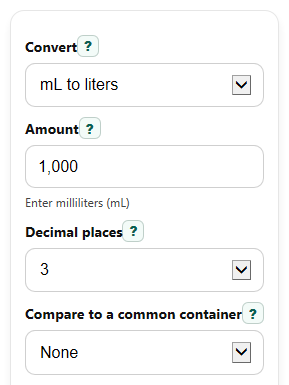
- Choose a direction in Convert: either mL to liters or Liters to mL.
- Enter your value in Amount. You can use decimals, ordinary spacing, and conventional comma grouping such as 1,000.
- Pick Decimal places to control rounding in the main answer, or leave it on Auto for a clean result without extra zeros.
- If you want a real-world size check, choose an option under Compare to a common container to see about how many bottles or cartons match the amount.
- Click Calculate, then sanity-check that moving from mL to liters makes the number smaller and moving from liters to mL makes it larger by 1,000 times.
Definitions
Milliliter (mL): A metric unit for small liquid volumes.
Liter (L): A metric unit equal to 1,000 milliliters.
Convert: The direction of the math, either mL to liters or liters to mL.
Decimal places: How many digits appear after the decimal point in Converted amount.
Converted amount: The main answer shown in the other unit.
Common container view: An estimate of how many selected 500 mL bottles, 1 L cartons, or 2 L bottles match the volume.
Common mistakes and quick fixes
Mistake: Typing a value in Amount but choosing the wrong direction in Convert .
Fix: Make sure Convert matches your starting unit before you calculate.
Mistake: Expecting Converted amount to stay the same size when switching units.
Fix: Remember that mL to liters divides by 1,000, while liters to mL multiplies by 1,000.
Mistake: Setting Decimal places too low and thinking the math is wrong.
Fix: Use Auto or a higher Decimal places setting if your result looks too rounded.
Mistake: Reading Common container view as an exact packaging count.
Fix: Treat Common container view as an estimate for understanding size, not a rule for real product packaging.
Mistake: Leaving Compare to a common container on a bottle or carton option and forgetting why an extra result appears.
Fix: Set Compare to a common container to None if you only want the direct unit conversion.
Limitations & Key Assumptions / Boundary Conditions
- The converter assumes the exact metric relationship 1 L = 1,000 mL.
- Common container view is only a size comparison based on fixed container sizes of 500 mL, 1,000 mL, and 2,000 mL.
- Rounded display depends on your Decimal places choice, so the shown value may be shorter than the full exact decimal.
- Very small values may need more displayed decimals to avoid looking like zero after rounding.
- Negative values are allowed as signed math, but they usually represent an abstract calculation rather than a real liquid amount.
Methodology
Conversion rule
The calculator uses the standard metric relationship that 1 liter equals 1,000 milliliters.
L = mL / 1000
mL = L * 1000
Container comparison
If you choose a value in Compare to a common container, the calculator first expresses the volume in milliliters, then divides by the selected container size.
count = volume_mL / container_size_mL
Rounding
If Decimal places is set to a number, the main answer is rounded to that many places. If it is set to Auto, the display trims extra trailing zeros while keeping the value readable.
Mini example
If Convert is set to mL to liters and Amount is 750, the calculation is 750 / 1000 = 0.75, so Converted amount is 0.75 L. If the comparison is 500 mL bottle, then 750 mL / 500 mL = 1.5 bottles.
Input handling
The calculator accepts spaces and conventional three-digit comma grouping such as 1,000 before reading Amount. It rejects malformed comma grouping, blank entries, non-numeric text, NaN, and Infinity.
Assumptions in use
This tool performs exact unit conversion only. Real containers may not be filled exactly to the labeled comparison size, so the comparison output is for quick understanding rather than packaging decisions.