
Convert seconds into decimal hours, total minutes, days, and a clear hours-minutes-seconds breakdown in one quick step.
Table of contents
How to use our Seconds to Hours Converter
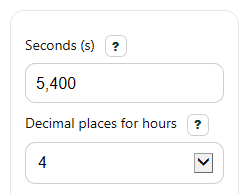
- Enter the time in Seconds (s). You can use whole numbers, decimals like 90.5, or a negative value for a signed time difference.
- Choose Decimal places for hours to control how detailed the Hours result looks.
- Click Calculate to see Hours, Hours, minutes, and seconds, Total minutes, Days, and Formula used.
- Sanity-check the result: 3,600 seconds should equal 1 hour, 60 seconds should equal 1 minute, and the Hours, minutes, and seconds line should match the same duration as the decimal hours.
Definitions
Seconds (s): The starting duration entered into the calculator.
Decimal places for hours: How many digits appear after the decimal point in the Hours result.
Hours (hr): The total duration written in hours as a decimal number.
Hours, minutes, and seconds (h:m:s): The same duration split into whole hours, whole minutes, and remaining seconds.
Total minutes (min): The full duration converted into minutes, not just the leftover minute part.
Days (d): The same duration converted into days.
Seconds per hour: 3,600 seconds make 1 hour because 60 seconds make 1 minute and 60 minutes make 1 hour [1][2].
Common mistakes and quick fixes
Mistake: Leaving Seconds (s) blank.
Fix: Enter a number in Seconds (s) , such as 5400 or 90.5.
Mistake: Typing words like "two hours" into Seconds (s) instead of a number.
Fix: Enter only a numeric value in Seconds (s) . If needed, convert your time to seconds first.
Mistake: Expecting Hours to show minutes and seconds automatically.
Fix: Read Hours as a decimal value, and use Hours, minutes, and seconds when you need a clock-style breakdown.
Mistake: Choosing too few digits in Decimal places for hours and thinking the answer is wrong.
Fix: Increase Decimal places for hours if you want a more detailed Hours result.
Mistake: Forgetting that a negative entry in Seconds (s) makes negative Hours , Total minutes , and Days .
Fix: Use a negative value only when you mean a signed time difference below zero.
Mistake: Mixing up Total minutes with the minutes part inside Hours, minutes, and seconds .
Fix: Read Total minutes as the full duration in minutes, not just the leftover minutes after whole hours.
Limitations & Key Assumptions / Boundary Conditions
- The calculator treats the input as a simple duration in seconds, not as a clock time, timestamp, or time-zone value.
- Negative values are allowed and are shown as signed durations; use them only when a below-zero time difference makes sense for your task.
- The Hours result is rounded to the selected Decimal places for hours, so the displayed decimal may be less exact than the internal calculation.
- The Hours, minutes, and seconds breakdown uses carrying when rounded seconds reach 60, which can change the shown minute or hour by 1 at the display level.
- Very large inputs are converted with standard JavaScript number arithmetic, so extremely large values can lose some precision.
- This tool converts units only; it does not decide how a school, employer, app, or timesheet rounds worked time.
Methodology
Core conversion
The calculator converts the same input seconds into several time units using fixed unit relationships.
hours = seconds / 3600
minutes_total = seconds / 60
days = seconds / 86400
These constants come from standard time relationships:
60 seconds in 1 minute and 60 minutes in 1 hour, so 1 hour = 3,600 seconds [2][2]. A day result uses 24 hours, so 24 x 3,600 = 86,400 seconds.
Hours-minutes-seconds breakdown
For the readable breakdown, the calculator first works with the absolute value of the input, then adds the sign back for negative durations in the displayed text.
whole_hours = floor(abs(seconds) / 3600)
remaining_after_hours = abs(seconds) - whole_hours x 3600
whole_minutes = floor(remaining_after_hours / 60)
remaining_seconds = remaining_after_hours - whole_minutes x 60
The remaining seconds are rounded only for display. If rounded seconds become 60, the calculator carries 1 into minutes. If minutes then become 60, it carries 1 into hours. This avoids display drift from rounding too early.
Mini example
Example: if Seconds (s) = 5400, then:
hours = 5400 / 3600 = 1.5
minutes_total = 5400 / 60 = 90
days = 5400 / 86400 = 0.0625
breakdown = 1 hour, 30 minutes, 0 seconds
So the same duration can be written as 1.5 hours or 1:30:00, depending on which format you need.
Rounding and assumptions
The selected Decimal places for hours changes only how the Hours value is displayed. Internal conversion still starts from the entered seconds value. Results may differ from school papers, payroll systems, or reports that use their own rounding rules.