
Enter a word count or paste text to estimate its reading or speaking time at the pace you choose.
Table of contents
How to use our Words to Minutes Calculator
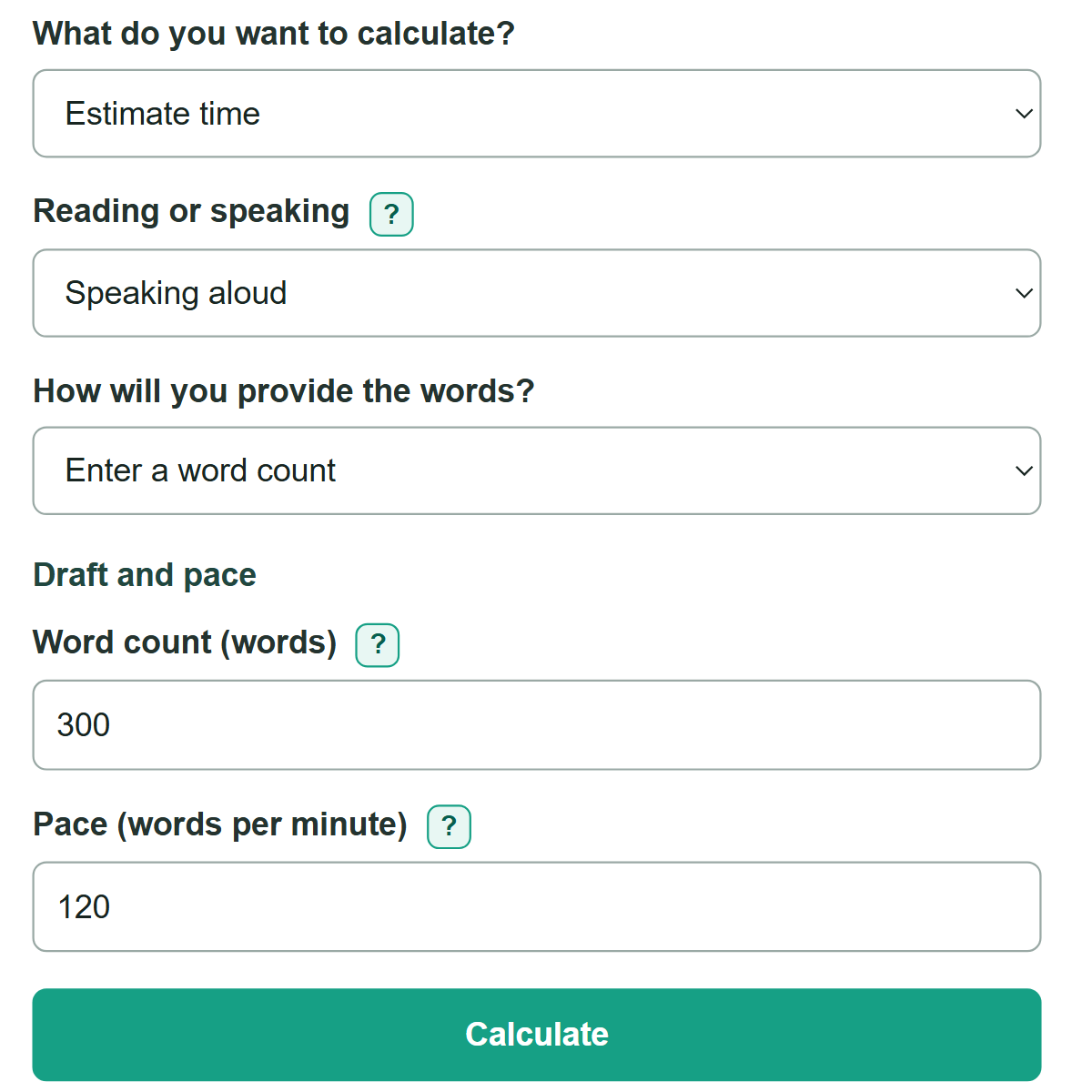
- Choose "Estimate time" for a draft you want to time, or "Plan a time budget" for a scheduled slot.
- Choose "Speaking aloud" or "Silent reading," then choose whether to enter "Word count (words)" or paste text.
- Enter "Pace (words per minute)." For a speech or recording, use the pace from a timed rehearsal if you have one.
- For "Plan a time budget," enter the full slot in "Target length (minutes)," optional extra seconds, and any time reserved for pauses or transitions.
- Compare the answer with a short rehearsal when timing matters. If your rehearsal runs long, lower the pace or reserve more non-word time.
Definitions
Word count: The number of complete words in a draft. For pasted text, the calculator counts nonempty chunks separated by spaces, tabs, or line breaks.
Pace (words per minute): The number of words you read or speak in one minute. The calculator uses the pace you enter.
Target length: The full scheduled slot, entered as minutes and optional extra seconds.
Reserved time: Part of a slot set aside for pauses, transitions, slide changes, demonstrations, or other time without words.
Word budget: The largest whole number of words that fits in the available time at the entered pace.
Words available to add or needing removal: The word budget minus the current draft count. A positive number means room to add words; a negative number means words to cut.
Common mistakes and quick fixes
Mistake: Using a silent-reading pace to time a speech.
Fix: Select "Speaking aloud" and enter a pace from a timed spoken rehearsal.
Mistake: Expecting the entered count and pasted text to be added together.
Fix: Choose one source in "How will you provide the words?" Only the selected source is counted.
Mistake: Entering 5.30 for a slot lasting 5 minutes 30 seconds.
Fix: Enter 5 in "Target length (minutes)" and 30 in "Extra target time (seconds)."
Mistake: Using the full presentation slot for spoken words.
Fix: Put planned silence, slide changes, demonstrations, and similar non-word time in "Time to reserve for pauses and transitions (seconds)."
Mistake: Treating the estimate as a guaranteed live delivery time.
Fix: Rehearse the complete draft and update your pace or reserved time to match what actually happens.
Limitations & Key Assumptions / Boundary Conditions
- The estimate uses a steady pace and cannot exactly predict nerves, audience reactions, difficult vocabulary, or changes in delivery speed.
- Pasted text is counted by whitespace-separated chunks, so a document editor may count unusual formatting differently.
- The time-budget calculation subtracts reserved seconds once, then assumes the remaining time is used for reading or speaking.
- The word budget rounds down to a whole word so it does not exceed the calculated capacity.
- For a graded speech, recording, or strict event limit, time a full rehearsal instead of relying only on an estimate.
Methodology
Time estimate
The calculator uses one draft count: either "Word count (words)" or the count from "Text to count." It converts that count into seconds using your entered pace.
estimated seconds = word count * 60 / words per minute
For example, 300 words at 120 words per minute takes 150 seconds, displayed as 2 min 30 sec. The displayed time rounds to the nearest second. A positive time below one second displays as "Less than 1 sec."
Time-budget calculation
In "Plan a time budget," reserved time is removed from the full slot before the calculator finds how many words fit.
available seconds = target minutes * 60 + target seconds - reserved seconds
word budget = floor(available seconds * words per minute / 60)
For example, a 5 min 30 sec slot with 30 seconds reserved leaves 5 min, or 300 seconds, for words. At 120 words per minute, the budget is floor(300 * 120 / 60), which is 600 words. A 600-word draft matches the budget.
Draft comparison
The calculator subtracts the current draft count from the whole-word budget.
words to adjust = word budget - current word count
A positive value means words can be added. A negative value means that many words need to be removed.
Calculation boundaries
Direct word counts must be whole numbers of zero or more, and pace must be greater than zero. In time-budget mode, the total target must be greater than zero, extra seconds must be from 0 through 59, and reserved time must be less than the full target length. These checks prevent an undefined or impossible calculation.