
Convert area units fast and compare the same space in square feet, square meters, acres, and hectares.
How to use our Area Converter Calculator
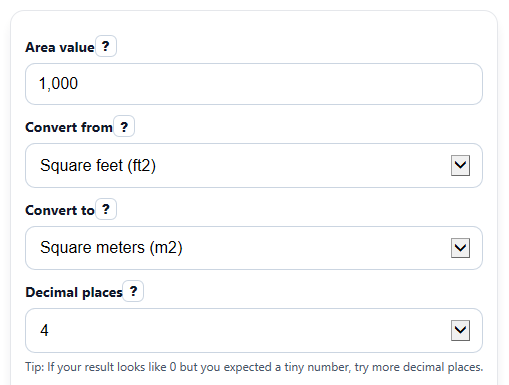
- Enter the number in Area value. Use 0 or a positive number only.
- Choose your starting unit in Convert from and your target unit in Convert to.
- Pick Decimal places to control rounding, then click Calculate.
- Read Converted area for the main answer, then use the quick comparison values in square feet, square meters, acres, and hectares.
- Sanity-check the result: if Convert from and Convert to are the same, the number should stay the same except for rounding style.
Definitions
Square feet (ft2): A common US area unit for rooms, homes, and small lots.
Square meters (m2): A common metric area unit for buildings, rooms, and land.
Acres (ac): A larger land unit often used in the US. One acre equals 43,560 square feet.
Hectares (ha): A metric land unit used for larger areas. One hectare equals 10,000 square meters [3].
Decimal places: How many digits to show after the decimal point in the displayed answer.
Conversion used: A short summary showing that the calculator converts your value through square meters as the base unit.
Common mistakes and quick fixes
Mistake: Leaving Area value blank or typing words instead of a number.
Fix: Enter digits only, such as 750, 2.5, or 1000.
Mistake: Entering a negative number in Area value .
Fix: Use 0 or a positive area. Real area sizes cannot be negative here.
Mistake: Picking the wrong starting unit in Convert from .
Fix: Match the unit to the number you already have before converting.
Mistake: Thinking Converted area is wrong because it looks too small or too large.
Fix: Check the unit in Convert to . A value in acres or square miles will usually look much smaller than the same area in square feet.
Mistake: Using too few digits in Decimal places and seeing a tiny nonzero result look like 0.
Fix: Increase Decimal places to 4 or 6 when converting very small or very large areas.
Mistake: Ignoring the comparison outputs like Also in square feet or Also in acres .
Fix: Use those extra values to check whether the result makes sense for a room, lot, or larger piece of land.
Limitations & Key Assumptions / Boundary Conditions
- This calculator converts area only. It does not estimate property value, building size quality, or land usability.
- Inputs must be 0 or more. Negative areas are blocked because they do not make practical sense here.
- Displayed answers are rounded to the selected Decimal places, so very tiny nonzero results can appear as 0.
- If Convert from and Convert to are the same, the main value stays the same and only the display format may change.
- Quick comparison outputs are limited to square feet, square meters, acres, and hectares, even though the main converter supports more units.
- The calculator is only as accurate as the unit you choose. A wrong starting unit will give a wrong converted result.
Methodology
How the calculator converts area
The calculator first turns your input into square meters, then converts that square-meter value into the target unit. Using one base unit keeps all supported conversions consistent.
value_m2 = input_value x from_to_m2_factor
output_value = value_m2 / to_to_m2_factor
equivalent_unit_value = value_m2 / unit_to_m2_factor
Unit factors used
Examples of the built-in factors are:
1 square foot = 0.09290304 square meters, 1 acre = 4046.8564224 square meters, and 1 hectare = 10,000 square meters [1].
Worked mini-example
Suppose Area value is 1000, Convert from is square feet, and Convert to is square meters.
value_m2 = 1000 x 0.09290304 = 92.90304
output_value = 92.90304 / 1 = 92.90304
So the main result is 92.90304 square meters. The calculator then uses that same base value to show quick equivalents in square feet, acres, and hectares.
Rounding and notes
The displayed answer is rounded to your chosen Decimal places. If the starting and target units are the same, the calculator returns the original value and shows a short note that no unit change was needed.
Assumptions and limits
This method assumes the entered number is a valid area in the selected starting unit. It blocks negative values, and display rounding can hide very small nonzero results.